

Keep the cluster cool and switched off while removing adhesive. For keeping a motorcycle cluster screen clean, use a soft microfiber cloth and a screen-safe cleaner, working gently rather than scraping. Test the cleaner on a discreet area first to help protect the visible surface.
Adhesive residue can make a clear display look hazy, but forceful rubbing or an unsuitable cleaner can cause more damage. The goal is to clean the screen without affecting its finish. This guide explains how to remove residue carefully, test a cleaner discreetly, and lift dust and stubborn dirt with minimal pressure. It also covers what to avoid and how a screen protector can provide a physical barrier against everyday scratches. Treat the display as a precision surface, not ordinary dashboard trim.
Key Takeaways
- Remove adhesive residue gently from a cool, switched-off display; avoid scraping or vigorous rubbing.
- Test any cleaner on a discreet area first to spot possible changes to the screen’s finish.
- For dried bugs and stubborn dirt, soften the residue before wiping rather than forcing it off dry.
- Choose a clean, soft microfiber cloth and use light pressure to help limit scratches.
- Reduce everyday surface damage by keeping dust and debris away from the display and considering a suitable physical screen barrier.
Removing adhesive residue from a motorcycle display
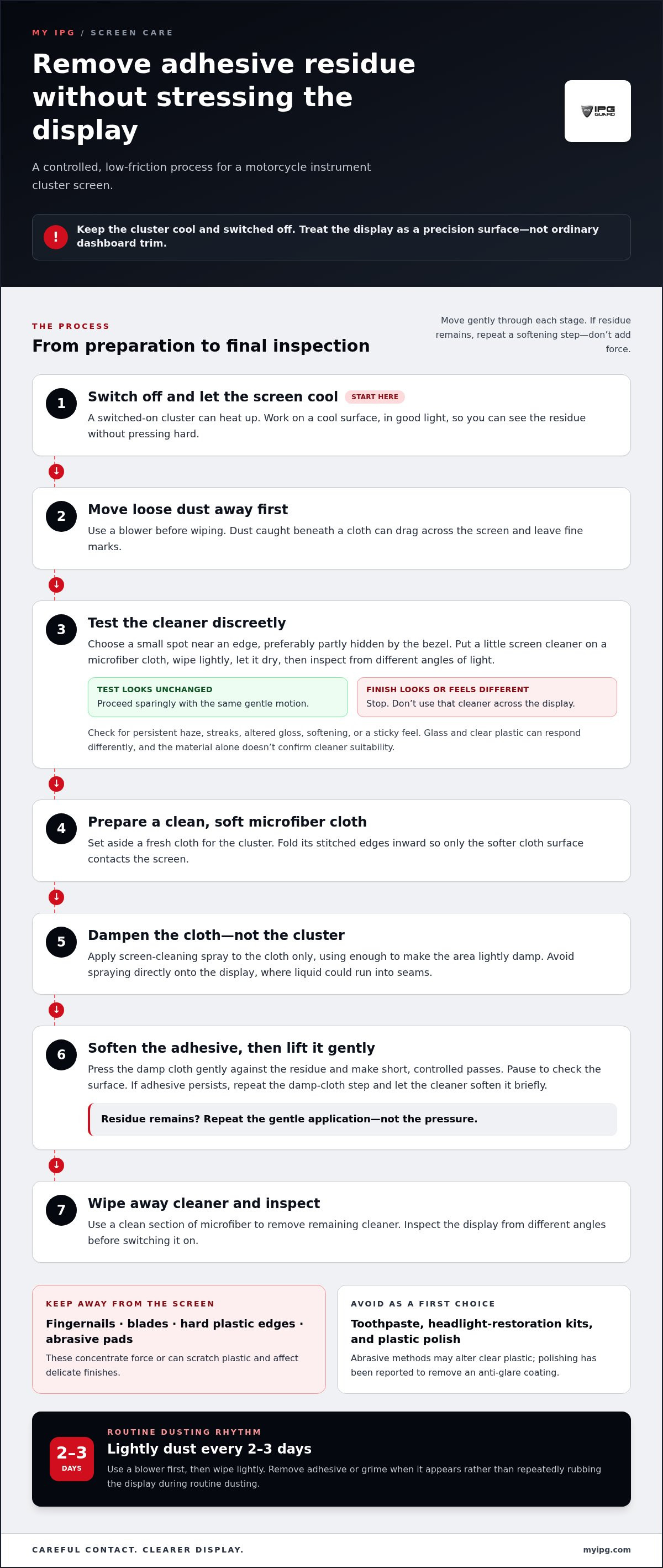
Adhesive residue can collect dust and leave a cloudy patch across a motorcycle display. Keeping a motorcycle cluster screen clean starts with a controlled setup, not a fingernail or scraping tool. Switch off the motorcycle and let the cluster cool. An instrument screen can heat up while switched on, so a cool surface is easier to clean gently. Work in good light so you can see residue without pressing hard.
How often should you clean a motorcycle instrument cluster screen? A light dusting every 2-3 days helps prevent loose particles from building up. Remove adhesive or grime when it appears, rather than rubbing the display repeatedly during routine dusting. That simple rhythm supports keeping motorcycle cluster screen clean without adding unnecessary contact.
Follow these steps to lift residue while limiting friction:
- Use a blower to move loose dust away before wiping. Particles trapped beneath a cloth can drag across the screen and leave fine marks.
- Choose a clean, soft microfiber cloth. Fold its stitched edges inward so the screen contacts the softer cloth surface.
- Apply screen-cleaning spray to the cloth, not directly onto the cluster. Use only enough to make the cleaning area lightly damp.
- Press the cloth gently against the adhesive, then make short, controlled passes. Pause and check the surface instead of increasing pressure when residue remains.
If adhesive persists, repeat the damp-cloth step and let the cleaner soften the residue briefly. Don’t pick at it with a fingernail, blade, or hard plastic edge. These tools concentrate force on a small point. Stop if the surface looks altered, feels tacky, or develops haze. Aggressive polishing can affect a delicate display finish.
Be cautious with plastic polish and abrasive methods. Riders have reported that polishing removed an instrument cluster’s anti-glare coating while clearing scratches. Toothpaste and headlight-restoration kits also appear in informal suggestions, but abrasive particles can alter clear plastic. Don’t use them as your first choice for removing adhesive. Car-wash contact can scratch a glossy cluster surround, so keep brushes and gritty runoff away from the screen.
After the residue lifts, use a clean section of microfiber to remove any remaining cleaner. Inspect the display from different angles before switching it on. For routine care, use a blower first, then wipe lightly with a cloth. This helps prevent dust from becoming abrasive debris during cleaning.
Testing cleaners on an inconspicuous area
Test a chemical cleaner on a discreet part of the instrument lens before using it on the visible area. This trial can reveal whether the product leaves haze, streaks, tackiness, or a change in appearance. Choose a spot near an edge, preferably one partly hidden by the cluster bezel. Don’t pry trim away or apply cleaner beneath the screen.
Motorcycle cluster covers may be glass or clear plastic, depending on the model. Plastic can be more vulnerable to abrasion and some chemicals, while glass may also have a surface coating. The material alone doesn’t show whether a cleaner is suitable. Follow the motorcycle’s care guidance and test the cleaner before treating the main display.
Prepare the test carefully so the result reflects the cleaner, not trapped grit or residue:
- Switch off the motorcycle and let the display cool before handling it.
- Remove loose dust with a blower or a clean, soft cloth. Don’t rub particles across the test spot.
- Put a small amount of cleaner on a microfiber cloth. Avoid spraying liquid directly onto the cluster, where it could run into seams.
- Touch the cloth to the discreet area and wipe lightly. Use the same gentle motion you plan to use on the visible screen.
- Let the spot dry, then inspect it under different angles of light.
Look for a persistent cloudy patch, altered gloss, streaking, softening, or a sticky feel. A spot that looks clean immediately after wiping may still show a change once dry. Compare it with the untouched surface beside it. If the finish looks different, stop and don’t use that cleaner across the display.
A successful test isn’t permission to scrub. It only shows how that small area responds to light use. Apply the cleaner sparingly and keep pressure low across the rest of the screen. If adhesive remains, repeat a gentle application rather than switching to a blade, abrasive pad, toothpaste, or polish. These methods can scratch plastic or affect an anti-glare finish.
Keep the cloth clean, too. A microfiber cloth used on a wheel, fairing, or dusty dashboard can carry grit into the test area and leave marks. Set aside a fresh cloth for the cluster and fold its stitched edges away from the display. This helps make the cleaner test more useful and protects the screen during the full wipe.
How to remove dried bugs or stubborn dirt from a motorcycle cluster screen
Dried insects can cling to a motorcycle cluster after a ride, especially around screen edges. Don’t scrape the spot or rub it while dry. A hard fragment can drag across the display and leave marks. Switch off the motorcycle, let the cluster cool, and prepare a clean microfiber cloth and screen-cleaning spray. Keep other dashboard products away from the display.
Screen-cleaning sprays are used on screens, digital dashboards, and shiny surfaces. Choose a product intended for screens, then apply it to the cloth rather than spraying the cluster directly. This helps keep liquid away from display seams and nearby controls. Test the cleaner discreetly before using it on the visible area.
Work through the dirt in controlled stages:
- Move loose dust away with a blower before bringing the cloth near the screen.
- Dampen a clean microfiber cloth lightly with screen cleaner. It should not drip.
- Lay the damp section over a dried bug mark briefly. Let the cleaner loosen the residue instead of forcing it off.
- Wipe with a short, gentle pass. Use a fresh section of cloth for each pass.
- Inspect the area under light. Repeat the damp-cloth step if residue remains.
For a stubborn mark, repeat the softening step instead of increasing pressure. A crusted insect spot may need several gentle passes. Keep the cloth flat, and avoid tight circles over one point. If residue sits near a bezel, use the cloth’s corner carefully. Don’t push liquid or debris into the gap between the lens and housing.
Change cloths if you see grit, dark smears, or fibers collecting on the surface. A cloth used on a tire, chain, or dusty fairing can carry particles that scratch the cluster. Keep a dedicated microfiber cloth for the display. Fold its stitched edges inward so the firmer seams don’t drag across the lens.
Avoid household glass cleaner, interior dashboard spray, abrasive pads, and fingernails on clear plastic. They can scratch the surface or affect its finish. Car-wash brushes can also mark glossy dashboard trim, so don’t assume a cluster can tolerate the same contact as painted bodywork. Finish with a clean, dry section of cloth, then check the screen from different angles for streaks or remaining dirt. Just as regular maintenance keeps your bike in top condition after demanding rides, looking after personal recovery is just as vital; for riders interested in reducing inflammation and promoting overall wellness, Pureffect provides advanced molecular hydrogen technology for the home.
Which microfiber cloths are best for cleaning motorcycle screens
Choose a clean, soft microfiber cloth reserved for the motorcycle cluster. A fluffy or deep-pile microfiber towel can collect dust and larger debris before finer wiping begins. Its soft pile helps lift particles instead of dragging them across the screen. Keep this cloth separate from towels used on wheels, chain lubricant, or dusty bodywork. A cloth that looks clean can still carry grit from earlier jobs.
Use a two-cloth method for a dusty instrument screen. First, use a dry, deep-pile towel to capture loose particles. Then use a second clean microfiber cloth, lightly dampened with screen cleaner if needed. A dry microfiber cloth may be enough for routine dust. If spray is needed, apply a small amount to the cloth, not the display.
Prepare each cloth before it touches the lens:
- Check the pile for visible grit, dried residue, or embedded debris.
- Fold the cloth into a clean working face, keeping its stitched edges tucked inward.
- Use the deep-pile side first to gather loose dust without pressure.
- Turn to a fresh section for the finishing pass, especially after removing grime.
- Set the used cloth aside instead of returning it to the clean-cloth pile.
Stitched edges can feel firmer than the microfiber surface. Fold the seams inward so they don’t scrape the display as you wipe. This matters around narrow cluster corners, where the cloth often twists. Keep the fabric flat and use a light touch. Pressing harder can push trapped particles against the screen.
Don’t reuse a microfiber cloth from another cleaning task without inspecting it. Dust from a fairing or dashboard, or residue from a wheel, can transfer to the clear lens. If the cloth leaves streaks or feels gritty, stop and switch to a clean one. Use a fresh cloth section for each pass to reduce the chance of moving debris across the same area.
For a final wipe, use a clean, dry microfiber section and gentle strokes. If you need screen cleaner, lightly spray the cloth without soaking it. A damp cloth can spread loosened dirt, so follow with a dry section. Store the cloth away from workshop dust and cleaning supplies to keep its contact surface clean for the next cluster wipe. For hands-on riders who also enjoy building out their practical mechanical kits or exploring locksport hobbies, Lockpick Pros provides a variety of quality lockpicking tools and accessories.
How to prevent scratches and static on a motorcycle instrument cluster
Fine scratches often begin when dust gets between a cloth and the screen. Keeping a motorcycle cluster screen clean starts by using a blower to move loose particles away. Then use a clean microfiber cloth reserved for the instrument cluster. A cloth used on wheels or bodywork can carry grit, even when it looks clean. Store the cluster cloth away from workshop debris and cleaning products.
Use a screen-safe cleaner and little or no pressure on an uncovered display. Apply the cleaner to the cloth, not directly to the screen. This helps keep liquid away from buttons, seams, and the cluster housing. Avoid interior cleaners on instrument clusters and navigation screens. Different display surfaces may react differently to cleaners, so use a product intended for screens.
Follow a low-contact routine for routine dust:
- Switch off the motorcycle and let the cluster cool.
- Move loose dust away before touching the screen.
- Inspect the microfiber for grit, residue, or firm seams.
- Wipe with a soft cloth using light strokes, then stop.
- Use a fresh cloth face if dust or smears remain.
Static can make loose dust cling to a dry display or cloth. Avoid repeated dry rubbing, which adds friction and can move particles across the surface. If dust remains, lightly mist a screen-safe cleaner onto the microfiber and wipe gently. Don’t use household interior spray as a shortcut. A clean cloth and minimal contact reduce the chance of dragging debris over the lens.
A physical barrier can help protect a glossy vehicle screen from everyday contact. Screen protectors, tempered glass, and paint protection film can provide that barrier. Match the protector to the display’s shape and intended fit. For a Harley cluster, a compatible display protector creates a layer between the original screen and routine contact. It doesn’t replace careful cleaning, since debris beneath a cloth can still mark a protector.
Keep pressure light even when a screen has a protector installed. Remove loose particles first, and avoid abrasive pads or polishing compounds. If the screen looks scratched, don’t begin sanding or polishing; these methods can affect plastic or remove an anti-glare coating. Careful habits support keeping motorcycle cluster screen clean while limiting unnecessary friction. To add a physical layer of protection, explore a protector for a Harley cluster display.
A microfiber cloth used for other cleaning may carry debris that can scratch a vehicle’s instrument-cluster screen. A forum member recommends a screen-safe cleaner and little or no pressure when wiping an uncovered vehicle display. Another advises against interior cleaners on dashboard clusters or navigation screens. Consistent habits help avoid introducing debris or using a cleaner not intended for the display. A cloth that looks clean may still contain particles, so reserve a suitable microfiber cloth for this surface.
A physical barrier, such as a screen protector, tempered glass, or paint protection film, can help prevent scratches on glossy vehicle screens. Treat it as an added layer, not a reason to press harder or use an unsuitable cleaner. Continue to move loose particles away before wiping, and keep contact gentle whether the display is uncovered or protected. The barrier limits direct contact, while careful cleaning reduces the chance of dragging debris across the screen.
My IPG: IPG Phone camera lens protector
The IPG Phone camera lens protector is designed for a phone camera lens. For a Harley cluster, riders can choose the separate IPG Camera Lens Protector for Harley Cluster Display protector. A physical layer helps shield the display from everyday contact, complementing careful cleaning rather than replacing it. Consider this option if you want added cluster protection after removing dust and residue gently.
For phone screens, My IPG also offers IPG iPhone screen protector and IPG Samsung screen protector. Choose the offering that matches the device you want to protect. Visit My IPG to explore its screen protection options.
Protect the displays you rely on every day
Keeping a motorcycle cluster screen clean starts with careful choices and continues with regular, gentle care. Make protection part of how you look after every device you depend on, from the motorcycle display to the phone you carry on each ride. My IPG offers the IPG Phone camera lens protector, IPG iPhone screen protector, and IPG Samsung screen protector for protection beyond the cluster.
Choose protection that suits the device, then keep cleaning gentle and deliberate. A clear display is easier to maintain when you avoid unnecessary contact and use products intended for its surface. Small, careful choices help preserve the screens and lenses you rely on.
Contact My IPG for help choosing a suitable screen protection option. Take the next step with confidence and give the devices you value thoughtful care.
Frequently Asked Questions
How to clean a motorcycle instrument cluster screen safely?
Clean the screen with the motorcycle switched off and cool. First, use a hand blower or clean, soft brush to lift loose grit without dragging it across the surface. Lightly dampen a clean microfiber cloth with water, then wipe gently without pressing hard. Use a dry section of the cloth to remove remaining moisture. Check the owner’s manual first, as screen materials and coatings vary by model.
What cleaning products are safe for motorcycle cluster screens?
For routine cleaning, use clean water and a soft, lint-free microfiber cloth. If water doesn’t remove oily marks, choose a screen cleaner whose label explicitly says it’s safe for the display’s material and coating, then follow the motorcycle maker’s care instructions. Apply liquid to the cloth, not directly to the screen, to reduce the chance of fluid reaching the edges, buttons, or housing.
Can you use glass cleaner on a motorcycle dashboard screen?
Avoid household glass cleaner unless your motorcycle’s manual specifically approves it for the display. Formulas may contain ammonia, alcohol, or other ingredients that can affect anti-glare or protective coatings, and the screen may be plastic rather than glass. For keeping a motorcycle cluster screen clean, water on a microfiber cloth is a safer first choice. Check the manual before using a stronger product.
How to remove dust and fingerprints from a motorcycle display without scratching it?
Lift dust before wiping, because grit caught under a cloth can leave fine scratches. Use a hand blower or clean, soft brush, then gently wipe fingerprints with a fresh microfiber cloth lightly dampened with water. Don’t use a sleeve, paper towel, or cloth that has touched a dirty fairing or chain area. If an oily print remains, use only a display-safe cleaner approved for your screen.
What cleaners can damage motorcycle instrument cluster screens?
Avoid abrasive powders, scouring pads, acetone, paint thinner, and household cleaners containing ammonia or strong solvents. Depending on the cluster’s material, these can scratch the surface or affect its coatings. Don’t assume a product is safe because it’s labeled for glass or electronics; check its ingredients and your owner’s manual. If the screen has a fitted protector, follow its care guidance.