

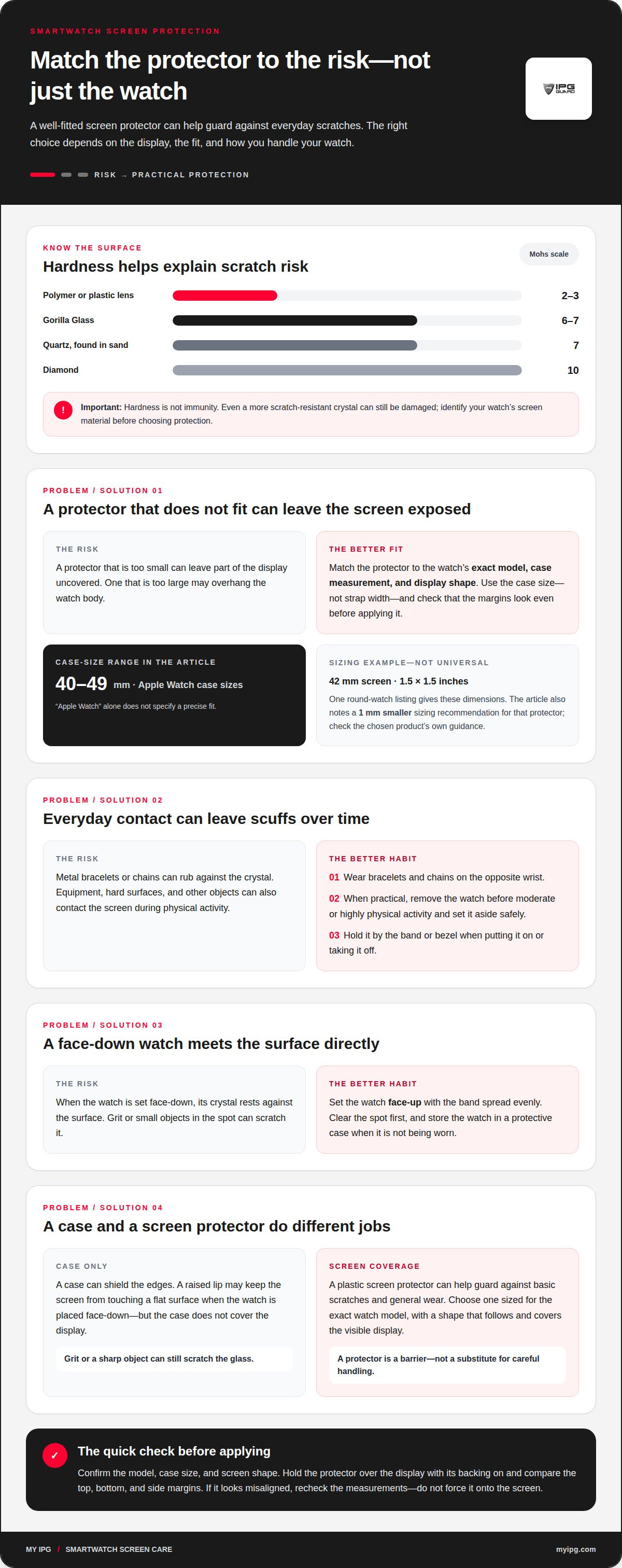
Your watch’s glass determines how much protection it needs. Polymer or plastic lenses have a hardness rating of 2-3 Mohs, while Gorilla Glass used in Android smartwatches rates 6-7 Mohs, so the best way to protect a smartwatch screen from scratches is to choose a well-fitting protector suited to its display. Keep the watch away from avoidable scuffs, too.
It’s natural to want a barrier that protects the screen without clouding the display or affecting touch response. The right fit and careful installation help preserve clarity and everyday usability.
Learn how to identify your watch’s screen material, choose a protector that covers the display without overhanging, and install it cleanly and evenly. You’ll also find practical habits to help reduce scratches when wearing, setting down, or storing your watch.
Key Takeaways
- Identify your watch’s screen material before choosing protection; different surfaces have different scratch risks.
- Match the protector to your watch’s exact case size for even coverage without overhanging edges.
- Choose a protector that balances screen coverage with the display feel and clarity you want.
- Prepare the screen carefully and align the protector before pressing it into place.
- Give the adhesive time to settle before returning to normal wear or exposing the watch to water.
Smart Watch Screen Protector: Do You Really Need One?
- Identify the screen material before choosing protection. Polymer or plastic smartwatch lenses rate 2-3 Mohs, while Gorilla Glass used in Android smartwatches rates 6-7 Mohs. Quartz, the mineral in sand, rates 7 Mohs. Diamond has a hardness of 10 Mohs, according to the U.S. Geological Survey. Hardness helps explain scratch risk, but it doesn’t make a screen immune to damage.
- Use a protector when everyday contact could mark the exposed display. A plastic protector can help guard against basic scratches and general wear. For Apple Watch, match the protector to the exact case size. Apple Watch case sizes range from 40mm to 49mm, so a protector for one size may leave another model uncovered.
- Wear bracelets and chains on the opposite wrist. Metal jewelry can rub against the watch crystal during ordinary movement and leave scuffs over time. Moving a bracelet to your other wrist reduces contact without adding anything over the display.
- When practical, remove your watch before moderate or highly physical activity. Contact with equipment, hard surfaces, or other objects can scratch the screen. Set the watch aside safely before you start. A protector adds a barrier for routine wear, but careful handling still matters during activities with a greater risk of contact.
- Hold the watch by its band or bezel when putting it on or taking it off. Avoid pressing your fingers against the display as you fasten the band. This gives you a steadier grip and keeps the screen away from nearby hard surfaces. Use the same careful hold when adjusting the watch on your wrist.
- Set the watch face-up, with the band spread evenly. A face-down watch puts its crystal directly against the surface. Clear the spot first, especially if it has grit or small objects on it. When you’re not wearing the watch, store it in a protective case to reduce accidental contact.
- A screen protector does not inherently damage a smartwatch display when it is correctly fitted and applied as directed. Installing one does not by itself determine warranty coverage; the applicable warranty terms and circumstances of any damage matter. Don’t force a protector onto the screen, as pressure or poor alignment can affect the fit.
- A case can shield the edges, and a raised lip may keep the screen from touching a flat surface when the watch is placed face-down. But a case doesn’t cover the display, so grit or a sharp object can still scratch the glass. For screen coverage, choose a protector sized for the exact watch model.
Choosing a protector for the exact case size
- Start with the watch’s model and stated case size. Apple Watch sizes range from 40mm to 49mm, so “Apple Watch” alone doesn’t identify a precise fit. Learning how to protect a smartwatch screen from scratches starts with matching the protector to the specific case. A protector made for a smaller case can leave part of the display exposed; a larger one may overhang.
- Use the case measurement, not the strap width, to guide your choice. The strap attaches to the watch body, but its width doesn’t indicate the screen dimensions. Find the case size in the watch’s device information or packaging, then choose a protector specified for that model or measurement.
- Check the protector’s listed dimensions before choosing it. One round-watch protector listing gives a screen size of 42 millimeters and dimensions of 1.5 inches long by 1.5 inches wide. Those measurements describe that protector, not every round watch. Compare them with your watch rather than assuming all circular screens share one size.
- Account for the protector’s edge clearance. A sizing recommendation for this protector is to select one 1 mm smaller than the watch measurement. That margin can help avoid an overhanging edge, but it doesn’t replace checking compatibility with your specific model. Follow the sizing guidance for the protector you choose.
- Choose plastic protection for basic scratches and everyday wear. A plastic screen protector creates a barrier against routine contact. Check that its shape follows the watch display and covers the visible screen. One that’s too small can leave a strip exposed; one that’s too large can extend beyond the screen edge.
- Inspect the display shape as well as its measurement. A round protector is designed around a circular outline, while a different screen shape needs a matching cut. For example, a 42-millimeter listing shouldn’t be treated as a universal fit for every round watch. Match the protector’s stated size and shape to your device.
- Before installation, hold the protector over the display without removing its backing. Compare the margins at the top, bottom, and sides. The screen should be evenly covered, with no edge extending over the watch body. If the alignment looks off, check the model and measurements again before applying the adhesive.
- Let fit guide your choice, rather than relying on a “universal” label alone. A universal round protector may suit a compatible circular display, but its stated dimensions still matter. To protect a smartwatch screen from scratches, compare the watch measurement with the protector size and follow its fit guidance. This helps provide coverage without overhanging edges.
Using tempered glass protectors on smartwatches
Choose a protector material that suits your screen and priorities. Weigh the risks to the watch crystal against the protection and display experience each option provides.
-
Compare Watch-Glass Scratch Resistance
Identify the crystal material listed for your watch, then consider its limitations. Gorilla Glass, polymer, and sapphire respond differently to everyday contact, so the material alone doesn’t eliminate the need for careful handling. Sapphire resists scratches well, but its edges can chip after a sharp impact. Scratch resistance doesn’t protect against every kind of damage.
-
Choose Between Tempered Glass and TPU Film
Decide whether you prefer a more rigid screen barrier or a thin film. Tempered glass is recommended for stronger screen protection than a plastic protector. TPU film is a flexible alternative, but its protection depends on the film and its fit. Compare the material, display coverage, and stated transparency instead of choosing by name alone.
- Use tempered glass when screen protection is your priority. Its protective layer sits over the watch face, helping shield the display from contact. A smartwatch protector typically adds less than 0.3 mm of thickness, so consider the added layer alongside your watch’s case and screen shape. Compatibility still matters: a protector that doesn’t fit properly can leave areas uncovered.
- Consider film if preserving a clear view is central to your choice. A film protector product description lists 99.9% transparency. That figure describes transparency, not scratch-proofing or impact protection. Review the product’s stated material and intended coverage, then weigh those details against the kind of daily contact your watch faces.
- Keep the watch’s water-resistance rating in perspective. Applying a screen protector doesn’t change or increase the watch’s factory water-resistance rating. Follow the watch’s original rating, and don’t assume a glass or film layer changes the device’s limits.
- Match the protector to the crystal’s shape before applying it. A flat protector may not sit properly on a curved display, and a misaligned edge can leave part of the screen exposed. Check the fit and the protector’s stated compatibility with your watch model. Material is one factor in your decision, not a substitute for correct sizing.
- Balance protection with the display feel you want to preserve. Tempered glass offers a stronger screen barrier than plastic, while film can provide a slim, clear layer. Compare the stated transparency and fit, then choose an option suited to your watch’s crystal and daily use.
Protector installation and adhesive curing
- Remove a scratched protector before fitting a replacement. Gently lift one edge with a fingernail, then peel it back slowly. Avoid metal tools or pressing against the display. After removal, wipe away loose adhesive residue with a clean, soft cloth. Don’t install the new layer over debris or leftover fragments.
- Prepare a stable, well-lit work surface. Set out the protector and its included accessories before handling the watch. Bright light helps reveal dust on the screen, while a steady surface makes precise alignment easier. Keep the protector’s adhesive side away from fingers, fabric, and loose particles.
- Clean the screen before applying the protector. Use the supplied cleaning materials, then remove visible lint with a clean cloth. Inspect the display from different angles. Even a small speck can become trapped beneath the adhesive, so take time to leave the surface visibly clean and dry.
- Check the alignment before exposing the adhesive. Hold the protector above the display and compare its edges with the watch face. Make sure its cutouts and curves line up with the screen. Once the adhesive touches the display, repositioning may disturb the fit, so settle the placement before applying pressure.
- Apply the protector with controlled pressure. Follow its included directions, and hold the device in your palm for 1-2 minutes during application. Press from the center toward the edges if the instructions call for it. This helps the protector settle across the display without shifting its position.
- Inspect the installed layer before wearing the watch. Look for visible dust, misaligned edges, or bubbles that affect screen coverage. Avoid lifting and reapplying the protector repeatedly, as handling can introduce more particles. If a defect remains, follow the product’s instructions for adjustment or replacement.
- Wait 10 minutes after application before wearing the watch. This gives the protector time to settle before normal movement puts pressure on its edges. Avoid rubbing or pressing the screen during this period. Then allow the adhesive to cure for typically 24 hours before exposing the watch to water.
- Keep the watch dry during the curing period. Water exposure before the adhesive has cured can affect how the protector sits against the screen. Follow the protector’s specific directions if they describe a different curing process. A screen protector doesn’t change the watch’s factory water-resistance rating.
- Replace a scratched layer only after checking that the screen underneath is clean and intact. Remove the old protector slowly, wipe away residue with a soft cloth, and repeat the careful alignment process. A damaged protector can obscure the display, but don’t mistake damage to the protector for damage to the watch screen.
Touch sensitivity and display clarity
Protect the display without sacrificing the controls you use every day. Assess the screen before installation, then test touch response and visibility afterward.
- Inspect the uncovered display in bright and dim surroundings. Open a watch face with clear text and check whether details remain easy to read. Note any existing haze, scratches, or dead areas first. This gives you a useful baseline for assessing changes after fitting a protector.
- Choose a protector with specific information about transparency. A product description may state a transparency figure that helps you compare options. Treat that specification as a guide to light transmission, not a guarantee of perfect visibility. The watch’s brightness, viewing angle, and ambient light also affect what you see.
- Keep the protector surface clean during installation. Dust or fingerprints trapped between the film and display can create visible spots. Clean the screen, inspect it under a light, and avoid touching the adhesive. A clear installation starts with a clean surface and careful placement.
- Align the protector with the active display, not just the outer case. An off-center layer can cover the screen edges unevenly or interfere with controls near the bezel. Compare the edges before applying pressure. A properly positioned protector should sit flat across the intended display area.
- Test touch response after installation using familiar actions. Tap icons, swipe between watch faces, and open a menu. Compare these gestures with your earlier baseline. If a swipe repeatedly misses in one area, inspect the protector for bubbles, debris, or misalignment before changing settings.
- Check the display from several angles. Look for glare, cloudy patches, or reflections that make text harder to read. The protector’s finish and surface condition can affect the viewing experience. Wipe away smudges with a soft cloth, then reassess the same screen in the same lighting.
- Consider thickness as part of the touch and clarity balance. A smartwatch screen protector typically adds less than 0.3 mm. Even a thin layer can change the feel of direct contact slightly. Test taps and swipes before returning to regular use, especially near curved edges.
- Reassess after daily use rather than judging only the first touch. Try the watch face, notifications, and an on-screen control you use often. If clarity or response remains poor, remove the protector carefully and inspect the display. For device-specific screen protection options, explore compatible screen protectors.
My IPG
My IPG helps protect valuable devices with screen and camera lens protection solutions. If you’re applying the sizing, material, and clarity checks from this guide to other devices, its offerings include iPhone and Samsung screen protectors, plus camera lens protectors for phones. These options suit readers looking to protect compatible device screens or lenses from everyday wear.
Keep the same careful approach: match protection to the device, preserve the areas you use, and follow installation instructions closely. For help with device protection options, contact My IPG.
Make Screen Protection Part of Your Routine
A protector is only one part of smartwatch care. Wearing, handling, and storing the watch also affect how well its display stays protected. Choose a solution suited to your device, then keep an eye on fit and screen condition as part of regular care. Consistent attention helps keep your watch ready for the moments you rely on it.
Knowing how to protect a smartwatch screen from scratches can also guide your choices for other devices. My IPG offers iPhone screen protectors, Samsung screen protectors, and phone camera lens protectors for compatible devices.
If you’re ready to explore device-protection options, start a conversation with My IPG. Give your technology thoughtful care, one screen at a time.
Frequently Asked Questions
It Starts With the Glass: What Is Your Watch Actually Made Of?
Check your watch’s model information to identify its screen material. Smartwatch displays may use polymer, Gorilla Glass, or sapphire crystal, each with different strengths and limitations. Polymer is more vulnerable to basic scratches, while sapphire can chip at the edges after a sharp impact. Knowing the material helps you choose protection for the risks your watch actually faces, rather than relying on appearance alone.
The Decision: Do You Actually Need One?
A protector is worth considering if your watch regularly comes into contact with hard surfaces, jewelry, or workout equipment. If you prefer not to add a layer, reduce contact instead: wear bracelets on the opposite wrist, remove the watch for demanding activities, and store it safely when unworn. Consider your daily routine. Someone at a desk and someone handling equipment face different risks of accidental screen contact.
What is the best screen guard for Apple Watch?
The best choice is one made for your exact Apple Watch model and case size. Apple Watch case sizes range from 40mm to 49mm, so a protector labeled only for “Apple Watch” may not fit your display. Consider whether you prefer tempered glass or flexible film, then prioritize complete screen coverage, clear viewing, and reliable touch response over a broad compatibility label.
What types of smartwatch screen protectors are available: tempered glass, film, and liquid?
Tempered glass and flexible film are physical layers placed over the display. Tempered glass is recommended for stronger protection than a plastic protector, while film offers a flexible alternative. Liquid products are applied as a coating rather than positioned as a pre-cut sheet. Compare what each option covers and how it fits your screen. Don’t assume all three types offer the same level of scratch protection.
Which smartwatch screen protector offers the best scratch protection without affecting touch sensitivity?
Compared with plastic, tempered glass is the stronger choice for screen protection, but fit matters too. A misaligned or poorly seated layer can make edge gestures less comfortable. Before relying on the watch, test familiar actions, such as opening a notification or swiping between screens. If response feels inconsistent, check the protector’s alignment and surface for trapped dust or bubbles.
How do I find the correct screen protector size for my smartwatch model?
Use the watch’s model name and case size, not its strap width, to select a protector. For Apple Watch, listed case sizes range from 40mm to 49mm. Read the protector’s compatibility details and compare its shape with your display. A round watch needs a round protector with suitable dimensions; a similar-looking protector may still leave part of the screen exposed.
How do I apply a smartwatch screen protector without bubbles or dust?
Work on a clean, steady surface and prepare the screen before exposing the protector’s adhesive. Use the included cleaning materials, remove visible lint, and inspect the display under bright light. Align the protector before it touches the screen, then apply it as directed. Dust trapped underneath can appear as a spot, while uneven placement can leave edges lifted or coverage incomplete.
How scratch-resistant are sapphire crystal and Gorilla Glass smartwatch screens?
Gorilla Glass used in Android smartwatches has a hardness rating of 6-7 Mohs. Sapphire crystal can resist scratches but may chip at its edges after a sharp-edged impact. For context, quartz, the mineral in sand, rates 7 Mohs, and diamond rates 10 Mohs, according to the U.S. Geological Survey. Hardness comparisons describe scratch resistance, not immunity to every impact or type of damage.