

A screen that beads water isn’t necessarily protected from fingerprints. An oleophobic coating helps reduce fingerprint marks and makes skin oils easier to wipe away; a hydrophobic coating repels water. To understand how to protect your phone’s oleophobic coating, use gentle cleaning and avoid products or materials that can wear it down.
It’s easy to assume the two coatings do the same job because both affect how liquids behave on glass. They’re related, but not interchangeable: oleophobic surfaces are also hydrophobic, while a hydrophobic surface isn’t always oleophobic. Neither coating makes a screen immune to marks or wear.
This guide explains what the coating does, how it differs from a hydrophobic coating, and how everyday contact and harsh cleaning can affect it. You’ll also learn a screen-friendly cleaning method: use a soft, lint-free microfiber cloth, dampening it with water when needed instead of spraying the phone. Careful habits help preserve the screen’s feel and make smudges easier to manage.
Key Takeaways
- Oleophobic coatings help fingerprints wipe away more easily, while hydrophobic coatings focus on repelling water. The two properties are related but not interchangeable.
- Reduce coating wear by avoiding abrasive materials and harsh household cleaners on your screen.
- For routine cleaning, use a soft, lint-free microfiber cloth. If you need water, dampen the cloth rather than spraying the phone.
- Alcohol wipes can affect screen coatings, so learn what to consider before using them and how to clean more gently.
- A screen protector can add a replaceable protective layer between daily contact and your phone’s display.
What is an oleophobic coating?
A phone warranty’s coverage depends on its written terms and the reason the coating wore away. Gradual wear and a coating defect are different issues, so the warranty language determines whether a particular case is covered.
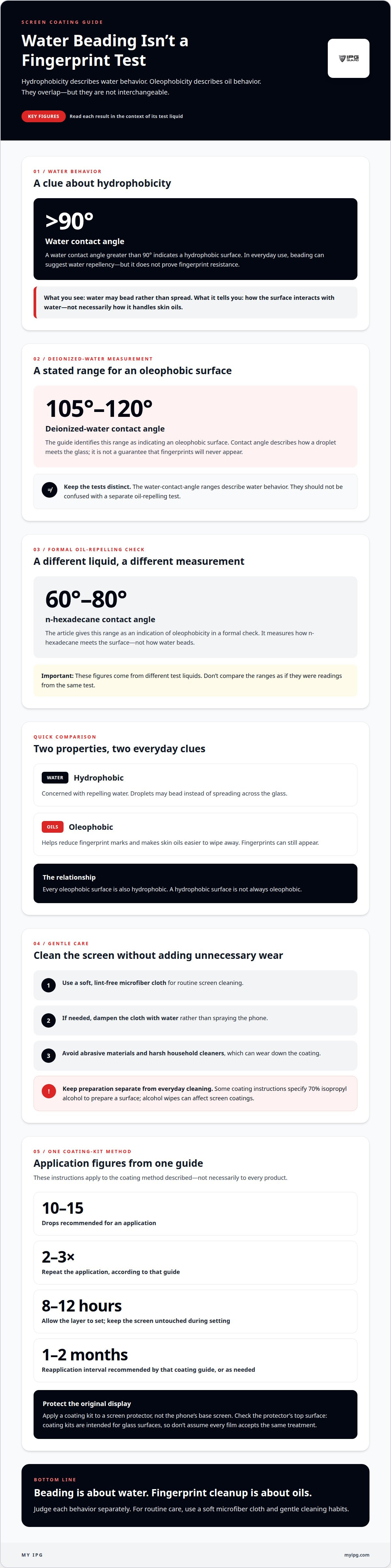
- Understand what each coating is designed to do. An oleophobic coating is a thin fluoropolymer-based layer bonded to smartphone glass. It reduces fingerprint marks and helps skin oils wipe away more easily, but doesn’t prevent fingerprints entirely. A hydrophobic coating repels water. The properties overlap, but they aren’t the same: every oleophobic surface is also hydrophobic, while some hydrophobic surfaces aren’t oleophobic.
- Use water behavior as a clue, not a complete fingerprint test. A water contact angle greater than 90° indicates a hydrophobic surface. A deionized-water contact angle between 105° and 120° indicates an oleophobic surface. That measurement describes how a droplet meets the glass. In everyday use, droplets that bead rather than spread can suggest water repellency, but they don’t prove how well the screen resists skin oil.
- Prepare the surface carefully before applying a fresh coating. Dust, fingerprints, and residue can interfere with bonding, so clean the glass until it’s spotless and dry. Use a soft, lint-free microfiber cloth for routine screen cleaning. Some coating application instructions specify 70% isopropyl alcohol for surface preparation. Follow the coating product’s directions, and don’t treat that preparation step as everyday phone cleaning.
- Apply a coating kit to a screen protector, not the phone’s base screen. A protector provides a separate surface that can be replaced without treating the original display. First identify the protector’s top surface. Tempered glass has a glass face; hydrogel protectors have a film surface. Coating kits are intended for glass surfaces, including screen protectors, so don’t assume every film accepts the same treatment.
- Follow the kit’s application and setting instructions. One guide recommends 10-15 drops, repeating the application two to three times, then allowing 8-12 hours for the layer to set. Those steps apply to that coating method, not every product. A coating guide also recommends reapplication every 1-2 months or as needed. Keep the screen untouched during setting, and use gentle microfiber cleaning afterward to preserve the surface.
Differences between hydrophobic and oleophobic coatings
- Judge each coating by the liquid it is designed to manage. Hydrophobic treatment concerns water, while oleophobic treatment concerns oils, including skin oils. Water beading tells you how a screen interacts with water, not how easily fingerprints will wipe away. Treat water behavior and fingerprint cleanup as separate observations, not interchangeable tests.
- Use fingerprints as a practical test of oleophobic performance. After handling your phone, notice whether oily marks wipe away with a clean microfiber cloth or remain smeared. An oleophobic surface helps make oil easier to remove, but fingerprints can still appear. Don’t expect the screen to stay perfectly clean. Instead, judge how readily ordinary skin residue lifts during gentle cleaning.
- Treat water beading as a limited clue. A hydrophobic surface resists wetting, so droplets may bead rather than spread across the glass. That doesn’t establish that the surface also repels oils. A screen, for example, can repel water while still showing fingerprints. Keep the distinction clear: water behavior describes hydrophobicity; oil behavior describes oleophobicity.
- Separate the two functions when choosing a screen treatment. If your main concern is water spreading, hydrophobic performance is relevant. If thumb marks and skin oils are the issue, oleophobic performance matters more. Some surfaces provide both properties, but the terms don’t promise identical results. Check the product description for the specific claim rather than assuming “water-repellent” also means fingerprint-resistant.
- Observe both behaviors without damaging the glass. First, check how water behaves, then clean ordinary fingerprints with a soft microfiber cloth. Avoid scratching, scraping, or using harsh cleaners as improvised tests. These methods can affect the screen and won’t reliably distinguish coating types. If water beads but fingerprints smear, remember that these behaviors measure different interactions. This helps you choose care based on the problem you actually see.
For a more formal check, oleophobic coatings can be tested using n-hexadecane. Contact angles between 60° and 80° indicate oleophobicity. This measurement describes how the test liquid meets the surface, rather than how water beads or how ordinary fingerprints look after handling. It offers a separate way to assess oil-repelling behavior, but does not change the practical distinction between the two coating properties.
Contact angle also helps describe wetting more generally: a liquid droplet with a contact angle between 90° and 180° does not easily wet a surface. That observation concerns the measured liquid and surface together. It should not be treated as proof that the surface will repel every kind of liquid. Keep the test liquid in mind when interpreting a result, and use the relevant property for the concern you want to address.
Factors that accelerate coating wear
A worn coating can leave fingerprints lingering or smearing instead of wiping away easily. Water that flattens and runs across the screen can also indicate that the coating needs a touch-up.
- Account for ordinary contact as part of the wear process. Thumbs repeatedly cross the display during calls, messages, and scrolling. Pockets, cloths, and other surfaces also rub against the glass. This gradual friction can diminish the factory coating, even without a single obvious accident. Smartphone coatings typically last about 1-2 years, and frequent use can wear them down sooner. Compare how easily oily marks wipe away over time.
- Notice changes during everyday cleaning. If fingerprints become harder to remove with a soft cloth, the coating may have worn. Check whether oily marks lift or smear across the screen. Water flattening and running down the display can also indicate that a touch-up may be needed. Clean the screen gently before assessing it, since grime can leave persistent marks too. Don’t use scratches as a test: they indicate surface damage, not coating performance.
- Keep household cleaners away from your phone screen. Bleach, dish soap, polish, and glass cleaner can damage the oleophobic layer. Window cleaner, ammonia, household sprays, abrasive powders, and products containing hydrogen peroxide can also speed up wear. A product intended for glass or counters isn’t automatically suitable for a phone display. Avoid using these cleaners on the screen, even when a fingerprint or smudge seems stubborn.
- Choose soft cleaning materials instead of abrasive ones. Abrasives can diminish the coating, and some cleaning products may scratch the phone. A rough cloth or powder-based cleaner creates friction where the display needs a light touch. Use a soft, lint-free microfiber cloth. If a mark remains, don’t press harder or scrub repeatedly; that increases friction in the same area and can accelerate gradual wear.
- Take care when removing an adhesive screen protector. A Samsung Community member suggested that removing an adhesive screen protector may pull oleophobic coating from a phone screen. If the protector is damaged or needs replacing, peel it slowly and evenly rather than yanking it from one corner. Inspect the exposed display for residue or changes in how fingerprints clean up. Avoid scraping adhesive from the glass, since a hard edge can scratch it and disturb the coating.
Maintaining the coating with gentle cleaning
- A gentle cleaning routine is central to how to protect your phone’s oleophobic coating. Start with a clean, soft, lint-free microfiber cloth. A cloth carrying grit can drag particles across the display and scratch it. Check both sides before touching the screen. If you see dust or debris, use a cleaner cloth. Keep a separate microfiber cloth for your phone instead of using one that has touched a counter or another surface. This reduces unnecessary friction with every wipe.
- Wipe with light pressure and short, controlled strokes. Start at one edge of the screen and move across it, lifting the cloth before returning. Don’t repeatedly scrub a fingerprint with your fingertip or fingernail, as that concentrates pressure in one spot. Let the microfiber do the work. A gentle pass is better than forceful rubbing, especially near the display’s edge.
- Use water only when a dry cloth won’t lift the mark. Dampen a corner of the microfiber cloth, then wipe the affected area. Don’t spray water directly onto the phone. A damp cloth lets you control where moisture touches the screen. Keep it from getting wet enough to drip, then use a dry section to remove any remaining moisture. This keeps cleaning focused on the glass.
- Clean the entire display with an even touch, not just the most visible smudge. Heavy scrubbing in one area can make streaks harder to assess. Move the cloth across the screen in overlapping passes, using the same light pressure throughout. If a mark remains, dampen the cloth again instead of pressing harder. Avoid household sprays and abrasive materials, which can wear the coating or scratch the glass.
- If you’re deciding how to protect your phone’s oleophobic coating during daily care, make gentle wiping your default. Skin oils build up during messaging, browsing, and calls, but frequent hard scrubbing adds avoidable friction. Use a dry microfiber cloth for light marks, then dampen it with a little water when needed. Check the display under normal light. If fingerprints still smear after careful cleaning, stronger cleaner isn’t the answer.
Can alcohol wipes damage an oleophobic coating?
- Treat alcohol wipes as chemical cleaners, not routine screen-care cloths. Cleaning products and aggressive chemicals can diminish an oleophobic coating. Repeated wiping also adds contact with the glass, so both frequency and pressure matter, not just the wipe’s name. For everyday fingerprints, start with a soft microfiber cloth. Reserve alcohol-based cleaning for a specific need instead of using it after every use.
- Separate coating preparation from everyday phone cleaning. Some application instructions specify 70% isopropyl alcohol to prepare glass before applying a fresh coating. That instruction concerns preparation for bonding, not routine care of a coated display. Don’t assume a preparation step makes repeated alcohol wiping suitable afterward. Use the method specified for the coating application, then return to gentle screen cleaning once the layer is in use.
- Read the wipe’s ingredients before using it on the display. “Alcohol wipe” can refer to products with different formulations, and other ingredients may affect the surface too. Avoid wipes that contain harsh cleaners, abrasive particles, or other aggressive chemicals. Products containing hydrogen peroxide, ammonia, bleach, or glass-cleaning ingredients can accelerate coating wear. If the ingredients aren’t clear on the label, use a dry microfiber cloth instead of experimenting on your phone.
- Use a lower-friction method for visible smudges. First, wipe with a clean, soft microfiber cloth. If the mark remains, dampen part of the cloth with water, not the phone screen. Wipe lightly, then dry with another clean section. This avoids repeated chemical contact and limits moisture on the device. Don’t scrub harder just because an alcohol wipe removed the mark quickly once.
- Watch for changes after cleaning, not just how clean the screen looks right away. If fingerprints start smearing or become harder to wipe away, the coating may be wearing. Water flattening and running across the screen can also indicate reduced coating performance. These signs don’t mean alcohol was the only cause; daily contact with thumbs, pockets, and cloths also contributes. Keep a microfiber cloth nearby and use alcohol wipes only when the cleaning need justifies them.
Protect your display from daily contact with screen protection options.
My IPG: IPG Phone camera lens protector
My IPG Phone camera lens protector helps protect your phone’s camera lens, while gentle cleaning remains essential for the display’s oleophobic coating. These are separate surfaces, so a camera lens protector isn’t a replacement for careful screen care. Turn to this option when you want added protection for the camera lens as part of caring for your phone. For display protection, My IPG also offers an IPG iPhone screen protector. Choose the protection that matches the part of your device you want to safeguard. Contact My IPG to discuss phone protection.
Make phone care a lasting habit
Your screen’s condition is shaped by small choices repeated over time. Make care part of an existing routine rather than waiting until smudges become frustrating. A steady approach focuses on prevention instead of aggressive fixes.
Learning how to protect your phone’s oleophobic coating starts with choosing care suited to the surface. If your priorities extend beyond the display, identify which other parts of your phone need protection. A camera lens and touchscreen face different everyday contact, so one solution cannot replace the other.
Use your next phone-care check to notice which surfaces need attention. Consider how to protect your phone’s oleophobic coating as part of that routine, alongside any separate protection your device needs. Keep your choices practical and simple enough to maintain.
For help choosing a next step for your device, get in touch with My IPG. Small, thoughtful choices can help you care for the phone you rely on every day.
Frequently Asked Questions
Can you put the coating back?
Yes, you can apply a fresh oleophobic layer with a suitable coating kit. It won’t restore the factory coating or repair scratches in the glass. Treat it as a surface treatment, not a screen repair. For a clean application, the surface must be free of oils, dust, and residue, and the kit’s instructions should match the surface being treated.
Does a screen protector damage the phone's own coating?
A screen protector covers the display, so everyday contact happens on the protector rather than directly on the phone glass. Remove an adhesive screen protector slowly and evenly to avoid stressing the display surface. Peel it slowly and evenly instead of yanking it from one corner. If you replace a protector, don’t scrape leftover residue with a hard edge.
Is oleophobic the same as hydrophobic?
No. Hydrophobic describes how a surface behaves with water; oleophobic describes how it behaves with oils such as skin residue. A water-repellent screen can still show fingerprints, so water beading alone doesn’t tell you how easily oily marks will wipe away. If smudges concern you, pay attention to how the screen handles skin oils, not just water.
What is an oleophobic coating on a phone screen?
It’s a thin surface layer that helps reduce fingerprint marks and makes skin oils easier to wipe away. It doesn’t make a phone screen fingerprint-proof. After scrolling, for example, you may still see thumb marks, but they should be easier to remove when the coating is working. The coating affects how the screen cleans, not its resistance to every kind of damage.
What damages or wears down a phone's oleophobic coating?
Repeated rubbing from thumbs, pockets, cloths, and other surfaces gradually wears the coating. Harsh cleaners, abrasive powders, and rough materials can speed up wear and may scratch the screen. For example, don’t use glass cleaner or a gritty cloth to remove a stubborn mark. If fingerprints become harder to wipe away, review your cleaning habits before trying stronger products.
How to clean a phone screen without damaging the oleophobic coating?
Use a clean, soft microfiber cloth and light pressure. If a mark remains, dampen a small part of the cloth with water, wipe the screen, then dry it with a clean section. Don’t spray water directly onto the phone or repeatedly scrub one spot. A clean cloth also helps prevent grit from being dragged across the display during routine cleaning.
Which cleaners are safe for oleophobic phone screens?
A dry microfiber cloth is a gentle choice for everyday dust and fingerprints. If you need water, dampen the cloth rather than spraying the phone. Avoid abrasive materials and harsh household cleaners, including bleach, polish, ammonia, and glass cleaner. These can wear the coating or scratch the display. Don’t assume a product is safe for a phone screen just because it cleans household glass.
Can an oleophobic coating be restored or reapplied at home?
Yes, DIY coating kits are available, but the surface must be spotless for the new layer to bond. Apply the treatment to a screen protector rather than the phone’s base screen, and follow the kit’s instructions for that surface. A new coating sits on top of existing fine scratches, so it won’t fill them. DIY layers can fade and may need reapplication.