


A phone’s fresh appearance depends less on one perfect product than on consistent protection. Knowing how to keep your phone looking brand new starts with a well-fitted case and screen protector, followed by gentle cleaning and safer storage. These habits help limit everyday scuffs, screen marks, and avoidable wear.
It’s easy to focus on the screen and miss the small moments that leave marks: keys rubbing against your phone in a bag, grit trapped under a case, or a careless wipe across the display. A simple care routine can reduce these everyday risks without adding much effort.
This guide covers four practical ways to preserve your phone’s appearance. Learn how a case and screen protector help guard against wear, how to clean your device carefully, and where to store it to reduce contact with dirt and hard surfaces. Start with protection, keep the routine simple, and give your device a better chance of staying polished.
Key Takeaways
- Pair a protective case with a screen protector to help guard against everyday scratches and damage.
- Choose a case with a raised edge around the screen, and keep the fit secure to help limit direct contact during a drop.
- Clean your phone gently with a suitable screen-safe method, and avoid harsh materials that could mark its surfaces.
- Keep keys and coins in a separate pocket or compartment so they don’t rub against your phone.
- Carry and store your phone on a clean, clear surface, away from loose objects and grit that can cause scratches or dents.
1. Protective cases and screen protectors
A fitted case and screen protector provide a first layer of defense against everyday scuffs. Match the case to your exact phone model, including the button positions, camera opening, and charging port. A loose or poorly aligned fit can leave surfaces exposed or interfere with normal use. After fitting a protector, check that the screen remains responsive.
Tempered-glass screen protectors add a rigid layer over the display. Choose one designed for your phone’s screen dimensions and front sensors. Before applying it, clean the display, remove dust, and align the glass with the edges. Press from the center outward to help reduce trapped air. If the protector cracks, replace it to keep the original screen covered.
In the US, the cost of a phone case and screen protector varies with the phone model, materials, design, and protector type. Compare products by compatibility and coverage, not appearance alone. A case that fits securely and a protector suited to the display are more useful than accessories that leave gaps.
Keep the screen clean before and after installation. Turn the phone off, then wipe the display with a clean, soft microfiber cloth. For stubborn marks, lightly dampen the cloth rather than spraying liquid directly onto the phone. A 70 percent isopropyl alcohol wipe is another cleaning option; follow your phone maker’s care instructions and avoid getting moisture into openings.
Screen brightness affects how strongly an OLED display is driven. For everyday viewing, enable automatic brightness or lower the setting to a comfortable level. Set the screen to turn off sooner, and avoid leaving a bright, static image open for long periods. These steps can help limit conditions associated with OLED burn-in, when persistent elements may leave uneven display wear.
Refresh your phone’s look without replacing its hardware. Change the lock-screen wallpaper to a new image, such as a landscape photo or simple pattern. On an OLED screen, a darker wallpaper can also reduce bright static content. Hide lock-screen notifications if you prefer a cleaner appearance.
A practical answer to how to keep your phone looking brand new is to combine protection with small habits. Use a well-fitted case and compatible tempered glass, clean with a microfiber cloth, and adjust brightness and screen timeout. These simple steps help protect the display, while a new lock-screen image can refresh its appearance.
2. Cleaning and disinfecting a phone
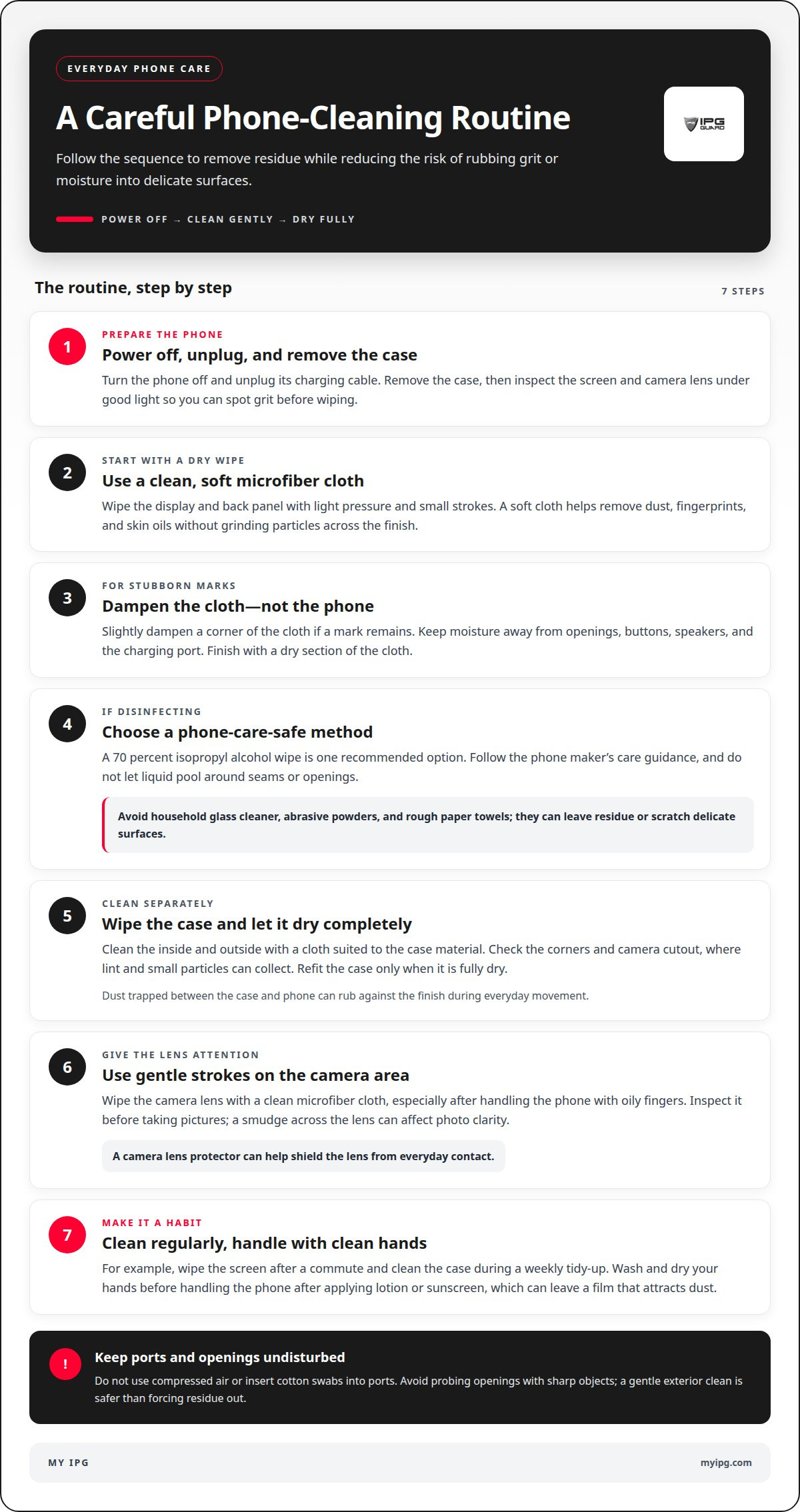
Dust, fingerprints, and skin oils collect on a phone’s screen, camera area, and case. A careful cleaning routine removes visible residue without grinding particles across the finish. Start by powering off the phone and unplugging its charging cable. Remove the case, then inspect the screen and camera lens under good light. This quick check helps you spot grit before wiping.
Use a clean, soft microfiber cloth for routine cleaning. Wipe the display and back panel with light pressure and small strokes. If a mark remains, slightly dampen a corner of the cloth, not the phone. Keep moisture away from openings, buttons, speakers, and the charging port. Finish with a dry section of the cloth.
For disinfecting, a 70 percent isopropyl alcohol wipe is one recommended option. Follow the phone maker’s care guidance, and don’t let liquid pool around seams or openings. Avoid household glass cleaner, abrasive powders, and rough paper towels. They can leave residue or scratch delicate surfaces. If a wipe catches on a camera ring or screen edge, stop and use a soft cloth instead.
Clean the case separately after removing it. Wipe its inside and outside with a cloth suited to its material, then let it dry completely before refitting it. Dust trapped between the case and phone can rub against the finish during everyday movement. Check the corners and camera cutout too, since these narrow areas often collect lint and small particles.
Give the camera lens special attention. Use a clean microfiber cloth and gentle strokes, especially after handling the phone with oily fingers. A smudge across the lens can affect the clarity of photos, so inspect it before taking pictures. For added surface coverage, an IPG Phone camera lens protector can help shield the camera lens from everyday contact.
Make cleaning a regular habit instead of waiting for marks to become obvious. For example, wipe the screen after a commute and clean the case during a weekly tidy-up. Wash and dry your hands before handling the phone after applying lotion or sunscreen. These products can leave a film that attracts dust and makes fingerprints more visible.
Follow your phone maker’s care guidance, particularly if it changes or you switch case materials. Don’t use compressed air or insert cotton swabs into ports, as either can push debris farther inside. If dirt sits in an opening, leave it rather than probing with a sharp object. A gentle exterior clean is safer than forcing residue out.
3. Cases with raised edges
A raised edge creates a small buffer between the screen and a flat surface. If a phone lands face down, that lip can help keep the glass from making direct contact. Phones without raised-edge cases can crack in drops as low as 0.5 meters. A raised rim adds protection, but it can’t prevent every impact or guarantee an undamaged screen.
View the case from the side before fitting it. Its edge should sit slightly above the screen, not flush with the glass. Check the entire perimeter, including the top and bottom corners. A rim that rises only along the sides leaves the screen more exposed if the phone lands near an edge or corner.
Check the case’s camera opening too. A raised border can help keep the lens from resting directly against a table. Set the phone on a clean, flat surface and view it from the side. If the lens or screen touches first, the case isn’t providing the intended clearance.
Fit matters as much as the raised lip. Press each corner into place and check that the case doesn’t shift when you grip the phone. A loose edge can lift during daily handling, while a warped or worn rim may no longer sit evenly. Remove the case and check for trapped grit before refitting it.
Pair the raised edge with a compatible screen protector for another layer of protection. The protector should sit inside the case’s border, not be pushed upward by it. If its edges lift after you fit the case, remove and realign the components. A protector that stays flat is less likely to collect dust around its edges.
Consider how you use the phone. If you often place it face down on a desk, choose a rim that keeps the glass clear of the surface. If you carry it in a pocket, look for a snug case that won’t catch or shift. Test the fit with the phone in the pocket you use most often.
Raised edges reduce direct screen contact in some situations, but drop outcomes depend on the impact and landing surface. Concrete, tile, and a soft floor absorb impact differently. Treat the rim as one part of your protection routine, not permission to toss or drop your phone. Replace a case if damage or wear keeps it from sitting securely.
4. Keeping phones away from keys and coins
Keys and coins often share pockets with phones because they’re easy to carry together. But metal edges can rub against the phone’s glass, frame, or camera area as you walk. Put your phone in a separate pocket and keep keys and loose change elsewhere. Separating them helps prevent repeated friction.
Choose a consistent way to carry your phone. For example, reserve a front pocket for it and use a zipped pocket or key clip for keys. In a handbag or backpack, put the phone in its own sleeve and keep coins in a closed wallet. Don’t leave loose items against the phone where they can shift during a commute.
Check pockets before putting your phone inside. A stray key, coin, or grain of grit may remain after you remove other items. If you spot debris, turn the pocket inside out and brush it clean before carrying your phone. This is especially useful after handling loose change or working near sand and dust.
A phone case creates a layer between the device and nearby objects, but it doesn’t make contact harmless. Keys can press against the case and move around inside a crowded pocket. Keep them apart even when your phone is covered. If the case has a camera opening, don’t let keys slide across that exposed area.
At home or work, give your phone and keys separate places. Set the phone on a clear desk, then put keys in a bowl or on a hook. Don’t drop both into the same tray, where they can knock together when you reach for them. A phone stand or dedicated shelf also keeps the screen away from loose objects.
Before traveling, organize your bag. Put your phone in a padded compartment or sleeve, and secure keys in a zipped section. Keep coins in a closed wallet rather than a pocket shared with electronics. When you arrive, remove the phone carefully instead of pulling it through a cluster of metal objects.
If you notice a mark, inspect the phone under steady light before wiping it. Check inside the case too, since trapped grit may rub against the surface as you move. Remove debris with a soft cloth, then change how you store your phone and keys. Keeping them separate is a simple, repeatable way to reduce avoidable scratches.
5. How should you store and carry a phone to avoid scratches and dents?
Choose a regular place for your phone before you leave home. A dedicated compartment helps prevent it from sliding against hard items as you walk. In a backpack, use a padded pocket for electronics. In a handbag, place the phone in a sleeve and keep it upright instead of letting it tumble beneath other belongings.
Check what else is in that space. A charger plug, water bottle, sunglasses case, or loose accessory can press against the phone and leave marks. Move bulky items to another compartment and close zippers before carrying the bag. If the phone compartment is crowded, remove an item rather than forcing the phone inside.
Avoid carrying your phone in a back pocket. Sitting down can press it against a chair or bend it against your body. A front pocket offers easier access, but keep it clear of sharp objects and grit. Before sitting in a car or at a desk, move the phone to a stable surface.
At a desk, use a clean, level spot away from the edge. Keep the phone clear of mugs, pens, and paperwork that could slide across it. A stand can hold the device in place during a video call. If you set it beside a laptop, leave enough room to avoid knocking it onto the floor.
For overnight storage, choose a bedside table or drawer with a clean interior. Don’t place the phone beneath a book, clothing, or another heavy object. In a drawer, keep it away from tools and accessories that could press against the screen or camera area. A soft sleeve adds a barrier when storing your phone for travel.
Take extra care when moving between rooms or vehicles. Hold the phone securely rather than balancing it on a bag or carrying several loose items together. In a car, put it in a stable compartment instead of on a seat, where it can slide during a turn. Never leave it where a door or seat mechanism could trap it.
Build a simple routine: clear the storage spot, place the phone securely, then check that nothing presses against it. For added camera-area coverage during daily use, explore phone camera lens protection. Consistent storage choices reduce unnecessary contact and help preserve the phone’s clean finish.
My IPG: IPG Phone camera lens protector
My IPG’s IPG Phone camera lens protector adds a dedicated layer of protection for your phone’s camera lens. Consider it as part of your everyday care routine. For display protection, My IPG also offers the IPG iPhone screen protector and IPG Samsung screen protector.
Choose the option that matches the part of your device you want to protect. A camera lens protector focuses on the camera area, while a screen protector covers the display. These products complement careful cleaning, secure storage, and a well-fitted case. They’re a practical next step when you’re ready to add a protective layer suited to your phone.
For help with phone protection options, contact My IPG.
Make phone care a lasting habit
Protecting your phone is easier when care fits naturally into your day. Notice where you handle and set down your device most often, then choose one small change that suits that routine. A commute, a busy desk, or a packed bag may call for different precautions. Start with the habit that feels easiest to maintain, and build from there.
A lasting approach to how to keep your phone looking brand new isn’t about achieving a flawless finish every day. It’s about making thoughtful choices to preserve the device you rely on. Revisit your routine when your schedule or surroundings change, and adjust the protection around your phone accordingly.
If you’re considering an added protective layer for your phone, contact My IPG for help. Choose a next step that fits your device and daily use, then keep your care routine simple and consistent. Small, steady habits can help you feel more confident carrying the phone you value.
Frequently Asked Questions
What screen protector best prevents scratches and cracks on a phone?
A compatible tempered-glass protector is a practical way to guard the display against scratches and some impacts. Match its cutouts and dimensions to your exact phone model so it doesn’t cover sensors or lift around the edges. No protector can guarantee a crack-free screen in every drop. For a curved or differently shaped display, choose one designed for that specific screen rather than a universal sheet.
How often should you clean your phone, and what products are safe to use?
Clean your phone screen twice weekly, and sooner if it picks up visible grime or residue. Use a clean microfiber cloth for routine marks; a 70 percent isopropyl alcohol wipe is an option for disinfecting, provided your phone maker’s instructions allow it. Keep liquid away from openings and avoid cleaning products meant for household surfaces. Clean the case separately, and let it dry before putting it back on.
How do you clean a phone screen without damaging its coating?
Power off the phone, then use a clean microfiber cloth with gentle pressure. If a fingerprint remains, lightly dampen part of the cloth rather than applying liquid to the display. Avoid rough fabric, paper towels, and abrasive cleaners, which can scratch or wear the screen’s surface. Follow the care instructions for your phone, especially if its maker provides guidance for cleaning a coated display.
Can you use alcohol wipes or disinfectant on a smartphone?
A 70 percent isopropyl alcohol wipe can be used to disinfect a phone, but follow the manufacturer’s cleaning guidance first. Wipe gently and keep the wipe from dripping into the charging port, speaker openings, or seams. Don’t use bleach, bathroom disinfectant, or spray cleaner unless your phone maker specifically permits it. If you’re unsure about a product, use a dry microfiber cloth for routine fingerprints instead.
How can you prevent scratches on the phone camera lenses?
Keep the camera area from rubbing against rough surfaces, and don’t place the phone lens-down on a gritty desk or countertop. Store the phone separately from loose objects, then check the camera area for dust before wiping it. A dedicated camera lens protector can add a layer of protection. If photos suddenly look hazy, gently clean the lens before assuming it’s scratched.
How do you remove smudges, fingerprints, or minor scuffs from a phone?
For fingerprints and surface smudges, wipe with a clean microfiber cloth using light pressure. If a mark remains, use a slightly dampened cloth and dry the surface afterward. Don’t polish a scuff with toothpaste, baking soda, or a rough pad; abrasive treatment can worsen the finish. A mark that remains after cleaning may be a scratch, so avoid rubbing it harder.
What common cleaning methods or materials can damage a phone?
Avoid abrasive powders, rough towels, sharp tools, and spraying liquid directly onto the phone. Don’t pour cleaner into ports or scrape debris from openings with a pin. These methods can scratch surfaces, push particles deeper, or let moisture reach sensitive areas. Household glass cleaner and bleach-based products may also be unsuitable for a phone’s screen coating. Follow the manufacturer’s care guidance when choosing a cleaning product.