
What if the clearest screen recording starts with moving a light, not adding a protector? Reflections can wash out text and details, and shifting your camera or display to avoid them can throw off your framing. An anti glare screen protector for camera use may help with viewing the display it covers, but it won’t remove reflections from footage. Knowing which problem you’re solving helps you choose the right fix.
Reflected light can make text hard to read on camera. Moving a light source or adjusting the camera may help, but either change can affect your composition. A screen protector has a different role: it protects the display it covers. It doesn’t control your filming setup or change what the camera sensor captures.
This guide explains how to identify the source of glare, adjust lighting and camera position without losing a consistent frame, and check recording settings for readable footage. You’ll also learn how matte anti-glare and anti-reflective protection differ, what My IPG’s Anti-Glare product family is for, and how to match screen protection to your device and priorities.
Key Takeaways
- Trace the reflection to its source, then adjust the light and camera position in a repeatable order.
- Compare lighting, framing, display adjustments, and screen protection to find which change addresses your specific issue.
- Use a test clip and lock focus and exposure when available to help keep screen footage consistent and readable.
- An anti glare screen protector for camera use protects the display it covers; it doesn’t control reflections captured in footage.
- Match screen protection to your device and intended use, and treat it as a complement to a careful filming setup.
Why Reflections Appear When You Film a Screen, and What an Anti-Glare Camera Protector Does
A display can look crisp to your eyes, then show bright shapes or washed-out areas on camera. Light from a window, ceiling fixture, or nearby object can bounce off the display toward the camera lens. That reflected light appears in the recording, competing with the screen’s text and images.
First, identify which screen is involved. There may be two: the display you’re filming and the camera’s rear or flip-out LCD. They serve different purposes, so protection on one doesn’t automatically reduce glare on the other. An anti glare screen protector for camera use is intended for the display it covers, not for reflections from a separate screen in your shot.
Which screen are you trying to protect or film?
The subject display is the monitor, tablet, vehicle screen, or other device shown in your footage. The camera LCD is the small screen you use to compose and review the shot. If the subject display reflects a bright window, a protector on the camera LCD won’t change that reflection. If glare makes the camera LCD difficult to view, protection fitted to that display addresses a different need. Identify the screen before choosing a solution.
This distinction also matters for recorded image quality. A protector on the camera’s rear or flip-out LCD sits over the display used for monitoring. The camera sensor captures the scene through the lens, so an LCD protector doesn’t alter the footage. It may help protect the camera display, but the filming conditions still determine what appears in the recording.
What anti-glare protection can and cannot solve
Anti-glare protection is designed to make the covered display easier to view by addressing glare at its surface. Different treatments manage light in different ways. For background on how coatings designed to reduce reflections work, see these anti-reflective coating principles. The terms anti-glare and anti-reflective aren’t always interchangeable, so consider the protector’s intended purpose and the display it will cover.
Keep expectations precise. A protector isn’t a substitute for controlling light, and it can’t guarantee that reflections will disappear or that recorded footage will look better. A bright source can still reflect from the screen being filmed, depending on its position and the camera’s angle. For example, a ceiling light may appear as a bright patch on a monitor even when the camera LCD is comfortable to view.
My IPG’s Anti-Glare product family is part of its screen-protection range. Treat protection as a complement to filming technique: match it to the display you want to protect, then manage the light and camera position around the screen you’re recording. This helps protect the right surface without expecting a camera LCD protector to correct reflections in the shot.
Set Up Lighting and Camera Angles to Reduce Screen Reflections
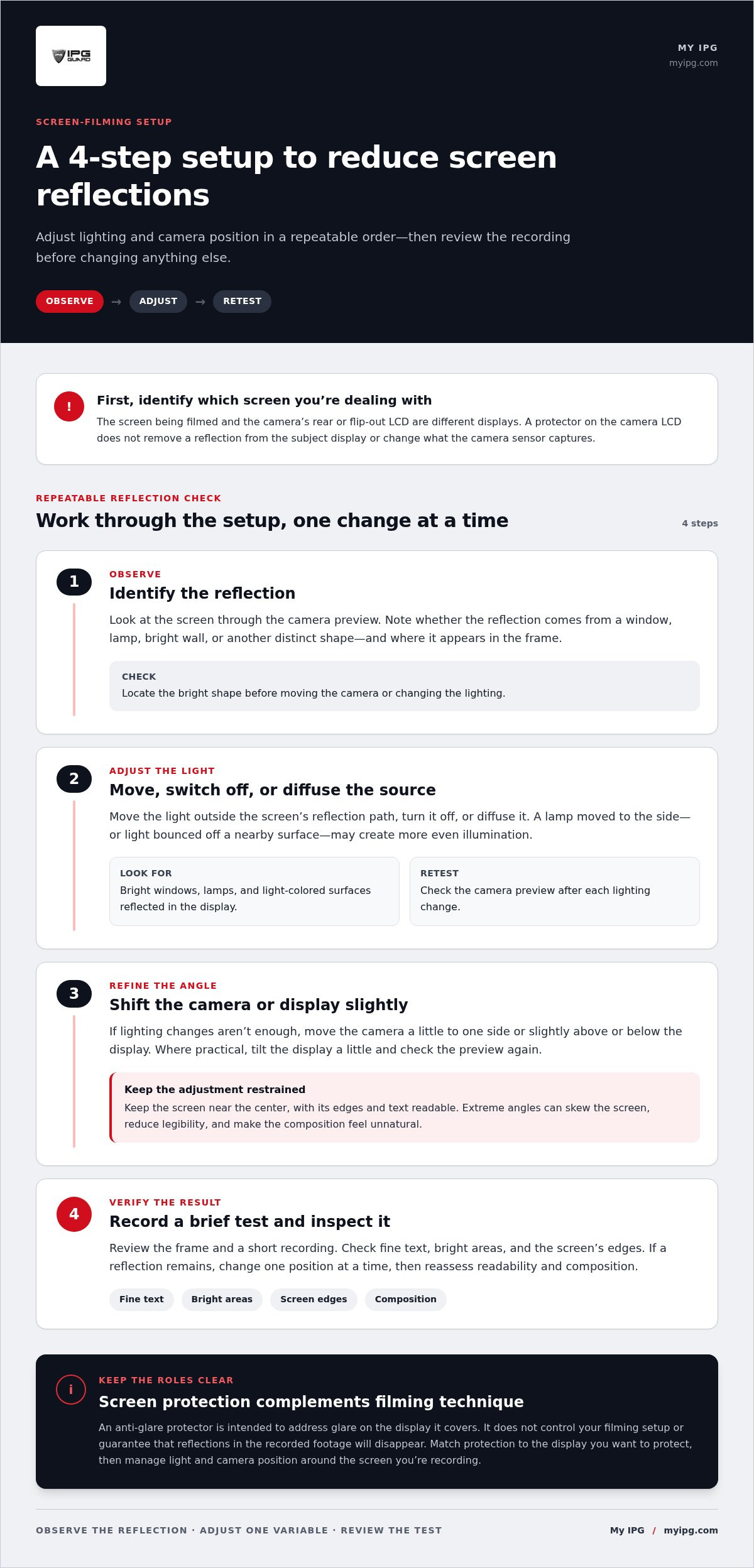
Use a repeatable setup rather than changing several things at once. A reflection’s position shifts when the light, display, or camera moves. Make one adjustment, inspect the screen through the camera, and retest. This shows what helped while keeping your framing under control.
- Identify the reflection. Look at the screen through the camera preview. Note whether you see a window, lamp, bright wall, or another distinct shape, and where it appears in the frame.
- Adjust the lighting. Move the source outside the screen’s reflection path, turn it off, or diffuse it. Retest before changing the camera.
- Reposition the camera. Make a small shift to one side or slightly above or below the display. Watch the reflection move, and keep the screen’s edges and text readable.
- Retest the whole setup. Review the frame and a short recording. If the reflection remains, change one position at a time, then check readability and composition again.
Place lights to avoid direct screen reflections
Check for bright windows, lamps, and light-colored surfaces reflected in the display. A lamp aimed straight at a monitor can create a concentrated reflection. Moving it to the side or bouncing its light off a nearby surface may make the illumination more even. Avoid adding a bright source directly toward the screen. After each change, look through the camera again to see whether the reflection has shifted or become less distracting.
A controlled environment often makes filming easier. Reduce competing room lights, close blinds if a window causes a bright patch, or diffuse a harsh source. Aim for even light that makes the room and device clear without creating another bright reflection. Don’t change several lights at once. Small, deliberate adjustments make the result easier to assess and repeat.
Adjust camera and display positions together
If changing the lighting isn’t enough, move the camera slightly off-axis while keeping the screen near the center of the frame. A modest shift can redirect reflected light away from the lens without making text look skewed. Where practical, tilt the display a little and check the preview again. Keep adjustments restrained: extreme angles can distort the screen’s shape, reduce legibility, and make the composition feel unnatural.
Once you find a clear position, note the camera and light placement so you can return to it. Record a brief test and inspect fine text, bright areas, and the screen’s edges. An anti glare screen protector for camera displays may support viewing the covered screen, but it won’t replace this setup process or control reflections on a separate display being filmed. If you’re considering screen protection alongside better filming technique, explore device-specific screen protection from My IPG.
Compare Filming Fixes Before Choosing an Anti-Glare Screen Protector
Choose a fix based on where the reflection occurs. Changes to the lighting, camera, or display can redirect reflected light in the shot. A protector, by contrast, is fitted to a particular display. Use this comparison to decide what to test first and what each option can realistically address.
| Option | What it addresses | When to try it | Limitation |
|---|---|---|---|
| Lighting changes | Bright sources reflected in the filmed screen | A window, lamp, or bright surface is visible on the display | Changing light can affect the overall scene’s brightness and appearance |
| Camera repositioning | The angle at which reflections reach the lens | The reflection shifts as you move the camera | Large movements can distort perspective or disrupt framing |
| Display adjustment | The angle of reflected light from the subject display | The display can be tilted safely and conveniently | Changing its position may affect viewing comfort or composition |
| Screen protection | The surface of the specific display the protector covers | You want protection suited to that display and its use | It doesn’t control light or reflections on a separate screen |
When filming adjustments are the right first move
If reflections come from a window, lamp, or camera angle, start with reversible setup changes. Move or diffuse the light, then shift the camera or adjust the subject display only as needed. Record a short test clip before and after each change. Compare text legibility, reflected shapes, and framing in playback, not only on the camera preview. This helps show whether the adjustment improved the recording without adding an accessory or changing the display surface.
Change one variable at a time. If you move a lamp and tilt the display together, it’s harder to tell which action helped. Keep the camera’s distance and framing steady while testing lighting, then make a small camera adjustment if needed. Once the image is clearer, check that screen edges look natural and on-screen details remain readable.
When anti-glare protection may be relevant
Protection is relevant when you want to protect a particular display and choose a protector designed for it. A protector on a camera’s rear LCD applies to that LCD; it doesn’t remove reflections from a monitor being filmed or change footage captured by the camera sensor. My IPG’s IPG Anti-Glare product family is a screen-protection option, not a replacement for controlling light and position.
Keep the purpose clear: filming adjustments address reflections in the shot, while screen protectors serve the display they cover. For broader factors in choosing protection for different devices, use the screen protector buying guide. If you’re considering protection for a device display, explore device-specific screen protection options as part of your decision.
Use This Screen-Filming Checklist for Clearer, More Readable Footage
A reliable recording starts with a quick check, not a last-minute fix. Use the same sequence each time you film a display. It helps catch issues before recording and makes it easier to identify which adjustment changed the result.
- Clean the screen. Remove visible smudges or dust from the display being filmed, then check that the camera lens is clean too.
- Scan for unwanted light. Look at the screen from the camera’s position and check for bright reflections from windows, lamps, or nearby surfaces.
- Confirm framing. Keep the full display in view, with text and important details comfortably readable in the preview.
- Check focus and exposure. Focus on the screen content. If your camera allows it, lock focus and exposure to help prevent visible shifts during recording.
- Record a test clip. Review the footage before capturing the full take, then make one adjustment at a time if something needs correction.
Run a quick reflection and exposure test
Show representative content in the test clip, including the text, icons, or graphics viewers need to read. Review the clip at full size, not only in the camera preview. Look for reflected shapes, washed-out areas, soft text, and unexpected brightness changes. If you spot an issue, adjust one variable, such as a light’s position, and record another short test. Comparing clips helps isolate the cause.
Check exposure carefully. If the screen looks too bright, make a small adjustment and review the brightest areas as well as the text. Lowering exposure too far can make details difficult to see; raising it too far can wash out bright content. When focus and exposure locks are available, use them after the display and camera are in position. This can help keep the image steady if you or someone nearby moves during the take.
Troubleshoot what remains in the frame
If a reflection persists, inspect the room and display from the camera’s exact position. It may come from outside the area you noticed while standing beside the setup. If the screen appears washed out, adjust exposure in small steps while checking that highlights and fine detail remain visible. If the framing feels distorted or text is difficult to read, reset the camera angle before considering a different protector.
Keep the recording setup and screen protection in their proper roles. An anti glare screen protector for camera displays is intended for the display it covers; it doesn’t replace a test clip, correct poor exposure, or remove reflections from a separate screen being filmed. My IPG’s IPG Anti-Glare product family offers screen-protection options. Explore IPG Anti-Glare screen protection for the display you want to protect.
Choose Camera-Screen Protection That Fits Your Device and Use
Once the filming setup is working, decide which display you want to protect. It may be the camera’s rear or flip-out LCD, or the monitor, tablet, or vehicle display you record. These screens have different dimensions and purposes. A protector designed for one won’t automatically fit another, and protecting a camera LCD won’t control reflections on a separate screen in your footage.
Start with the exact device model and identify the display you want covered. Match the protector to that device rather than relying on appearance alone. Screen size, shape, and cutouts can differ between models, even when devices look similar. Consider how you use the display, too: a screen used outdoors or checked frequently during filming may have different viewing priorities from one used mostly indoors.
Check fit, material, and installation guidance
Use the model name and display dimensions to narrow down the fit. Then consider the protector’s purpose and material. Anti-glare protection is intended for the covered display, while other screen-protection options may suit different priorities. Don’t treat these categories as interchangeable, and don’t assume that a protector fitted to a camera LCD will affect what the camera records.
Follow the installation method provided for the selected protector. Prepare the intended display as directed, align the protector carefully, and follow the installation guidance. Choose a protector for its intended device and screen, not simply because it looks close in size. If your main concern is a reflection in recorded footage, continue to manage the lighting and camera position. Screen protection doesn’t replace those adjustments.
Make the next step simple
Keep the decision in two parts: first improve the filming setup, then protect the display that needs protection. If glare makes the camera’s own LCD difficult to view, a protector suited to that screen may be relevant. If a filmed monitor shows reflections, address the light source, camera position, or display angle. These are separate needs, so choose a solution for the right surface.
My IPG offers screen protection for electronic devices, including camera displays, and the IPG Anti-Glare product family. Choose an anti glare screen protector for camera displays based on its intended screen and use, without expecting it to change footage captured by the camera sensor. Keep the device model, display dimensions, and intended purpose in view as you explore My IPG’s screen-protection range. Matching the fit and purpose helps protect the display you rely on while keeping your filming workflow in your hands.
Make Your Next Recording Setup Repeatable
Give your next recording a reliable starting point. Note the lighting and camera positions that worked, then use them as a reference when you film again. That saves time and helps you keep the display readable without relying on a protector to solve a lighting problem.
Choose an anti glare screen protector for camera use based on the display you want to protect and the way you use it. Screen protection and filming technique serve different purposes. My IPG has more than 15 years in the screen-protection market and reports serving more than 2 million customers worldwide. Its Lifetime Replacement Guarantee applies after warranty registration; replacement requests incur a $4.99 processing fee.
Ready to find protection for the display you rely on? Explore My IPG screen protection and choose your next step. A considered setup and a well-matched protector can help you care for your device while keeping control of the footage in your hands.
Frequently Asked Questions
Can I use a screen recording instead of filming a physical screen?
A screen recording can avoid reflections when the content is generated or displayed on a computer that supports screen capture. It records digital output rather than light bouncing off a physical panel. However, it won’t show someone tapping the screen, connected devices, or how the display looks in its actual environment. Film the physical display when those details matter, and use capture only when it suits the project and you have permission.
Why do rainbow patterns sometimes appear when I film a screen?
Rainbow bands or shifting color patches can come from moiré, an interaction between the display’s fine pixel pattern and the camera sensor. They aren’t necessarily reflections. Try changing camera distance slightly, adjusting the angle, or reframing so the screen pattern meets the sensor differently. Record a brief test after each adjustment and inspect playback. If the pattern changes, keep that setup for a full take; a protector isn’t a guaranteed fix.
Does a camera screen protector change the video recorded by the camera?
No. A protector fitted to the camera’s viewing LCD covers that display, while the image sensor records the scene through the lens. The protector shouldn’t be treated as a way to change captured reflections, color, or sharpness. It can protect the surface you look at while composing, but it doesn’t sit in front of the sensor. Match any anti glare screen protector for camera LCD use to the exact device before selecting one.
Will an anti-glare protector remove every reflection from filmed footage?
No. An anti-glare protector shouldn’t be expected to remove every reflection from recorded footage. A reflection can still enter the camera’s view from a window, lamp, or another bright surface, and the protector only applies to the display it covers. First test changes to the room and filming position. Then choose a protector for the relevant display and its fit, treating it as protection rather than a guaranteed correction for the shot.
Can I film a screen with a phone camera?
Yes, a phone camera can record a physical screen, though the result depends on the room, angle, focus, and display brightness. Position the phone so the full screen fits without cutting off menus or captions, then move obvious light reflections out of view. Make a short test clip. In playback, enlarge the image and check whether small text stays readable and bright areas retain detail; the live preview alone may not reveal the final result.
Should I apply an anti-glare protector to my camera’s flip-out display?
An anti-glare protector can be considered if you want protection for the camera’s flip-out LCD, but fit depends on the exact camera model and display shape. That LCD is separate from the screen you’re filming, so protection there won’t directly address reflections in the shot. Choose a protector made for the camera display and follow its installation instructions. Don’t assume a similarly sized protector will align with the screen’s edges or openings.