
The right material won’t protect your tablet if the fit is wrong. Choosing a hydrogel tablet screen protector starts with matching the exact model and generation. That small check can make the difference between proper screen coverage and a protector that doesn’t align.
It’s understandable to pause over the choice between hydrogel and tempered glass, or to worry that applying a flexible film will leave bubbles. Hydrogel offers a soft, flexible surface suited to precise coverage, while tempered glass has a harder feel and different impact-protection trade-offs. Application matters, too: these protectors use a wet installation process, so knowing what to expect can make the choice feel more manageable.
This guide explains how to identify your tablet’s exact screen, compare material and visibility trade-offs, and prepare for installation. It also covers device-specific options for Apple iPad, iPad mini, and iPad Air models, as well as Kindle Scribe Colorsoft and Topaz GemView tablets. Choose based on the screen, fit, and your everyday use, then protect the device you rely on.
Key Takeaways
- Match a hydrogel tablet screen protector to your tablet’s exact brand, model, generation, and display configuration.
- Understand what flexible hydrogel film can help protect against, and how its feel and protection differ from tempered glass.
- Compare model-specific My IPG options for select iPad, Kindle Scribe Colorsoft, and Topaz GemView devices.
- Follow the wet-application process and prepare, align, and inspect the film carefully to avoid common mistakes.
- Use the product details to narrow your choice and understand the stated replacement coverage for the life of the protector.
What Is a Hydrogel Tablet Screen Protector, and What Does It Protect Against?
A hydrogel tablet screen protector is a flexible film applied over a tablet’s display to help shield its surface from everyday contact and minor scratches. It’s a separate protective layer, not part of the screen itself. If the film gets marked, it acts as a sacrificial surface between daily use and the display beneath it.
Hydrogel describes a material type, not the tablet screen. For a broader overview of hydrogel composition, properties, and uses, see What is a Hydrogel? IPG Original hydrogel protectors are designed for specific tablet models. Their product descriptions specify wet application and a virtually invisible finish, so check both the model fit and application method when choosing one.
A protector can help guard against routine surface wear, but it can’t guarantee protection from every impact or type of damage. A hard drop, concentrated force, or damage to the tablet’s edges may still affect the device. Treat the film as one layer of care, not a substitute for careful handling.
How Does Hydrogel Film Differ from Tempered Glass?
Hydrogel is a flexible film; tempered glass is rigid. Film generally feels softer and sits close to the display, while glass offers a firmer, glass-like surface. They also handle differently during installation: flexible film bends, while a glass protector keeps its shape. Neither material is universally better. The right choice depends on your preferred feel, how you handle the tablet, and the kind of contact you want a surface layer to help address.
What Does a Virtually Invisible Protector Mean in Daily Use?
“Virtually invisible” is the product description’s claim about a low-profile appearance. It suggests the protector is designed to be unobtrusive over the screen and preserve a clear view of the display. It isn’t a quantified optical-performance measure, so don’t read it as a promise that the film will be undetectable in every lighting condition or viewing angle.
For broader context on display-protection materials and choices, explore The Ultimate Screen Protector Guide. As you compare options, keep your tablet’s exact model in view. A discreet finish matters, but the protector must also be intended for your device.
How to Choose a Hydrogel Tablet Screen Protector That Fits
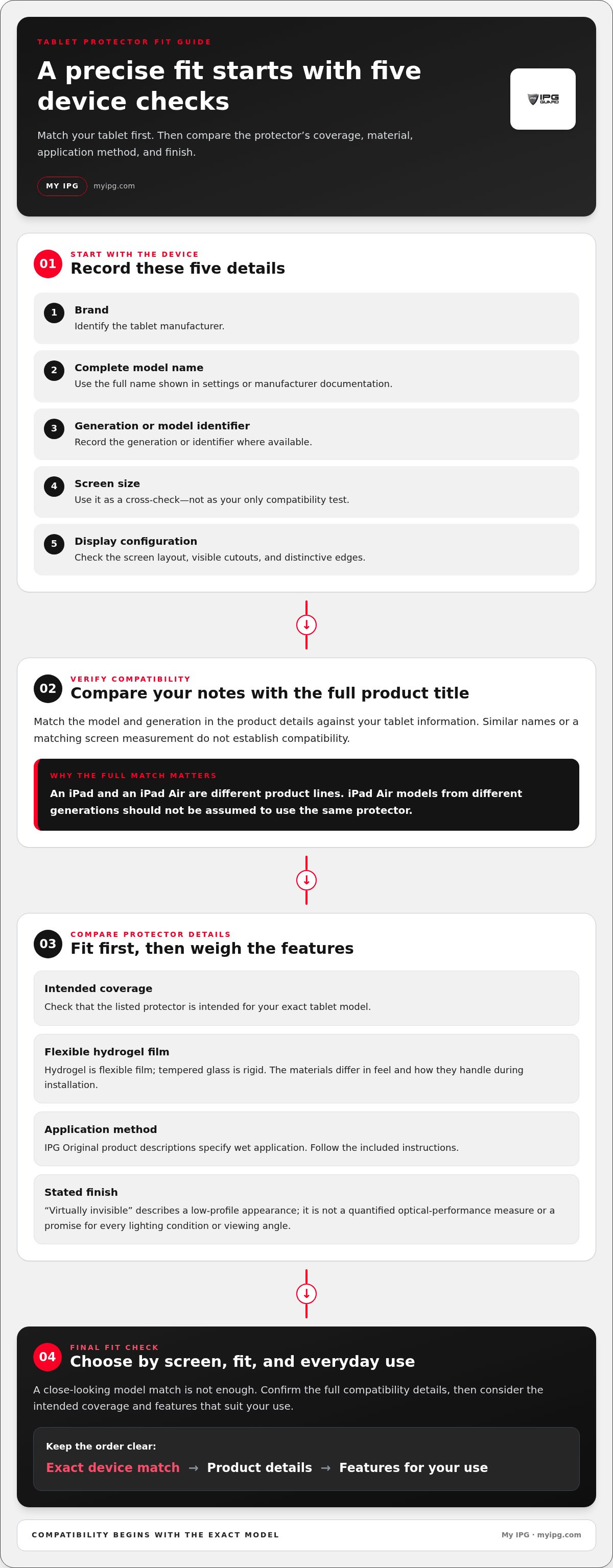
Match the protector to the exact model and generation, not just the screen size. Two tablets can share a brand name or similar diagonal measurement and still differ in screen dimensions, edges, camera placement, or display layout. A close-looking match doesn’t establish compatibility. Before choosing, compare the full product title with your tablet’s model information.
How Can You Identify Your Tablet’s Exact Model?
Find the model name in your tablet’s settings or manufacturer documentation. Record the brand, full model, generation, screen size, and display configuration. These details help distinguish closely named devices. For example, an iPad and an iPad Air are different product lines, and iPad Air models from different generations shouldn’t be assumed to use the same protector. Compare every detail, not just the family name.
Use this checklist before selecting a hydrogel tablet screen protector:
- 1. Brand: Identify the manufacturer.
- 2. Model: Note the complete device name shown in settings or documentation.
- 3. Generation: Record the generation or model identifier where available.
- 4. Screen size: Use it as a cross-check, not as your only compatibility test.
- 5. Display configuration: Consider the screen layout, visible cutouts, and distinctive edges.
Next, compare your notes with the complete product title and compatibility details. A similar name may refer to a different generation, and a matching screen measurement may not account for the full display layout. The American Chemical Society’s overview of Versatile Applications of Hydrogels highlights the material’s use in different fields. That broader context doesn’t establish a protector’s fit or performance, so rely on device-specific compatibility details for your tablet.
Which Features Should You Compare Before Buying?
Once you’ve confirmed the model, compare the protector’s intended coverage, flexible film material, application method, and stated finish. IPG Original product descriptions identify device-specific engineering, wet application, and a virtually invisible finish. Read those details alongside the model information, and follow the included application instructions. For a wider look at material trade-offs, see The Ultimate Screen Protector Guide.
Prioritize fit, then weigh the features that suit your use. If you’re also protecting a wearable, explore watch screen protectors designed for that separate device category.
Which IPG Original Hydrogel Tablet Protector Matches Your Device?
The options below are model-specific. Use the full compatibility wording to narrow your choice, then compare it with your tablet’s model name and generation. A matching brand or screen size alone isn’t enough. The unit count appears only where stated.
Which IPG Original Options Cover Apple iPad Models?
| IPG Original option | Compatible model details | Unit count stated |
|---|---|---|
| iPad Pro hydrogel screen protector | iPad Pro 2020-2022, 11-inch | No count stated |
| iPad mini hydrogel screen protector | iPad mini 6th generation, 8.3-inch | No count stated |
| iPad hydrogel screen protector | iPad 2021, 9th generation | No count stated |
| iPad hydrogel screen protector | iPad 10th generation, 10.9-inch | No count stated |
| iPad Air hydrogel screen protector | iPad Air 2022, 5th generation, 10.9-inch | No count stated |
Pay close attention to the two 10.9-inch options. One is for the iPad 10th generation; the other is for the iPad Air 2022, 5th generation. Their screen measurements match, but the product descriptions identify different tablet models. Don’t treat them as interchangeable. Match the full device name and generation before selecting your hydrogel tablet screen protector.
Are There Hydrogel Options for Kindle and Specialist Tablets?
| IPG Original option | Compatible model details | Unit count stated |
|---|---|---|
| Kindle Scribe Colorsoft hydrogel screen protector | Kindle Scribe Colorsoft, 11-inch | No count stated |
| Topaz Signature GemView hydrogel screen protector | Topaz Signature GemView, 7-inch | 2 |
These are distinct, model-specific options. Don’t assume the Kindle Scribe Colorsoft listing fits other Kindle devices or that the Topaz Signature GemView option fits other Topaz models. Compare each product’s complete title and compatibility details with your device before choosing.
IPG Original product descriptions state wet application, a virtually invisible finish, and free lifetime replacement for the life of the protector. Compare those details with the model match, then browse the tablet protector collection to find the option described for your device.
How to Apply a Hydrogel Tablet Screen Protector and Avoid Common Mistakes
IPG Original hydrogel product descriptions specify wet application. The exact process can vary by protector, so follow the instructions supplied with your product. Set aside enough time to work carefully. Rushing can leave dust trapped beneath the film or the protector off-center.
What Should You Do Before Applying the Film?
Prepare a clean, well-lit workspace, then prepare the tablet screen as directed in the product instructions. Before starting, confirm that the protector matches the tablet model and generation, and identify its correct orientation. Keep dust and loose particles away from the prepared display. Avoid touching the adhesive surface unnecessarily, since fingerprints or debris can interfere with a clean application.
Work through the application in four stages:
- Preparation: Read the supplied instructions from start to finish. Prepare the screen as directed and keep the work area clear.
- Alignment: Position the protector carefully before applying it. Check its orientation and placement against the display.
- Application: Follow the product’s wet-application steps. Handle the film as instructed rather than improvising or pressing it into place prematurely.
- Final inspection: Review the edges and visible display area. Look for dust, obvious misalignment, or application imperfections, then follow the supplied guidance for any adjustment.
Small details matter. Dust left on the screen may appear as a speck beneath the film. Rushed alignment can leave the protector visibly off-center, and unnecessary handling of the adhesive surface can introduce marks or particles. Slow down at each stage and follow the directions for your hydrogel tablet screen protector rather than relying on assumptions from another product.
What Should You Do If You Notice Bubbles or Misalignment?
Don’t immediately lift, press, or reposition the film. First, consult the application guidance supplied with the protector. A small application imperfection is different from a visible speck of trapped dust or a protector that clearly sits out of alignment; each may call for a different response. Avoid adding tools or steps that aren’t listed, and refer to Removing Air Bubbles from Your Protector for related troubleshooting guidance.
Careful installation starts with the right model and continues with patient, instruction-led work. For another device category, browse watch screen protectors to explore options for protecting a watch display.
Choose Your Hydrogel Tablet Screen Protector and Protect the Display
The right choice starts with compatibility, not appearance. Match the full device name and generation first, then compare the material, finish, and application method described for that protector. IPG Original options are model-specific, so compare the product details rather than assuming similarly named tablets share a fit.
Which Protector Should You Choose for Your Tablet?
Use this checklist before choosing a hydrogel tablet screen protector:
- Exact device: Match the full model name shown in your tablet settings or documentation.
- Generation: Check that the protector description names the same generation or year where provided.
- Material preference: Consider whether flexible hydrogel film suits the feel and everyday surface protection you want.
- Application method: Review the product description and supplied instructions, including the specified wet-application process.
Choose the option whose listed device details match your tablet. Examples include specific iPad Pro, iPad mini, iPad, and iPad Air models, along with a Kindle Scribe Colorsoft and Topaz Signature GemView option. These aren’t interchangeable categories: an iPad and iPad Air listing, for instance, refer to distinct models. Confirm the exact product wording, then review its stated coverage and application guidance.
IPG Original product descriptions state free lifetime replacement for the life of the protector. Consider that wording alongside the model match and application details as you compare options. A clear match helps you choose a film designed for the tablet named in its description.
Where Can You Browse the IPG Original Tablet Protectors?
Ready to compare model-specific options? Browse IPG Original tablet screen protectors and use each product description to identify the protector intended for your device. Check the complete model and generation before choosing, then follow the included application guidance to care for your display.
Choose a Closer Fit for Your Tablet
A dependable choice begins with the full tablet model and generation, not screen measurement alone. Compare those details with the product description, then weigh the film’s feel and application method against your everyday needs. This helps you choose a hydrogel tablet screen protector intended for your device instead of relying on a similar name or size.
IPG Original options are described for specific iPad, iPad mini, iPad Air, Kindle Scribe Colorsoft, and Topaz GemView models. Product descriptions specify wet application, a virtually invisible finish, and free lifetime replacement for the life of the protector. Follow the supplied instructions during application, and review the listed compatibility details before choosing.
Ready to find a model-specific option for your tablet? Browse IPG Original tablet screen protectors and compare the product descriptions with your device details. With the right match and careful application, you can give your display a protective layer while keeping your tablet ready for everyday use.
Frequently Asked Questions
Is a hydrogel screen protector good for a tablet?
Yes, a hydrogel screen protector can suit a tablet if you want a flexible film as a sacrificial surface against everyday contact and minor scratches. It’s a separate layer over the display, not protection against every kind of damage. A hard impact can still harm the screen. Choose a protector made for your exact tablet model, and consider whether a film’s feel and coverage suit how you use your device.
Is hydrogel better than tempered glass for a tablet?
Neither material is universally better. Hydrogel is a flexible film with a softer feel, while tempered glass is rigid and has a firmer, glass-like surface. Protection depends on the specific product and the kind of contact involved. Consider your priorities: flexibility and a low-profile film, or a rigid surface and glass-like feel. A protector is one part of device care, not a guarantee against damage.
How do I know which hydrogel screen protector fits my tablet?
Compare the protector’s full compatibility details with your tablet’s brand, model, generation, screen size, and display configuration. Find the model in device settings or manufacturer documentation. Don’t rely on screen size alone: similarly sized tablets can be different models. A model-specific hydrogel tablet screen protector is intended for the device named in its product description, so match the complete wording before choosing.
Can I install a hydrogel screen protector myself?
Yes, you can apply one yourself by following the instructions supplied with the protector. IPG Original product descriptions specify wet application, so read the steps before starting and prepare a clean, well-lit workspace. Check the protector’s orientation and alignment before applying it. Keep dust away from the prepared screen and avoid handling the adhesive surface unnecessarily. Don’t improvise with tools or steps that aren’t in the supplied guidance.
Does a hydrogel tablet screen protector affect touch or display clarity?
Effects can depend on the film and how it’s applied. IPG Original product descriptions describe a virtually invisible finish, meaning a low-profile appearance, not a guarantee of identical viewing in every condition. They don’t establish a measurable touch-response specification. Follow the application instructions and review the product description for its stated features. If touch or visibility changes concern you, compare those details with your needs before selecting a protector.
Can I use one tablet screen protector on different iPad generations?
Don’t assume a protector fits multiple iPad generations unless its compatibility details say so. Model names and screen measurements can be similar while referring to different devices. For example, an iPad and an iPad Air are distinct product lines, and the listed 10.9-inch options identify different models and generations. Check the complete product title against your iPad’s settings or documentation before applying a protector.
Does the IPG Original hydrogel protector include a replacement warranty?
IPG Original product descriptions state free lifetime replacement for the life of the protector. This wording refers to the protector’s life, not the lifetime of the tablet. Review the product description for the specific option you’re considering so you understand the stated coverage. Match the protector to your exact model and generation first; replacement coverage doesn’t change device compatibility or protect the tablet from every type of damage.