
The finish may catch your eye first, but your exact iPhone model should determine which iphone camera lens protector you choose. Camera layouts and dimensions vary between models and size variants, so a close-looking match isn’t enough. The wrong fit can leave part of the camera area uncovered or sit where you don’t want it.
It’s reasonable to want extra protection for an exposed camera area without changing your phone’s look. The key is understanding what the product is designed to do. My IPG’s model-specific options are protective and decorative vinyl products, not a promise of drop protection, waterproofing, or guaranteed camera-quality performance.
This guide explains how to compare fit, finish, protection needs, and application details. You’ll learn how to confirm your iPhone’s exact model and variant, check a listing’s camera-area coverage, and choose between subtle and decorative finishes. We’ll also cover what to verify about application, removal, and case compatibility, so you can understand what the listed protector does and doesn’t promise.
Key Takeaways
- Use your iPhone’s exact model and variant to narrow your options. Don’t assume Pro, Pro Max, Plus, and standard models share a fit.
- Compare the finish options listed for your model to find a look that suits your phone.
- An iphone camera lens protector in this collection is a vinyl cover. Check the listing to understand its intended coverage and limits.
- Before applying a protector, follow its product instructions and check any case-compatibility guidance.
- Choose by model fit first, then by finish and intended use. Don’t assume one option offers different protection performance from another.
Why choose an iPhone camera lens protector, and what protection do you need?
An iPhone camera area can come into contact with keys in a bag, grit on a table, or other rough surfaces during everyday use. A protector is an accessory intended to cover or shield part of that area. Its actual coverage and level of protection depend on its material and design, so check the product listing before deciding what it can do.
A camera-area decal is a fitted cover for the phone’s camera area, not a replacement for a damaged camera lens. It won’t repair a crack or restore a camera component. That distinction matters when choosing an iphone camera lens protector: the name alone doesn’t tell you whether the product covers the camera bump, individual lenses, or both.
What does an iPhone camera lens protector protect?
My IPG’s iPhone camera-area listings describe protective and decorative vinyl covers. They’re intended to add a fitted layer and a chosen look to the camera area, but the available product information doesn’t establish a particular scratch-resistance rating or guarantee against marks. It also doesn’t promise drop protection or waterproofing.
Before buying, confirm the listed material and exact coverage for your iPhone model. A vinyl cover isn’t the same material as tempered glass, which is produced through a separate manufacturing process. Don’t assume glass performance from the word “protector.” Verify the material in the listing.
Do vinyl camera covers suit every protection need?
They may suit shoppers who want a model-specific fit with a decorative finish and a stated protective purpose. My IPG’s listings describe the vinyl products as easy to apply and offer multiple finishes, though the choices vary by listing. That gives you options for coordinating the camera area with your phone’s look, but it doesn’t make a vinyl cover equivalent to a case or impact-rated camera protection.
If drop protection is your priority, look for product documentation that specifically describes impact protection rather than relying on a decal’s appearance or name. For broader context on accessory types, read The Ultimate Guide to IPG Phone Camera Lens Protectors.
Use the listing as your final check. Verify the exact iPhone model and variant, confirm what the cover fits around, and review any application, removal, or case-compatibility instructions. A close visual match isn’t enough. Let fit and stated purpose guide your choice.
How to check iPhone model fit before buying a camera lens protector
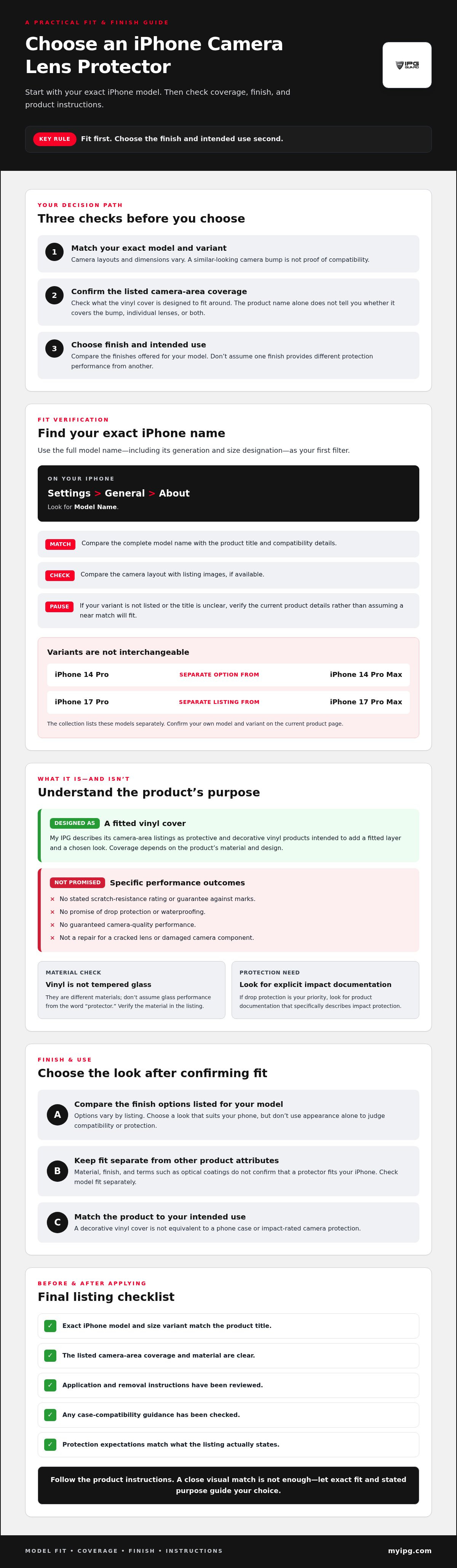
Camera layouts and dimensions vary between iPhone models, so match a protector to your exact model and size variant before buying. A similar-looking camera bump doesn’t prove compatibility. To check the fit, identify your phone, compare its full name with the product title, then confirm the variant on the product page.
Find your iPhone model and size variant
Open Settings > General > About and look for the Model Name. If you can’t access your phone, check its original purchase information. Note the full name, including the generation and size designation. “Pro” and “Pro Max” are distinct variants, just as “Plus” and the standard model shouldn’t be treated as interchangeable.
Match the product title to the confirmed collection options
Use the exact model name as your first filter. The collection includes separate model-specific options such as iPhone 14 Pro and iPhone 14 Pro Max. Those titles aren’t interchangeable compatibility claims. The iPhone 17 Pro and iPhone 17 Pro Max also have separate listings. Open the current product page and confirm the stated model and variant before ordering.
- Identify: Write down your iPhone’s complete model name.
- Match: Look for that same model and variant in the product title.
- Verify: Check the page’s compatibility details and compare the camera layout with listing images, if available.
Don’t choose by finish or appearance alone. A decorative design that looks right may still be made for a different camera layout. Terms about optical coatings describe a different product attribute. They don’t confirm that a protector fits your phone. Check fit separately from material, finish, and any performance claims.
If the product title is unclear or your variant isn’t listed, pause and verify the current page details rather than assuming a near match will work. Once you know your model, browse the model-specific back camera decal collection and compare the options for your device.
Compare iPhone camera lens protector finishes and collection options
My IPG’s iPhone camera-area vinyl covers are listed for specific models, with different finish selections available. Compare the exact model and the finishes shown on its product page. These differences describe fit and appearance, not proven differences in protection performance. Confirm your exact phone variant before choosing a finish.
Five-finish options for selected iPhone 14, 15, and 16 models
The listings identified for these models name five finishes: Black Carbon Fiber, Blue Coral, Pink Pearl, Silver Chrome, and Pearl Red. Check the current product page to confirm the finish choices and details for your model.
| Compatible model listed | Stated finish count | Listed finishes |
|---|---|---|
| iPhone 14 Pro | Five | Black Carbon Fiber; Blue Coral; Pink Pearl; Silver Chrome; Pearl Red |
| iPhone 14 Pro Max | Five | Black Carbon Fiber; Blue Coral; Pink Pearl; Silver Chrome; Pearl Red |
| iPhone 15 | Five | Black Carbon Fiber; Blue Coral; Pink Pearl; Silver Chrome; Pearl Red |
| iPhone 15 Plus | Five | Black Carbon Fiber; Blue Coral; Pink Pearl; Silver Chrome; Pearl Red |
| iPhone 15 Pro | Five | Black Carbon Fiber; Blue Coral; Pink Pearl; Silver Chrome; Pearl Red |
| iPhone 15 Pro Max | Five | Black Carbon Fiber; Blue Coral; Pink Pearl; Silver Chrome; Pearl Red |
| iPhone 16 | Five | Black Carbon Fiber; Blue Coral; Pink Pearl; Silver Chrome; Pearl Red |
| iPhone 16 Plus | Five | Black Carbon Fiber; Blue Coral; Pink Pearl; Silver Chrome; Pearl Red |
Four-finish options for iPhone 17 Pro and Pro Max
Compare the separate iPhone 17 Pro and iPhone 17 Pro Max listings by their full titles. The stated four-finish selection is Black Carbon Fiber, Chameleon-Purple to Navy Blue, Pink Glitter, and Silver Chrome. Don’t assume one variant’s listing applies to the other.
| Compatible model listed | Stated finish count | Listed finishes |
|---|---|---|
| iPhone 17 Pro | Four | Black Carbon Fiber; Chameleon-Purple to Navy Blue; Pink Glitter; Silver Chrome |
| iPhone 17 Pro Max | Four | Black Carbon Fiber; Chameleon-Purple to Navy Blue; Pink Glitter; Silver Chrome |
Separate listings also show a Blue, Orange, Green, and Silver set. Its exact compatible variant isn’t established here, so check the current product title and compatibility details before selecting it. Finish names describe appearance, not scratch, drop, or camera-performance ratings. For any iphone camera lens protector, verify the current listing’s model fit, material, and finish choices before ordering.
How to apply an iPhone camera lens protector and avoid common buying mistakes
My IPG’s iPhone camera-area vinyl covers are described as easy to apply. That description isn’t a substitute for the instructions for the exact product you’ve selected. Application steps can vary by item, so check its product page and any included directions before preparing your phone or placing the cover.
Prepare the phone and follow the product instructions
Start by checking the specific listing for application details. Follow any preparation, alignment, or repositioning instructions it provides. If the page or supplied directions don’t explain how to prepare the camera area, don’t assume cleaning products, moisture, or a particular technique are suitable. Verify the recommended method before applying the cover.
Take your time with placement. Use the product’s alignment guidance, if provided, and avoid improvising steps that could affect fit. If anything is unclear, pause and seek clarification from the seller or product documentation rather than relying on general advice for a different protector. A smooth application starts with understanding the actual instructions.
Avoid fit, coverage, and performance assumptions
Ordering by iPhone generation alone is a common trap. Two phones from the same generation can have different variants and camera layouts, so confirm the complete model name in the product title and compatibility details. A similar-looking camera area doesn’t prove that a cover will align correctly.
Check what the product is designed to cover. Don’t assume a camera-area decal fits over each lens individually or covers the full camera bump unless the listing says so. Case clearance, camera access, and removal guidance also need product-specific confirmation. The available information doesn’t establish universal case compatibility, residue-free removal, or unchanged camera results, so don’t treat those outcomes as guaranteed.
A camera-area cover and a screen protector serve different parts of the phone. If you’re also comparing display protection, consult the iPhone screen protector buying guide. Keep the decisions separate, then check the model, material, coverage, and instructions for each item.
Before applying an iphone camera lens protector, make one final check: the listing matches your exact variant, its stated coverage suits your needs, and you understand its application directions. To compare model-specific options, browse the back camera decal collection.
Which My IPG iPhone camera lens protector should you choose?
Start with your exact iPhone model, not the finish or product image. My IPG’s camera-area options are model-specific vinyl covers, and listings vary in compatibility and finish selection. They’re described as easy to apply, but that doesn’t establish different levels of protection between options. Choose based on the model named on the page, your preferred finish, and the listing’s stated purpose.
Standout model-specific options in the collection
- For iPhone 15 Pro or 15 Pro Max: The IPG Decorative for Apple iPhone 15 Pro & 15 Pro Max Back Camera Protection (5 in 1) listing identifies both variants. Its listed finishes include Black Carbon Fiber, Blue Coral, Pink Pearl, Silver Chrome, and Pearl Red. Confirm your exact variant and the current finish selection on the page.
- For iPhone 17 Pro: The IPG Decal for iPhone 17 Pro Back Camera Vinyl Cover 4 Color Sticker Set is a separate, model-specific option. The associated four-finish listing names Black Carbon Fiber, Chameleon-Purple to Navy Blue, Pink Glitter, and Silver Chrome. Check that the title says iPhone 17 Pro, not Pro Max.
- For the standard iPhone 16: The IPG Decorative for Apple iPhone 16 Back Camera Protection (5 in 1) offers an option for the standard model. Its listed finishes include Black Carbon Fiber, Blue Coral, Pink Pearl, Silver Chrome, and Pearl Red. Don’t treat it as a match for an iPhone 16 Plus or Pro without explicit compatibility details.
These examples can help narrow your options, but product titles and finish selections can change. Verify the current listing before ordering. Review the stated material and coverage, and don’t infer drop protection, waterproofing, case compatibility, or guaranteed camera results from a decorative finish or “protection” wording.
Make the final choice with confidence
Follow this order: confirm your complete iPhone model and variant, match it to the product title and listing details, choose a finish shown for that item, then follow its specific application instructions. If a variant or finish isn’t clearly listed, pause and verify instead of relying on visual similarity.
The right iphone camera lens protector is one that matches your phone and preferences, with claims you can confirm on its product page. Browse the My IPG back camera decal collection to compare model-specific options and listed finishes.
Choose a camera cover that fits your phone
A confident choice starts with your exact iPhone model and variant. Then compare the current listing’s material, coverage, and available finishes, and follow the product-specific application instructions. My IPG’s model-specific options include selected iPhone 14, 15, 16, and 17 variants, with finishes listed by product. Descriptions characterize application as easy, but follow the instructions for your chosen item.
Keep the product’s purpose in view. A vinyl camera-area cover can add a decorative touch and a layer over the camera area, but don’t assume it provides drop protection or other performance the listing doesn’t confirm. The right iphone camera lens protector matches your device and your expectations for fit and appearance.
Ready to compare options for your phone? Browse My IPG iPhone camera decals, and check the current product details before choosing.
Frequently Asked Questions
Does an iPhone camera lens protector fit every iPhone model?
No. Camera layouts and dimensions vary by iPhone model and size variant, so don’t assume a protector listed for one device fits another. Pro, Pro Max, Plus, and standard models can have different camera arrangements. Find your phone’s model name in Settings under General, then About, and match the complete name to the product listing before buying.
Can a vinyl camera lens protector prevent scratches?
A vinyl camera-area cover is intended to add a protective layer, but the available My IPG listing information doesn’t specify a scratch-resistance rating or guarantee that it will prevent scratches. Treat it as a protective and decorative cover, not impact-rated protection. Check the product listing for the material and exact coverage, and don’t assume it protects areas the product doesn’t cover.
Will an iPhone camera protector affect photo quality?
There isn’t enough product-specific information to guarantee that a camera-area cover will leave photo results unchanged. Check whether the listing says the cover sits over individual lenses or around the camera area, and follow its instructions. If you notice an issue after application, consult the product guidance and check that the cover is positioned as directed. Don’t infer camera performance from the finish alone.
How do I know which iPhone camera protector model to buy?
Find your complete model name in Settings under General, then About, or check your original purchase information. Match that name, including its size variant, to the product title and compatibility details. For example, don’t treat an iPhone 17 Pro listing as a match for an iPhone 17 Pro Max. Compare the camera layout with listing images when available, and verify details on the current product page.
Are My IPG camera lens protectors easy to apply?
My IPG’s iPhone camera-area vinyl product listings describe them as easy to apply. That general description isn’t a substitute for the instructions for your selected item. Check its product page and any included directions before application, especially for preparation and alignment steps. If the instructions don’t answer a question, verify the recommended method rather than applying techniques intended for a different protector.
What is the difference between a camera lens protector and a camera decal?
“Camera lens protector” is a broad accessory term for products intended to cover or shield part of a phone’s camera area. A camera decal refers more specifically to a decorative cover, such as My IPG’s model-specific vinyl products. A decal isn’t a replacement for a damaged lens. Check the listing to see what area it covers and what material it uses.
Can I use a phone case with an iPhone camera lens protector?
Possibly, but compatibility depends on the specific cover and case. The available My IPG product information doesn’t establish that every case will fit over or around its camera-area vinyl covers. Check the listing or product documentation for case-clearance guidance before applying one. Don’t assume a case that fits the bare phone will necessarily fit the same way with an added camera-area cover.