
The strongest privacy option for your Galaxy may not be a screen protector. The Galaxy S26 Ultra has a built-in Privacy Display you can toggle, while a samsung galaxy privacy screen protector is an add-on that may change how your screen looks during everyday use. The right choice depends on your exact phone model and how much privacy you want without compromising your viewing experience.
It makes sense to want a closer view of your messages and work in public, while also wondering whether a privacy filter could make your own screen harder to see. Choosing the right fit can be confusing: Galaxy model names are similar, and protector materials, installation methods, touch response, and case compatibility all matter.
This guide compares privacy, visibility, fit, and everyday usability to help you choose. You’ll learn what to confirm for your Galaxy model, how to weigh privacy against display clarity, and which installation, fingerprint, touch, and case-fit details to check before buying. If you use an S26 Ultra, we’ll also explain how its built-in feature differs from an add-on protector.
Key Takeaways
- Start with your phone’s full Samsung Galaxy model name. A shared family name alone doesn’t confirm that a protector will fit.
- Before choosing a samsung galaxy privacy screen protector, weigh the added privacy against possible changes to your own viewing experience.
- Compare privacy and standard protectors by intended use, then check product-specific details rather than assuming touch response or clarity will be the same.
- Review installation instructions, fingerprint-sensor compatibility, and case-fit information before applying a protector.
- If you’re considering the Galaxy S26 Ultra, distinguish its built-in Privacy Display from an add-on protector, then verify any product’s supported models and specifications.
What Does a Samsung Galaxy Privacy Screen Protector Do?
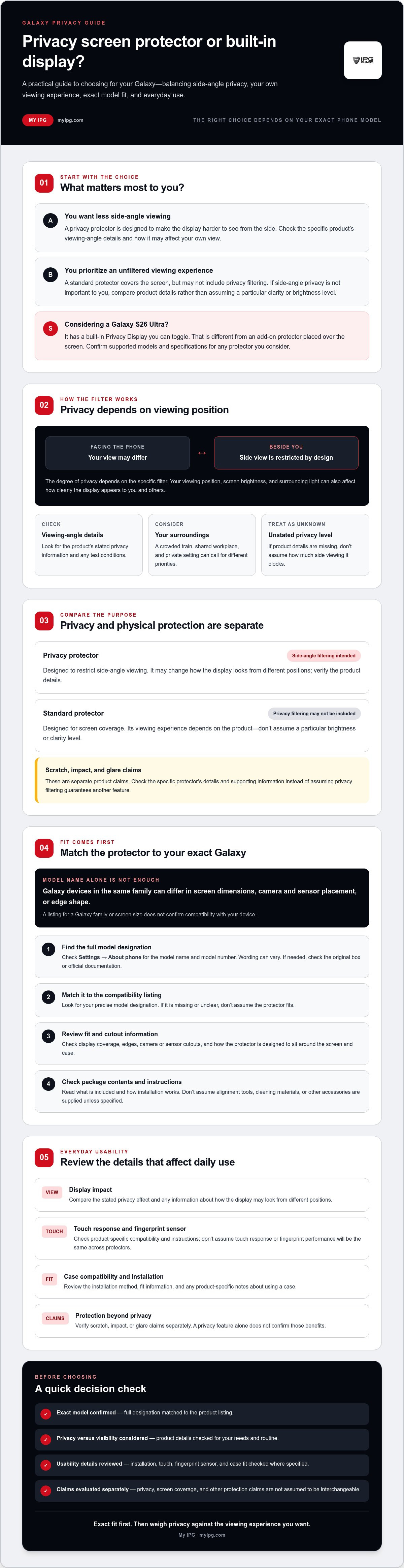
A privacy screen protector is a layer placed over a phone display to make it harder to see from the side. Its filter is designed to narrow the viewing angle, helping keep messages, documents, and other on-screen details less visible to people nearby. A standard protector may cover the display without limiting side-angle viewing. The general principle is explained in this overview of privacy screens.
How does a privacy filter change what nearby people can see?
The effect depends on where someone is looking from. A person facing the phone may see the display differently from someone seated beside you. The degree of privacy depends on the specific filter, while screen brightness, your viewing position, and surrounding light can also affect how clearly the display appears to you and others.
Don’t assume every samsung galaxy privacy screen protector blocks the same amount of side viewing. Check the product’s stated viewing-angle details, display impact, and any test conditions before buying. If those details aren’t provided, treat the privacy level as unconfirmed.
Your routine matters, too. On a crowded train, limiting side views of a work email may be useful. At a shared workplace, you might want privacy for sensitive information while still viewing the display comfortably. At home or in another private setting, a standard protector may better suit your priorities if side-angle privacy isn’t important.
Privacy protection versus ordinary screen protection
Privacy and physical protection are separate considerations. A privacy filter is intended to limit side-angle viewing. Scratch, impact, or glare protection depends on the specific protector and the evidence supporting its claims. Review the product details rather than assuming one feature guarantees another.
| Feature | Privacy protector | Standard protector |
|---|---|---|
| Primary purpose | Designed to restrict side-angle viewing | Designed for screen coverage; privacy filtering may not be included |
| Viewing experience | May change how the display looks from different positions; verify product details | Depends on the product; don’t assume a particular brightness or clarity level |
| Scratch or impact claims | Must be checked for the specific product | Must also be checked for the specific product |
For a broader look at screen-protector types and selection factors, read the ultimate screen protector guide. Compare product claims against your Galaxy’s needs and the listed specifications.
How to Match a Privacy Screen Protector to Your Samsung Galaxy
A protector needs to be made for your exact phone to fit the display properly. Galaxy models in the same family can differ in screen dimensions, camera and sensor placement, or edge shape. A listing that says “Galaxy S series” or “Galaxy A series” may not cover your device. Match the model designation, not just the family name or screen size.
Where to find your exact Samsung Galaxy model
On your phone, open Settings and look under About phone for the model name and model number. Menu wording can vary by device. If you can’t access Settings, check the original device box or official documentation. Don’t choose based only on a familiar series name or screen-size measurement. Similar names don’t guarantee identical dimensions or cutouts.
What to verify before ordering
Use this checklist before selecting a samsung galaxy privacy screen protector:
- Identify the exact model. Record the full model designation shown in your phone settings, box, or documentation.
- Match it to the listing. Look for that precise designation in the product’s compatibility information. If it’s missing or unclear, don’t assume the protector fits.
- Review the fit details. Check available information about display coverage, edges, and camera or sensor cutouts. Consider whether the stated dimensions suit your case and how the protector is designed to sit around the screen.
- Check what’s included. Read the listing for package contents and installation instructions. Don’t assume an alignment tool, cleaning materials, or other accessories are supplied unless specified.
Some privacy filters use micro-louver technology to limit visibility from off-center positions. That general explanation doesn’t confirm the construction or performance of a particular protector. Look for product-specific details instead of treating a general description as a specification.
Check case fit separately. A protector’s edge coverage and a case’s inner lip can affect how the two sit together. Use verified compatibility information for both items where available, and follow the protector’s installation guidance.
My IPG’s catalog includes IPG Samsung screen protectors and an IPG Privacy Screen Protector, but the available product information doesn’t identify supported Galaxy models. Verify exact model support and fit details before choosing. You can review the My IPG screen protector options as part of that check.
Privacy Screen Protector vs. Standard Galaxy Protector: What Changes?
The main difference is the intended viewing experience. A privacy protector is designed to limit what people can see from off-center positions. A standard Galaxy protector may cover the display without offering that privacy filter. Neither label alone confirms scratch resistance, impact protection, glare reduction, brightness, clarity, or touch response. Check the claims and supporting details for the exact protector you’re considering.
A privacy filter can involve a visibility trade-off: the display may look different depending on the filter and how you use your phone. Don’t assume every samsung galaxy privacy screen protector has the same effect. Look for product-specific information about viewing angles, display appearance, and touch performance, especially if you use your phone in different lighting or viewing positions.
| Consideration | Privacy protector | Standard protector |
|---|---|---|
| Primary purpose | Designed to limit side-angle viewing | Designed for screen coverage; privacy filtering isn’t implied |
| Viewing experience | May change how the display appears; verify the product’s details | Depends on the protector; don’t assume a particular clarity or brightness level |
| Protection claims | Scratch, impact, and glare claims need product-specific support | Check the same claims against the product’s specifications |
| Selection priority | Worth considering if limiting nearby views matters in your routine | May suit you if privacy filtering isn’t a priority |
When a privacy filter may suit your daily routine
On public transport, in a crowded waiting area, or at a shared office desk, you may prefer to make on-screen information less visible from the side. The value depends on your position and surroundings, and a filter can’t guarantee confidentiality. Use device security, lock-screen controls, and care about what you display in public alongside any physical accessory. If you are outfitting a mobile workstation or managing hardware for a team, retailers like Computech-Solutions offer a variety of IT equipment and gear to keep your devices protected and functional.
When a standard screen protector may be the better fit
If you often share your screen with someone beside you, or prefer a wider viewing experience, a standard protector may better match your habits. Compare verified product details rather than assuming it will always look clearer or respond better to touch. Your Galaxy use, privacy needs, and the specific protector matter more than choosing by price alone.
Decide what you want the protector to do, then check that the listing supports those needs and fits your exact Galaxy model. No protector type is right for every owner. Choose the option whose documented features and viewing trade-offs suit your everyday use.
How to Evaluate Everyday Visibility, Installation, and Case Fit
A product listing can name the right Galaxy model and still leave practical questions unanswered. Before ordering a samsung galaxy privacy screen protector, consider how it may look and feel in your routine, how it should be installed, and whether it’s documented to work with your case. Treat specifications as product-specific, not as guarantees for every protector.
What to consider about screen visibility and touch use
Visibility depends partly on your viewing position, lighting, and personal preference. Consider where you use your phone most: bright outdoor settings, typical indoor lighting, and low-light rooms can all feel different. A privacy filter may also affect how you see the display, but the extent depends on the specific product. Look for verified notes on display appearance and touch compatibility. Don’t assume a brightness change, viewing angle, or touch response without evidence for that model.
If the listing doesn’t answer a key question, such as whether touch functions are supported as expected, ask the seller before ordering. This is especially useful if you rely on particular screen features and want to avoid surprises after application.
Installation and case compatibility checks
Use this checklist before applying any screen protector:
- Read the instructions for the exact protector. Follow its stated preparation and installation steps. Application methods can differ, so don’t rely on instructions for another product.
- Check the listed contents. Confirm what the package includes instead of assuming tools or cleaning materials come with it.
- Review case-fit information. Look for details about case compatibility, edge coverage, and how the protector sits on the display. A case’s inner edge may affect the fit, so don’t infer compatibility from the phone model alone.
- Resolve unclear details first. If the listing doesn’t address your case or installation concern, ask the seller before ordering. Verify that the answer applies to your exact phone and protector.
Before application, read the complete instructions and check that the screen and product match the stated requirements. Careful preparation helps you make an informed decision before the protector is in place.
As you compare products, review My IPG screen protection options and confirm exact model support, visibility details, installation guidance, and case compatibility.
Choose an IPG Samsung Galaxy Privacy Screen Protector with Confidence
Choose in sequence: decide whether limiting side views matters in your routine, identify your exact Galaxy model, then verify that the product listing supports it and explains the details you care about. This keeps your privacy preference separate from compatibility. A samsung galaxy privacy screen protector is suitable only if its confirmed fit and documented behaviour meet your needs.
A quick pre-purchase checklist for Galaxy owners
- Confirm your phone model. Check its full model designation in device settings, on the original box, or in official documentation. Match that exact designation to current product compatibility information.
- Set your privacy priority. Consider whether limiting nearby views in public or shared spaces matters more to you than viewing the screen from a wider range of positions.
- Review product-specific behaviour. Look for verified information about display appearance and touch compatibility. Don’t assume every privacy filter affects viewing in the same way.
- Check fit and application details. Confirm the product’s case-compatibility information and follow its own installation instructions. If model support or a key specification is unclear, verify it before purchase.
My IPG’s catalog includes a My IPG Privacy Screen Protector and My IPG Samsung screen protectors. The available product information doesn’t confirm which Galaxy models the privacy protector supports or specify its filter performance, materials, display impact, touch response, case fit, or installation method. Treat those as details to verify, not assumed features. Check the current listing for your exact phone and the specifications that matter to you before deciding.
This check helps you avoid relying on a broad Galaxy-series label. If the listing doesn’t clearly establish model support or answer a fit question, pause and seek confirmation before ordering.
Where to continue comparing screen protection
For broader guidance on display protectors, see the Samsung screen protector buying guide. Camera lenses need a separate kind of protection, so use the phone camera lens protector guide for that distinct device component.
Compare options through My IPG screen protection, and verify exact model compatibility and product details before selecting a protector.
Choose Protection That Fits Your Galaxy
The right samsung galaxy privacy screen protector starts with two checks: whether side-view privacy suits your daily routine and whether the protector is confirmed for your exact Galaxy model. Then review product-specific details for visibility, touch use, installation, and case fit. Privacy filters can help limit side-angle viewing, but they don’t guarantee confidentiality or replace careful screen habits.
My IPG’s catalog includes an IPG Privacy Screen Protector and Samsung screen protectors. The available information doesn’t confirm which Galaxy models the privacy protector supports or its specific performance details, so verify compatibility and specifications before choosing. A precise match matters more than relying on a broad series name.
To compare options, explore My IPG screen protection and check the current product details against your device. With the right information, you can choose protection that suits your privacy needs and everyday use.
Frequently Asked Questions
Does a Samsung Galaxy privacy screen protector stop people from seeing my screen?
A privacy screen protector is designed to restrict what people can see from some side positions, but it can’t guarantee that nobody will view your screen. The result depends on the specific product, viewing angle, lighting, and distance. Check verified specifications for your exact Galaxy model. For sensitive content, also use secure lock settings, keep your device close, and avoid displaying private information where others can see it.
Will a privacy screen protector make my Samsung Galaxy screen darker?
It may change how the display looks from certain positions, but the effect varies by protector and viewing conditions. Don’t assume every product has the same impact on brightness or clarity. Before buying, check the listing for verified display information for your Galaxy model, and consider how you use your phone indoors, outdoors, and in low light. If the details aren’t clear, ask the seller before ordering.
How do I know which privacy screen protector fits my Samsung Galaxy?
Find your phone’s exact model designation in Settings under About phone, or check its box or official device information. Match that designation to the protector’s compatibility listing. A Galaxy family name or screen size alone may not confirm fit because models can differ in dimensions, edges, and cutouts. If compatibility is unclear, ask the seller to verify the exact model and any relevant case-fit details before you order.
Can I use a case with a Samsung Galaxy privacy screen protector?
Possibly, but compatibility depends on the dimensions and edge coverage of both products. A protector may fit the phone yet not suit every case. Review the protector listing for case-fit guidance, confirm it applies to your exact Galaxy model, and follow the product’s installation instructions. Don’t assume a case and protector will work together because they fit another Galaxy model. Ask the seller if your specific combination isn’t addressed.
Is a privacy screen protector better than a regular Galaxy screen protector?
Neither option is automatically better for every Galaxy owner. A privacy filter may suit you if you often use your phone around others and want to limit side views. A standard protector may better match your preference for an unrestricted viewing experience. Compare intended function, exact-model compatibility, and product-specific information about visibility and touch use. Choose based on your routine and verified details, not a universal ranking or price alone.
Can a privacy screen protector affect touchscreen use or fingerprint recognition?
It depends on the phone, protector design, installation, and the touch or biometric feature you use. Don’t assume compatibility without checking verified information for your exact Galaxy model. Read the product instructions before applying the protector, and follow your device maker’s guidance if a feature behaves differently afterward. If the listing doesn’t address touch or fingerprint compatibility, ask the seller before buying rather than relying on general claims.
Is a Samsung Galaxy privacy screen protector useful for working in public?
It may help limit side views while you read work messages or documents in a shared office, on public transport, or in a waiting area. Its effectiveness depends on the specific filter and viewing conditions, and it can’t guarantee confidentiality. Check verified product specifications for your Galaxy model. Keep using device security and careful screen habits, and avoid displaying sensitive information where others may be able to see it.