
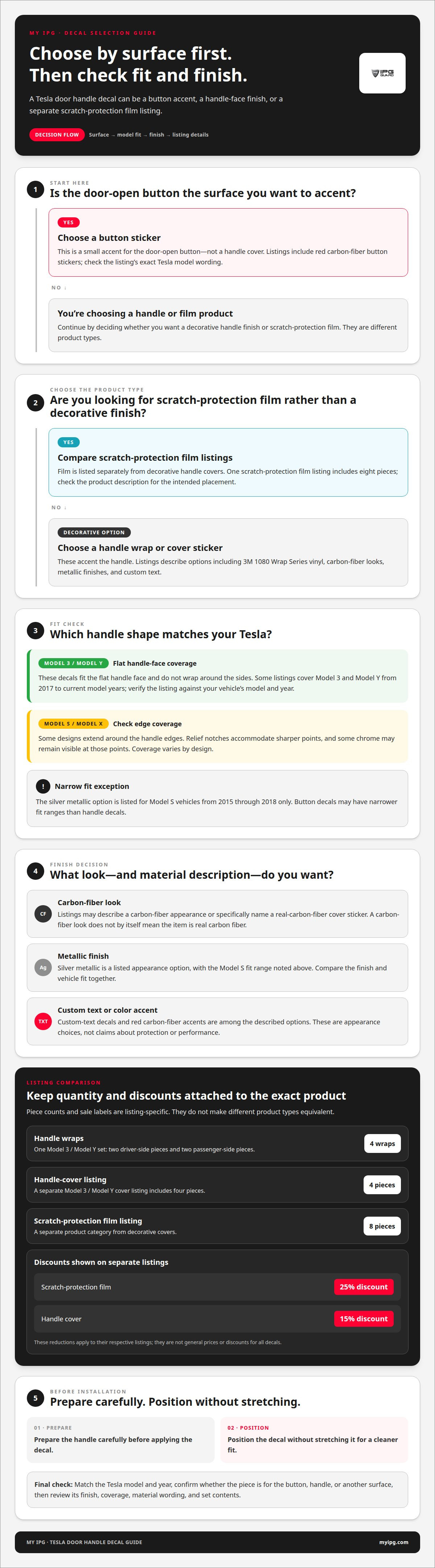
The finish is only half the decision: a Tesla door handle decal can add a carbon-fiber accent, metallic look, custom text, or scratch-protection film. Model 3 and Model Y options fit the flat handle face, while some Model S and Model X designs extend around the edges.
Choosing a Tesla door handle decal means balancing the look you want with your vehicle’s handle shape and model. A metallic finish creates a different effect from a carbon-fiber look, and the coverage depends on the design.
This guide compares the styles and finishes described in product listings, explains fit considerations, and outlines general installation steps. Use these details to choose a Tesla door handle decal that suits your vehicle and the surface you want to accent.
Key Takeaways
- Compare carbon-fiber, metallic, custom-text, and scratch-protection styles by the finish and coverage you want.
- Check whether a listing is for handle wraps or door-open button stickers; they’re different decal types.
- Match the decal to your Tesla model and year. Some listings cover Model 3 and Model Y from 2017 to current model years, while button decals may have narrower fit ranges.
- Review the coverage before choosing: Model 3 and Model Y decals fit the flat handle face, while some Model S and Model X decals extend around the edges.
- For installation, prepare the handle carefully and position the decal without stretching it for a cleaner fit.
Carbon-fiber and metallic decal options
Carbon-fiber and metallic finishes create distinct looks. Listings include red carbon-fiber door-open button stickers. Another option is a red real-carbon-fiber handle-cover sticker. These are different pieces, not interchangeable descriptions. One decorates the door-open button. The other covers part of the handle. A Tesla door handle decal should match the surface you want to accent. Start by deciding between button detail and handle coverage.
Carbon-fiber listings also vary in material wording. Some describe a carbon-fiber button sticker. Another specifically describes a real-carbon-fiber cover sticker. Other door-handle decals use 3M 1080 Wrap Series vinyl. Read the product description carefully. A carbon-fiber appearance does not automatically mean real carbon fiber. The listed material helps distinguish a textured look from a named material. It also helps you compare options accurately.
- Button sticker: a small accent for the door-open button.
- Handle-cover sticker: a separate piece for the handle face.
- Wrap vinyl: decals described as 3M 1080 Wrap Series.
- Silver metallic: listed for Model S vehicles from 2015 through 2018 only.
Fit matters as much as finish. Model 3 and Model Y decals fit the flat handle face. They do not wrap around the sides. Model S and Model X decals may include extra material around handle edges. Their relief notches accommodate sharper points. Some chrome can remain visible at those points. That edge detail changes the final appearance. Compare the decal’s coverage with your handle shape before choosing a Tesla door handle decal.
Metallic and carbon-fiber finishes offer different visual effects. Silver metallic can coordinate with bright trim, while a red carbon-fiber accent adds contrast. These are appearance choices, not claims about protection or performance. Before choosing, check whether the listing describes a button sticker, a handle cover, or a wrap. The product type determines where the finish appears.
Set contents also affect how a style is applied. One Tesla Model 3 and Model Y decal set includes four wraps. It has two driver-side pieces and two passenger-side pieces. A separate Model 3 and Model Y handle-cover listing includes four pieces. Treat those counts as listing-specific. Match each piece to its intended side and surface. The extra edge material described for Model S and Model X changes coverage, not the basic finish choice.
For a cleaner selection, use this order: choose the Tesla model, identify the handle or button surface, then compare the finish and material description. Check edge coverage, especially on Model S and Model X. For Model 3 and Model Y, expect flat-face coverage rather than a side wrap. A Tesla door handle decal is designed for installation without stretching. That detail helps preserve its intended fit and finish.
Listed product pricing
Compare listings by item type first. Tesla Model 3 and Model Y listings cover different pieces. A door-open button sticker is not a handle wrap. A cover sticker targets the handle. Scratch-protection film is another separate category. These distinctions matter before comparing listed prices. A lower amount may describe a smaller piece. A larger set may cover more surfaces. Read the product title and contents together. Don’t compare button accents with full handle covers.
Set quantity offers a useful comparison point. One Model 3 and Model Y cover listing includes four pieces. A separate scratch-protection film listing includes eight pieces. Those counts don’t make the products equivalent. The cover and film have different stated purposes. Check whether the listing describes one handle, multiple handles, or another surface. A set count alone won’t explain the full coverage. Compare the named product, quantity, and intended placement.
Button-sticker listings also differ by model wording. One set names both Model 3 and Model Y. Another listing names Model 3 specifically. That distinction affects which listings belong in your comparison. Custom-text decals add another variable. Their listed price may appear beside an original price and sale price. Keep those figures clearly separated when reviewing a listing. Don’t treat an original price as the current offer. Note the product name and pricing label together.
- Button stickers: compare the listed Tesla models.
- Handle wraps: compare the stated coverage and quantity.
- Scratch film: distinguish film from decorative covers.
- Custom text: separate sale and original price labels.
Sale labels need careful reading. A scratch-protection film listing carries a 25% discount. A handle-cover listing carries a 15% discount. Those reductions apply to separate listings. They don’t establish a general price for all decals. Keep the discount beside its matching product. Also note whether the item is a cover or film. This prevents a misleading comparison between unlike options.
Use a simple comparison process. First, choose the Tesla model named. Next, record the product type and piece count. Then note whether the listing shows a sale. Finally, compare only similar items. For example, compare button stickers with button stickers. Compare handle covers with handle covers. Treat the four-piece cover and eight-piece film separately. This approach makes listed prices easier to interpret. It also keeps decorative accents distinct from scratch-protection products.
For a Model 3 or Model Y, begin with the exact surface you want covered. A button sticker, handle wrap, and scratch-protection film serve different roles. Then check the listing’s model wording and included quantity. Those details give each price its context. A custom-text option needs its own comparison because its design differs. Keep sale labels attached to the specific listing. The clearest comparison matches product type, vehicle wording, and contents.
Tesla door handle decal styles and finishes
Carbon-fiber, silver metallic, and custom-text finishes create different looks. Red carbon-fiber accents add contrast, while silver metallic can echo bright trim. Custom text personalizes the handle area. A Tesla door handle decal may accent a door-open button or cover part of a handle, depending on its design. Choose the surface first, then compare finishes designed for it.
Material wording also matters. Some listings describe 3M 1080 Wrap Series vinyl; others specify a carbon-fiber appearance or real-carbon-fiber material. Those descriptions don’t mean the same thing. For example, a carbon-fiber look doesn’t establish that the piece uses real carbon fiber. Read the named material and finish together before deciding.
Are Tesla door handle decals legal or restricted in the United States? A handle decal is a cosmetic accessory, not a window or license-plate covering. Keep it on the handle and clear of controls and required markings. Vehicle rules can vary by location.
How do you remove a Tesla door handle decal without damaging the paint? Lift an edge gently and peel the film back slowly. Avoid metal tools, force, and aggressive scraping against the paint. If adhesive remains, use a paint-safe removal method.
Do Tesla door handle decals affect handle operation or keyless entry? Keep moving handle areas clear and avoid covering seams or contact points needed for normal operation. Don’t stretch film across edges where it could interfere with movement.
How durable are Tesla door handle decals in sun, rain, and car washes? Durability depends on the material, installation, edge adhesion, and exposure. Sun, moisture, and wash friction can stress exposed edges. Follow the product’s care directions to help preserve its finish.
Coverage changes the result. Model 3 and Model Y decals fit the flat handle face, not the sides. Some Model S and Model X designs extend around edges, with relief notches at sharp points. Chrome may remain visible at those points. Check coverage against the handle shape before choosing a Tesla door handle decal.
- For contrast: compare red carbon-fiber styles.
- For a metallic look: consider silver options.
- For personalization: explore custom-text designs.
- For a closer fit: match coverage to the model.
Choose by finish, material, and coverage together. A flat-face style creates a contained accent. An edge-wrapping design changes more of the handle outline. For Model 3 and Model Y, focus on flat-face coverage. For Model S and Model X, inspect edge details. A Tesla door handle decal should complement the vehicle while leaving its handle clear to operate.
Which Tesla models and years are compatible with door handle decals?
Compatibility depends on the Tesla model and decal type. Model 3 and Model Y handle-wrap listings cover vehicles from 2017 to current model years. That range applies to the listed wraps, not every handle accessory. A button decal can have a narrower fit range. Match the exact product type before selecting a year range. Model name alone isn’t enough.
Door-switch button decals have their own listed fit. One listing covers Model Y 2019-2024 and Model 3 2019-2023. Those years differ from the broader Model 3 and Model Y wrap range. Don’t transfer the button decal’s compatibility to a handle wrap. Likewise, a handle-wrap fit doesn’t establish button-sticker fit. Read the model and year details for the specific piece.
- Model 3 and Model Y wraps: listed for 2017 to current model years.
- Model Y door-switch button: listed for 2019-2024.
- Model 3 door-switch button: listed for 2019-2023.
- Model S and Model X: listings describe edge-wrapping material.
Handle shape also affects coverage. Model 3 and Model Y decals fit the flat handle face. They don’t wrap around the sides. Model S and Model X decals include extra material for edges. Relief notches accommodate sharp points. Some chrome can remain exposed at those points. These differences concern decal shape and coverage. They don’t establish a year range for Model S or Model X.
Older Model 3 handles need particular attention. For Model 3 vehicles manufactured before 2021, chrome handles may show a thin chrome edge after installation. That visible strip is a fit detail. It can affect the finished appearance. Compare the handle’s trim with the decal’s coverage before choosing. Don’t assume a flat-face decal will conceal the sides.
Use this compatibility check before purchase:
- Identify the model. Separate Model 3, Model Y, Model S, and Model X.
- Identify the decal. Distinguish a handle wrap from a door-switch button decal.
- Match the year. Use the exact range shown for that product type.
- Check the handle finish. Note chrome handles on pre-2021 Model 3 vehicles.
- Compare coverage. Check flat-face fit against edge-wrapping designs.
For example, a 2020 Model 3 owner should separate two checks. The Model 3 and Model Y wrap listing includes that year within its stated range. The door-switch button listing covers Model 3 2019-2023. A pre-2021 chrome handle may still show a thin edge. Each detail answers a different fit question.
Model S and Model X owners should focus on the listed handle shape and edge coverage. Model 3 and Model Y owners should distinguish wrap compatibility from button compatibility. A matching model, year, and decal type gives the clearest fit check.
Verify model and year independently.
How do you install a Tesla door handle decal?
Start with a decal set made for your Tesla model and handle shape. Check the listed piece count and identify the intended position of each piece before installation. Keeping pieces matched to their positions helps prevent side-to-side mix-ups.
Prepare the handle before positioning the film. Clean away surface dirt, then let the area dry fully. A clean, dry surface helps the adhesive contact evenly. Avoid starting over dust or moisture. Check the decal against the handle before exposing its adhesive. Confirm its edges and orientation first.
- Identify each piece. Separate driver-side and passenger-side wraps.
- Check the surface. Make sure the handle area is clean and dry.
- Align the decal. Match its shape to the intended handle face.
- Apply gradually. Set one edge, then work across the surface.
- Press it in place. Smooth the film without stretching it.
- Inspect the result. Look for lifted edges or misplaced sections.
Keep the film relaxed during application. Tesla handle decals are designed for installation without stretching. Pulling the material can distort its shape. That may make alignment harder, especially near curved edges. Place the decal carefully instead. For Model 3 and Model Y, the wrap fits the flat handle face. It doesn’t extend around the sides.
Model S and Model X designs can include extra edge material. Their relief notches accommodate sharper points. Align those notches with the matching handle details. Some chrome may remain visible at sharp points. Treat that exposure as part of the coverage design. Don’t pull the film to hide it.
Work through one piece at a time. If your set includes four wraps, verify the side before applying each one. Press from the aligned edge toward the remaining surface. Check the fit as you go. Don’t force material across a gap or around an edge the decal wasn’t designed to cover. The goal is accurate placement, not extra coverage.
One reviewer reported applying all four stickers in less than 10 minutes. Your pace depends on careful alignment and preparation. Take time with the first piece. It gives you a clear reference for the remaining wraps. After application, inspect each edge and confirm that the decal sits flat.
For a Model 3 or Model Y, choose the matching Tesla handle decal option and follow its included application guidance. A well-aligned decal starts with the correct fit, clean preparation, and steady placement.
My IPG: IPG Phone camera lens protector
My IPG’s IPG Phone camera lens protector helps protect another valuable device: your phone. After choosing a finish for your Tesla, consider the camera lens you rely on for everyday photos. My IPG also offers an IPG iPhone screen protector, an IPG Samsung screen protector, and IPG Camera Lens Protector for iPhone Samsung Tempered glass. Choose by device and protection type, keeping the product name matched to your phone. For Tesla handle coverage, the relevant option is the IPG Tesla Model 3 / Model Y door handle decal.
My IPG also offers phone camera lens protectors and screen protectors for selected devices. Browse the My IPG store to find a product designed for your device.
Choose the Finish That Feels Right
Make your final choice with your Tesla’s overall look in mind. A handle accent is a small detail, but it becomes part of the vehicle’s daily character. Decide whether you want the finish to stand out or blend with the existing trim, then choose an option that suits how you personalize your car.
A Tesla door handle decal is one way to make that detail your own. The right next step is matching the style you prefer with the model-specific option available for your vehicle. My IPG offers an IPG Tesla Model 3 / Model Y door handle decal for owners considering that fit. Keep your choice focused on the appearance and coverage you want.
Ready to explore decal options? Contact My IPG about decal options. Choose a finish that suits your Tesla, and enjoy the thoughtful detail every time you reach for the handle.
Frequently Asked Questions
What is a Tesla door handle decal and what does it do?
A Tesla door handle decal is a shaped sticker or film for a handle or door-open button. It can add a chosen finish, while listings specifically described as scratch-protection film are intended to protect the covered surface from scratches. For example, a button accent decorates the button rather than covering the handle. Check the product’s stated purpose and coverage before choosing.
How much do Tesla door handle decals cost?
Listed prices vary by product type. These are listing prices, not My IPG prices. Compare like with like, and distinguish sale prices from original listed prices.
What materials and finishes are available for Tesla door handle decals?
Options include 3M 1080 Wrap Series vinyl, red carbon-fiber styles, silver metallic finishes, and custom text. Material descriptions can differ, so don’t assume a carbon-fiber appearance means real carbon fiber. For example, a listing may specifically describe real carbon fiber, while another names vinyl. Read both the finish and material wording to understand what the option describes.