

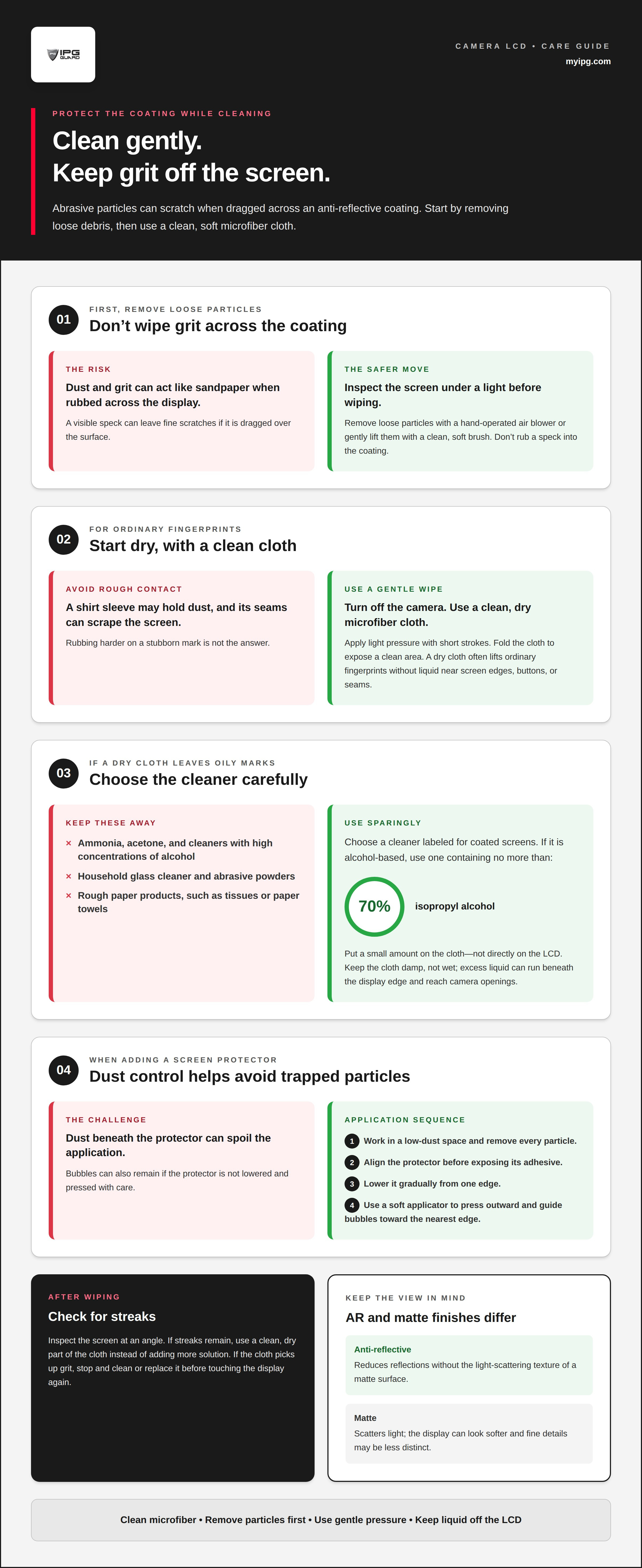
Could a cleaning swipe do more harm than a fingerprint? Knowing how to protect anti-reflective coating on digital camera screens starts with clearing loose particles before wiping, so grit isn’t dragged across the surface. Use a clean, soft microfiber cloth, and avoid cleaners with ammonia, acetone, or high concentrations of alcohol. For an alcohol-based cleaner, the guidance is no more than 70% isopropyl alcohol.
That care matters because an anti-reflective coating reduces distracting reflections while keeping the display clear. Made of thin layers applied to a glass or plastic surface, it can be affected by abrasive particles and unsuitable cleaners. Gentle handling helps preserve screen clarity and color.
This guide explains what the coating does, why cleaning can put it at risk, and how to care for it safely. Learn which habits to avoid, how anti-reflective and matte surfaces differ, and how a screen protector can add a practical layer of defense for a camera display.
Key Takeaways
- Anti-reflective coatings reduce reflections, helping preserve a clear view of the camera display.
- Matte surfaces scatter light and can make screen details appear softer, so a protector’s finish matters.
- Particles can scratch the surface when dragged across it; remove loose debris before wiping.
- A screen protector can provide a physical barrier, but its surface may change how reflections and image details appear.
Cleaning products for coated screens
In the United States, camera screen protector prices depend on the protector type and camera fit. Professional LCD repair costs depend on the camera model, damage, parts, and work required.
Start with the gentlest method: a clean, dry microfiber cloth. Turn off the camera so fingerprints, dust, and streaks are easier to see against the dark display. Use light pressure and short strokes. A dry cloth often removes ordinary fingerprints without bringing liquid near screen edges, buttons, or seams.
Before wiping, inspect the display under a light. Dust and grit can act like sandpaper when rubbed across the surface, leaving fine scratches. Remove loose particles with a hand-operated air blower or lift them gently with a clean, soft brush. Don’t rub a visible speck into the coating. Fold the microfiber cloth to expose a clean area, then wipe the screen.
If a dry cloth leaves oily marks, use a small amount of screen-safe cleaner on the cloth, not directly on the LCD. For an alcohol-based cleaner, choose one containing no more than 70% isopropyl alcohol. Keep the cloth damp, not wet. Excess liquid can run beneath the display edge and reach openings in the camera body.
- Use: a clean microfiber cloth and, when needed, a cleaner labeled for coated screens.
- Avoid: ammonia, acetone, and cleaners with high concentrations of alcohol, which can degrade the coating.
- Skip: household glass cleaner, abrasive powders, and rough paper products, such as tissues or paper towels.
How do you apply a camera screen protector without trapping dust or bubbles? Work in a low-dust space, remove every particle, and align the protector before exposing its adhesive. Lower it gradually from one edge, then press outward with a soft applicator to guide bubbles toward the nearest edge.
For a stubborn mark, use a fresh section of microfiber instead of pressing harder. If the cloth picks up grit, stop and clean or replace it before touching the display again. Avoid using a shirt sleeve: fabric can hold dust, and its seams can scrape the screen.
Cleaning products can also affect visual clarity. A residue-free cleaner helps keep the LCD clear for reviewing focus, exposure, and color, without smears that may cause visual strain. After wiping, inspect the screen at an angle. If streaks remain, use a clean, dry part of the cloth instead of adding more solution.
Protector prices vary by type and camera fit. Professional LCD repair costs depend on the camera model, the damage, the parts needed, and the work required.
An anti-reflective-coated lens can transmit light up to about 99.9%. Alternating low-index and high-index layers can produce an anti-reflective coating with reflectivity as low as 0.1%.
Screen clarity and color preservation
An anti-reflective coating makes a camera LCD easier to view by reducing reflections from surrounding light. That matters when reviewing focus, exposure, and color in bright conditions. Reflected light can obscure the displayed image and make fine detail harder to distinguish. Reducing that interference supports clarity without the light-scattering texture of a matte surface.
Coatings can use one layer or multiple layers. A single layer of magnesium fluoride can reduce reflectance from about 4% to 1.3%. Multiple layers can address unwanted reflections across more wavelengths, or colors. The design affects how reflections behave across the visible spectrum, so a coated surface can maintain a more consistent view than one that reflects more ambient light.
Matte protectors work differently: their textured surfaces scatter light, which can make the display look softer. That trade-off matters when checking a fine edge, a small subject, or subtle color transitions. An anti-reflective coating suits situations where reducing glare and reflections is the priority, while a matte finish changes how light spreads across the screen.
For a practical visual check, display a familiar photograph with skin tones, neutral grays, and fine detail. View it in steady light, then tilt the camera slightly. Notice whether reflections obscure the image or texture softens edges. Keep the camera’s brightness setting unchanged during comparisons. Otherwise, a brighter display might be mistaken for improved clarity or stronger color.
- Reflections: Look for bright patches that cover image details as the camera angle changes.
- Color: Compare familiar colors under the same lighting and display settings.
- Fine detail: Check a sharp edge or small texture to spot a softened appearance.
Prolonged effort to see through glare or unclear detail can contribute to eye strain. Reducing reflections may make screen review more comfortable, but it doesn’t replace sensible viewing breaks or suitable display brightness. Avoid judging color under mixed lighting, such as a window beside a warm indoor lamp. The lighting can change how colors appear, even when the screen itself hasn’t changed.
Protecting the coating helps preserve the display’s intended optical performance. Abrasion, residue, and an added textured layer can affect the view in different ways. Keep the screen clean, assess clarity under consistent conditions, and consider the visual trade-off before adding a screen protector. When learning how to protect anti-reflective coating on digital camera screens, aim for a display setup that lets you review focus and color clearly, without distracting reflections.
Care of AR-coated surfaces
A useful way to think about how to protect anti-reflective coating on digital camera screens is to reduce friction and contact. The coating is a thin optical layer on glass or plastic. Treat its exposed surface as delicate, even if the display feels smooth. Keep hard accessories, such as memory-card cases and metal clips, from pressing against the LCD inside a camera bag.
How can you tell whether a camera screen coating is scratched, worn, or peeling? A scratch often looks like a fine line, while worn coating may appear as uneven patches with changing reflections. Peeling may show a lifting edge or irregular boundary. Gently clean away surface smudges first, since residue can resemble damage.
Inspect the display with the camera powered off, then tilt it under steady light. A mark that shifts or disappears may be a reflection or residue. A fixed line or patch that stays in place from different angles suggests physical damage. Don’t press the screen to test it. Note where the mark appears so you can tell whether it changes over time.
If the anti-reflective coating is already damaged, stop abrasive cleaning and don’t polish, scrape, or strip the affected area. These actions can enlarge the damaged patch or harm the display beneath it. Keep the surface clean with gentle care and prevent further contact. If the defect interferes with image review, arrange an assessment through a camera repair service.
When considering how to protect anti-reflective coating on digital camera screens during transport, focus on what touches the display. Close the screen against the camera body when its design allows. Place a clean divider between the LCD and accessories. Avoid setting the camera screen-down on a table, where unseen grit can scratch it as the camera shifts.
- Before storage: remove dust from the camera and case so particles don’t collect against the LCD.
- During transport: keep batteries, cables, and memory-card cases from pressing on the display.
- After outdoor use: check for sand or dried droplets before folding or rotating the screen.
Temperature changes can affect inspection. After moving a camera from cold air into a warm room, let condensation clear before wiping. Rubbing a damp surface can spread moisture and make it harder to tell whether a mark is residue or damage. Let the camera acclimate, then inspect it under even light.
To assess a suspected defect, display the same image and view the screen from different angles. Check whether the mark stays fixed while the image changes. If it remains on the physical surface, avoid stronger cleaners or repeated tests. Careful handling protects undamaged areas and helps prevent a small defect from becoming a larger distraction.
Choosing non-abrasive cleaning materials
A clean microfiber cloth is the safest starting point for an AR-coated camera display. Choose one reserved for screens or eyewear, not one used on camera bodies, lenses, or other equipment. A cloth that looks soft can still carry dust, grit, or dried cleaner from its last use. Keep screen cloths separate and inspect them before each cleaning.
Check the cloth under a bright light before it touches the LCD. Look for loose fibers, visible particles, stiff spots, or rough edges. If you find debris, shake the cloth away from the camera or wash it before reuse. Don’t use a cloth that has touched a dusty table, a pocket, or a bag compartment containing crumbs or sand.
Fabric care matters, too. Wash reusable microfiber separately from lint-producing items, such as cotton towels. Follow the care label and avoid fabric softener, which can leave residue on the fibers. Let the cloth dry fully before storing it in a clean, closed pouch. A damp or lint-covered cloth can transfer marks instead of lifting them.
Some materials may look harmless but can scratch the screen. Avoid paper tissues, kitchen paper, shirt hems, and rough cleaning pads. Their fibers or embedded particles can drag across the coating. Don’t substitute a lens-cleaning brush for a cloth unless it’s clean and intended for delicate surfaces. A brush that has collected grit in a camera bag can cause damage in a single pass.
- Microfiber: Choose a clean, smooth cloth kept for screen or eyewear care.
- Brush: Use only a clean, soft brush to lift loose dust before wiping.
- Storage: Keep cleaning tools inside a closed pouch, away from grit and camera accessories.
- Replacement: Retire a cloth with frayed edges, stubborn residue, or particles that remain after washing.
Use separate tools for different tasks. For example, don’t immediately use on the display the cloth that removed dust from a camera grip. The grip can collect oils and particles that transfer to the screen. Use a fresh cloth surface for the LCD, folding it so each pass touches a clean section.
When a mark needs moisture, apply screen-safe cleaner to the cloth rather than pouring it onto the camera. The cloth should be lightly damp, not saturated. Keep liquids away from screen edges, seams, buttons, and hinges. This controlled approach limits residue and keeps cleaner on the surface being cleaned.
Good materials make each wipe more controlled. Clean microfiber, a protected storage pouch, and a debris-free soft brush help remove contaminants without grinding them into the coating. Inspect the cloth, prepare the screen, and use gentle strokes. These small steps reduce avoidable scratches and keep the camera display ready for image review.
Do screen protectors protect anti-reflective coatings on camera LCDs?
A screen protector can act as a sacrificial barrier over a camera LCD, shielding the display from direct contact with fingernails, bag contents, and routine handling. If the protector is scratched, the mark may be on the added layer rather than the camera’s coated surface. It won’t repair coating that’s already damaged.
The result depends on the protector’s surface and fit. A clear, smooth protector can preserve a familiar view, while a matte, textured finish scatters light and can make details look softer. Any added layer can also change reflections slightly. For color review or focus checks, compare the LCD before and after fitting under the same lighting.
Fit matters. A protector designed for a different camera may cover a hinge, leave edges exposed, or sit unevenly on the display. Before choosing one, identify the camera model and LCD shape. A correct match should align with the active display area and allow the screen to open or rotate as intended.
Dust trapped beneath a protector can create visible specks, while uneven contact can leave bubbles that distract from the image. Apply it in a clean, still space. Clean and dry the LCD first, remove the backing without touching the adhesive, and align the protector before lowering it. Smooth it from the center toward the edges with a soft applicator.
- Protection: A protector takes direct contact that might otherwise reach the display surface.
- Image review: A matte finish may soften fine detail through light scattering.
- Fit: Model-specific alignment helps avoid uncovered edges or blocked screen movement.
- Installation: Dust and uneven placement can remain visible beneath the added layer.
A protector doesn’t eliminate the need for careful cleaning. Debris on its outer face can still scratch that surface when rubbed, and pressure may transfer through to the display. Remove loose particles before wiping, and replace the protector when scratches interfere with viewing. Avoid repeatedly peeling it away to inspect the coating, since removal can introduce dust or bring the LCD into contact with other surfaces.
Choose a protector when you want a removable physical barrier and can accept a possible change in reflections or screen appearance. If accurate color and fine detail take priority, assess the view carefully after installation. Explore camera screen protection options to find a layer suited to your device and viewing needs.
A clear, smooth protector with an even, precise fit can preserve a familiar view. Choose one designed for the camera model so it aligns with the active display.
My IPG
My IPG offers screen and camera lens protection for compatible smartphones, including IPG iPhone screen protectors, IPG Samsung screen protectors, and the IPG Phone camera lens protector. These options help protect a phone display or camera lens from everyday contact. A phone protector is separate from a camera LCD protector, so choose one based on the device and surface you need to shield.
If you’re protecting both a digital camera and a smartphone, the same careful approach applies: prioritize a well-fitting protective layer and preserve a clear view. For help exploring My IPG’s phone screen and camera lens protection options, contact My IPG.
Keep your camera ready for the next shoot
Make screen care part of your camera routine, not an afterthought. A quick look at the LCD after a dusty outdoor shoot or a long day of image review can help you spot changes before they disrupt your next session. Keep cleaning materials with your camera gear, and use the same gentle approach whenever the screen needs attention.
A dependable routine for how to protect anti-reflective coating on digital camera screens should suit the way you use and carry your camera. If you’re choosing a protective layer for another device, match it to that device and display rather than assuming one protector suits every surface. My IPG offers phone screen and camera lens protection for compatible devices.
For guidance on protective options, Contact My IPG with your questions. Keep your display ready for the moments that matter, and enjoy a clearer view of your next shot.
Frequently Asked Questions
What is Anti-reflective Coating (AR Coating)?
Anti-reflective coating is a thin optical treatment that reduces reflections from a surface. On a camera display, this helps make the image easier to see under surrounding light. The coating can use multiple layers of metallic oxides applied to glass or plastic. These layers manage reflected light through optical interference, rather than changing the image content displayed by the camera.
What is anti-reflective coating on a digital camera screen, and what can damage it?
It’s an optical layer on the LCD’s outer surface, designed to reduce distracting reflections while you review images. Abrasive particles can scratch it if dragged across the display, and unsuitable chemicals can degrade the finish. For example, grit caught between a screen and a closed camera panel can rub against the coating during transport.
How should you clean an anti-reflective camera LCD screen safely?
Power off the camera and inspect the LCD before cleaning, especially after outdoor use. If you see dust, remove it without rubbing it across the display. For fingerprints, use a clean screen cloth with gentle strokes, then inspect the LCD from another angle. If the mark remains fixed, don’t press harder or try to scrape it away.
Which cleaning cloths and solutions are safe for camera screen coatings?
Use a clean, smooth microfiber cloth intended for delicate screens or eyewear. Keep it in a closed pouch, separate from lens and body-cleaning tools. If it has visible grit, frayed edges, or residue, use another cloth. Choose a cleaner labeled for coated screens, and apply a small amount to the cloth rather than the camera.
Can alcohol, ammonia, or household glass cleaner damage a camera screen coating?
Yes. Ammonia, acetone, and high concentrations of alcohol can degrade anti-reflective coatings. If you use an alcohol-based cleaner, choose one with no more than 70% isopropyl alcohol. Household glass cleaner isn’t a safe default because its ingredients may include unsuitable chemicals. Check the label and choose a product made for coated screens instead.