

Your high-value display is an investment that deserves meticulous stewardship. When a protector finally cracks or loses its clarity, the urge to simply peel it away is strong, but brute force is the enemy of your screen's integrity. You likely worry about jagged glass shards or leaving permanent scratches on the original factory finish. It's a valid fear. Whether you're dealing with a standard smartphone or a specialized industrial tool, knowing exactly how to remove screen protector safely is the only way to preserve what you value most.
We agree that the safety of your device is the absolute priority. This guide provides the 2026 precision standards for damage-free removal, ensuring your hardware remains pristine. You'll master the professional techniques for lifting stubborn hydrogel films and tempered glass without risking the underlying display. We'll explore the essential role of thermal management, specific tools for car displays, and the critical warnings for modern foldable devices. This methodical approach transforms a risky task into a controlled, professional procedure that keeps your technology secure.
Key Takeaways
- Learn why low-level heat is the essential first step to prevent display delamination and soften aged adhesives safely.
- Master the "Slow-V" peeling technique to understand exactly how to remove screen protector layers from glass or hydrogel without applying uneven tension.
- Access specialized protocols for large-format EV navigation screens and high-precision industrial diagnostic tools like Autel and Snap-on.
- Resolve stubborn residue and stuck edges using the non-invasive "Dental Floss Method" to protect your display's original oleophobic coating.
- Discover the material science required for 2026 displays and how to transition to advanced IPG Zerodust technology for superior protection.
Preparation and the Guardian's Tool Kit
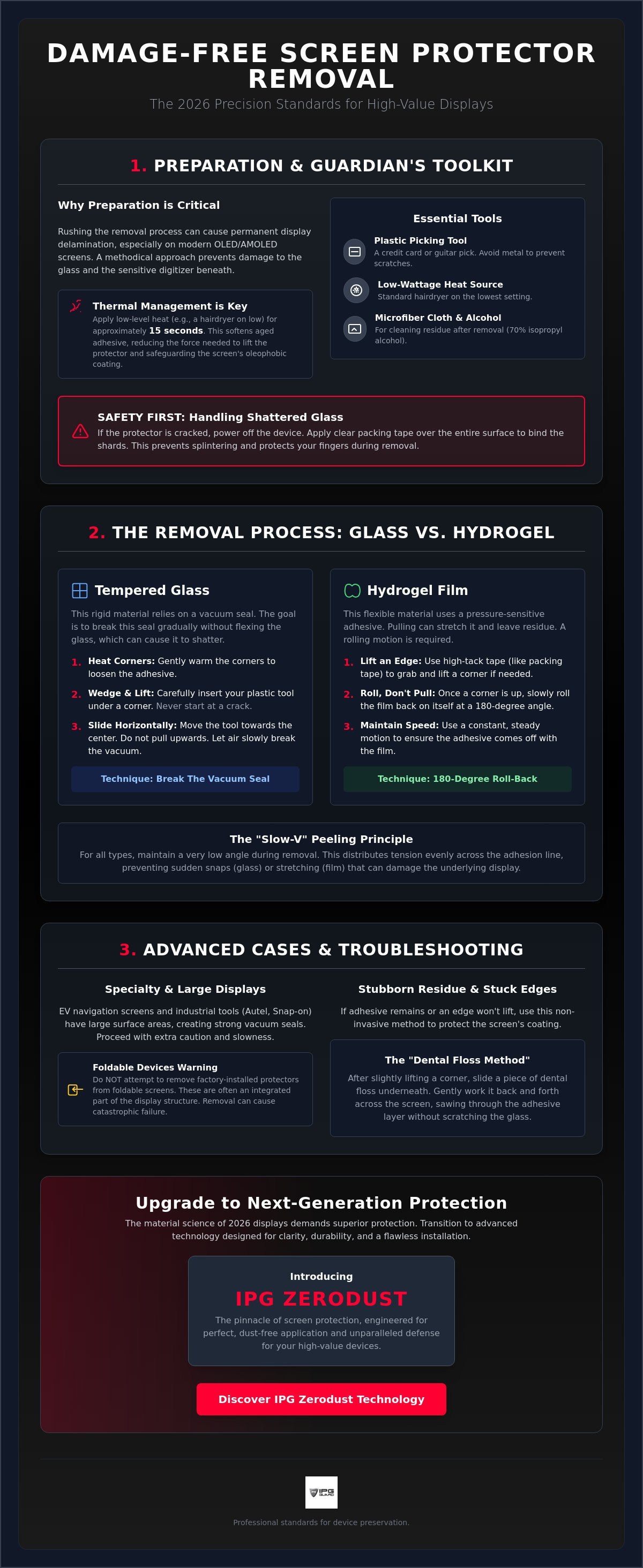
Protecting your high-value display requires a disciplined approach. Rushing the removal process often leads to display delamination, where the bond between the glass and the internal digitizer is compromised. This is especially critical for modern OLED and AMOLED panels found in 2026 flagship devices. To prevent this, you must prioritize preparation over speed. A successful swap starts with understanding how to remove screen protector layers without stressing the underlying hardware.
Heat is your primary ally in this procedure. Aged adhesives, especially on high-durability glass protectors, can become brittle and overly stubborn. Applying low-level heat for approximately 15 seconds using a hairdryer on its lowest setting softens the bonding agent. This reduction in adhesive viscosity allows the protector to lift away with minimal vertical tension, protecting the delicate oleophobic coating of your device.
Creating a controlled environment is equally vital. Perform the removal in a clean, well-lit space. A humid room, such as a bathroom after a shower, helps ground airborne particulates. This prevents dust from settling on the bare screen the moment the old shield is removed, ensuring a perfect foundation for your next IPG Zerodust Screen Protector.
Essential Tools for Damage-Free Removal
Professional results don't require expensive specialized kits. You likely have the necessary precision instruments in your home. Avoid using fingernails, as they lack the rigidity needed for glass and can chip easily. Instead, gather these items:
- Plastic Picking Tools: A standard credit card or a thin guitar pick provides the necessary leverage without scratching the glass.
- Heat Source: A standard hairdryer or a low-wattage heat gun.
- Sanitization Kit: Microfiber cloths and 70% isopropyl alcohol for post-removal residue management.
Safety First: Handling Shattered Glass
If your protector is already compromised, the removal process carries risks of micro-cuts and further display damage. Secure the integrity of the shattered surface before you begin. Power down the device completely to avoid any electrical interference or accidental inputs during the process.
Apply a layer of clear packing tape over the entire surface of the cracked protector. This binds the shards together, ensuring they lift as a single unit rather than splintering into your workspace. This protective measure keeps your fingertips safe and prevents small glass fragments from wedging into the bezel of your smartphone or industrial tool. If the underlying screen is also compromised, iRepairMan London provides expert repair services to restore your hardware. Steady, lateral pressure is the goal. Never pull upward with force.
The Removal Process: Glass vs. Hydrogel
Identifying your protector material is the critical first step in successful device preservation. Stiff tempered glass behaves differently than pliable hydrogel films. Glass relies on a vacuum seal; hydrogel utilizes a pressure-sensitive adhesive. Misidentifying these leads to cracked displays or stubborn residue. Mastering how to remove screen protector layers requires adapting your technique to the material's specific physical properties. Glass is rigid and prone to snapping if bent, while hydrogel is elastic and can stretch or tear if handled with improper tension.
The 'Slow-V' peeling technique is the professional standard for maintaining uniform tension. By keeping the removal angle extremely low, you prevent the material from snapping or stretching. This is especially vital for large-format tablet displays where the suction seal is significantly stronger than on a smartphone. High surface area creates a powerful vacuum. You must work slowly to allow air to migrate under the protector, breaking the seal without stressing the underlying digitizer.
Removing Tempered Glass Screen Protectors
Rigid glass requires a methodical approach to break the vacuum seal safely. Follow these specific steps:
- Step 1: Apply gentle heat to the corners. This expands the glass slightly and reduces adhesive grip.
- Step 2: Wedge your plastic card at the least-damaged corner. Never start at a crack. Starting at a compromised point increases the risk of the glass splintering during the lift.
- Step 3: Slide the card horizontally. Do not pull upward. Move the card toward the center of the display to break the vacuum seal gradually.
Lifting IPG Original Hydrogel and Film Shields
Hydrogel requires a 'roll' rather than a 'pull' technique. Pulling upward creates vertical stress that often leaves adhesive streaks on the display. If the edge is difficult to catch, use a piece of high-tack adhesive tape to lift the corner. Once the edge is free, roll the film back on itself at a 180-degree angle. Maintain a constant, steady speed to ensure the adhesive stays attached to the film rather than the screen. For those seeking a more flexible, self-healing solution, the IPG Original (Hydrogel) Screen Protector provides a superior fit for curved displays. Learning how to remove screen protector films correctly ensures your device is ready for a fresh, clean application without any lingering residue.
Removing Protectors from Specialty and Large Displays
Large-format displays found in electric vehicles and industrial environments present unique challenges that standard smartphone techniques cannot fully address. These screens have significantly more surface area, creating a much stronger vacuum seal. They are also subject to extreme environmental stressors. UV exposure and intense cabin heat cycles can alter the chemical composition of adhesives over time. Learning how to remove screen protector layers from these high-value panels requires a specialized approach to avoid damaging factory coatings or delicate interior trim.
Temperature control is your most critical variable in this process. In automotive interiors, cabin temperatures can fluctuate wildly. If the environment is too cold, the protector becomes brittle and prone to shattering. If it is too hot, the adhesive may liquefy and leave a stubborn film. Aim for a stable 70°F (21°C) environment. This temperature ensures the bonding agent remains pliable enough to release without losing its structural integrity. It allows for a clean lift that preserves the screen's original clarity.
Automotive Screens: Tesla, BYD, and Beyond
Navigation displays in vehicles like the Tesla Model 3 or the BYD Seal are central to the driving experience. These screens often feature specialized anti-glare or anti-reflective coatings. These factory finishes are sensitive to high vertical tension. Protect the surrounding dashboard trim by applying low-tack painter's tape to the edges of the console. This prevents your plastic removal tool from marring the leather or soft-touch plastics. Start the removal from the top corner and work downward. This allows gravity to assist the process, reducing the amount of force needed to maintain a steady peel.
Industrial and Marine Gear
Industrial diagnostic tools operate in harsh conditions. Contaminants like machine oil, hydraulic fluid, or grit often accumulate around the edges of Snap on screen protectors or Autel diagnostic systems. Before you begin, clean the perimeter of the tool with a damp microfiber cloth. This prevents abrasive particles from being dragged across the display during the removal process. Use a thin plastic wedge to lift the edge, ensuring you don't apply pressure to the internal digitizer.
Marine electronics, such as fishfinders or Lowrance units, require meticulous care to maintain their waterproof integrity. These displays are often recessed into a housing. Avoid using liquid adhesive removers that could seep into the bezel and compromise the internal gaskets. Stick to the "Slow-V" technique. Use steady, lateral pressure to break the seal. This methodical pace ensures no moisture or residue enters the housing, keeping your marine gear ready for the next expedition. Knowing how to remove screen protector shields from ruggedized gear is about maintaining the tool's longevity as much as its visibility.
Troubleshooting Stubborn Residue and Stuck Edges
Sometimes, even the most meticulous preparation meets resistance. Aged adhesives or low-quality materials can create a bond that defies standard lifting techniques. If your protector refuses to budge or snaps midway through the process, you must shift your strategy immediately. Brute force will only result in a damaged digitizer. Understanding how to remove screen protector remnants safely is a skill of patience and precision. Your device deserves a clean slate, and forcing a stuck edge is the fastest way to compromise its integrity.
Distinguishing between adhesive residue and actual screen damage is vital for your peace of mind. Residue often appears as a cloudy "ghosting" pattern or a tacky ring around the perimeter where dust has collected over time. Screen damage, such as delamination or scratches, will be felt with a fingernail or seen as light refraction issues within the glass itself. If the protector breaks during your attempt, ensure every fragment is secured with tape as discussed in our preparation guide. Your goal is a perfectly smooth, naked display ready for its next layer of security.
For users who are uncomfortable performing these steps themselves or are dealing with a severely cracked screen, professional technicians at SIMSIM Repairs can provide the expert care needed to restore your device's display safely.
The Dental Floss Technique
When a plastic card cannot find purchase under a stuck edge, dental floss acts as a micro-saw to break the bond. This method is highly effective for stubborn tempered glass that has been in place for years. It provides a non-invasive way to master how to remove screen protector layers that feel fused to the display.
- Selection: Use unwaxed dental floss. Waxed versions can leave additional deposits on the screen that are difficult to clear.
- Entry: Gently slide the floss under a lifted corner. Use a steady, back-and-forth sawing motion to work the thread between the display and the protector.
- Execution: Maintain a flat plane. Keep the floss parallel to the screen at all times. This creates a shearing force that breaks the adhesive bond without putting vertical stress on the glass.
Chemical Cleaning and Aftercare
Once the shield is gone, focus on the residual adhesive. Never pour liquid cleaners directly onto your device. Capillary action can draw fluids into the speaker grilles or under the bezel, causing internal corrosion. Apply 70% isopropyl alcohol to a clean microfiber cloth first. Wipe in small, circular motions to dissolve the tacky remains without stripping the factory oleophobic coating.
Buffing out the ghosting patterns prepares the surface for the next step. A pristine surface is the only way to learn how to put a screen guard on correctly without trapped bubbles or debris. After the alcohol evaporates, use a dry section of the cloth to polish the glass back to its original luster. If you're ready to restore your device's security with a professional fit, explore the IPG Zerodust Screen Protector for a seamless, residue-free application.
Upgrading to Next-Generation Screen Protection
Next-generation displays in 2026 utilize advanced material science that demands more than generic shielding. Knowing how to remove screen protector layers is only half the battle; the next step is choosing a replacement that respects your hardware's integrity. Modern OLED and high-refresh-rate panels are sensitive to light filtration and touch sensitivity. Standard retail options often use low-grade adhesives that can cloud your view or leave the residue we just learned to clean. IPG Zerodust technology eliminates the frustration of trapped particles, ensuring your high-value investment remains pristine from the moment of application.
The longevity of your device depends on a proactive approach. Investing in precision-cut screen protection ensures that your next removal will be just as seamless as this one. Custom-fit shields prevent dust accumulation at the edges, which is the primary cause of adhesive failure. This emphasis on precision and environmental durability is a value shared by glass specialists like Window Galaxy USA, who provide high-quality window replacement solutions. Once you understand how to remove screen protector residue and prepare the glass, the upgrade process becomes effortless. By matching the protector to your specific environment, you provide a tailored layer of security that standard "one-size-fits-all" products cannot match.
Choosing the Right Replacement
Evaluate your daily usage to find the optimal balance between security and performance. For high-impact environments, 9h hardness tempered glass offers the ultimate defense against structural failure. If you are a mobile professional, the debate between privacy screen protector vs matte comes down to your need for data security versus glare reduction. Even specialized aquatic environments require precision, where anti glare fish finder screen protectors maintain visibility under direct sunlight.
The IPG Advantage: Precision and Preservation
Our brand persona is built on a guardian mindset. We don't just sell accessories; we provide a stewardship plan for your technology. Investing in protection for screen longevity means choosing materials that won't degrade or damage your display over time. A custom-fit protector avoids the overhang that leads to peeling, keeping your device secure and your user experience fluid.
- Verify the screen is 100% free of micro-dust using a bright lateral light source.
- Align the protector using the camera lens or speaker grille as a fixed anchor point.
- Apply pressure from the center outward to displace air evenly and activate the bond.
- Seal the edges with a firm, sweeping motion to ensure no moisture can penetrate the seal.
Secure Your Display's Future
Preserving your technology requires a commitment to precision. By mastering the balance of thermal management and graduated tension, you've ensured your device remains free from delamination and unsightly residue. Whether you applied the 'Slow-V' technique to a smartphone or navigated the complex vacuum seals of a large-format EV navigation screen, your methodical approach has protected the integrity of your high-value hardware. You now understand exactly how to remove screen protector shields without risking the underlying display.
Now that your screen is pristine, it's time to apply a superior layer of defense. We provide specialized solutions for Tesla, Snap-on, and Garmin displays, ensuring every tool in your arsenal is guarded against the elements. From advanced IPG Original Hydrogel to 9H Tempered Glass, our precision-cut protective films are available with global shipping to meet your needs wherever you operate. Upgrade your display with precision-engineered IPG protection and experience the confidence of total hardware security. Your investment is safe in our hands.
Frequently Asked Questions
Can I reuse a screen protector once I have removed it?
No, you cannot effectively reuse a screen protector once it has been removed. The adhesive layer is engineered for a single permanent bond and loses its structural integrity and optical clarity upon exposure to air. Reapplying a used shield often results in permanent bubbling and trapped contaminants that compromise your display's visual performance and touch sensitivity.
Will removing a tempered glass protector damage my phone screen?
Removing a tempered glass protector will not damage your original display if you follow precision protocols. Use plastic tools and avoid vertical force to prevent screen delamination or scratches. Your device's factory finish is resilient, but it requires a gentle, lateral peeling motion to ensure the vacuum seal breaks safely without stressing the glass digitizer.
How do I remove a screen protector that is shattered into tiny pieces?
Use clear packing tape to secure a shattered protector before attempting removal. Cover the entire surface area with tape to bind the loose glass shards into a single, cohesive unit. This prevents micro-cuts to your fingers and stops small fragments from falling into the device's bezel. Once secured, lift the edge as a single piece using a plastic wedge.
What is the best way to remove sticky residue from the screen?
The most effective way to remove sticky residue is using 70% isopropyl alcohol applied to a clean microfiber cloth. Never pour liquid directly onto the display. Use light, circular motions to dissolve the adhesive bond. This method safely clears the screen while preserving the original oleophobic coating, preparing the surface for a fresh, clean application.
Is it safe to use a hairdryer to help remove the protector?
Yes, a hairdryer is safe and highly recommended when used on its lowest heat setting. Apply heat for approximately 15 seconds to soften aged or brittle adhesives. This makes the removal process significantly easier and reduces the risk of the protector snapping. Always keep the heat source moving to avoid concentrated thermal stress on the internal components.
Can I use a credit card to lift the edge of the protector?
A plastic credit card is an excellent tool for lifting the edge of a protector safely. Its rigid yet non-abrasive material provides the necessary leverage without scratching the glass. Wedge the corner of the card under the least-damaged area of the shield. This is a critical step in how to remove screen protector layers without using metallic objects that could cause permanent damage.
How do I remove a screen protector from a car navigation screen without scratching it?
Maintain a stable cabin temperature of 70°F (21°C) when removing protectors from car navigation screens. Use a plastic wedge and protect the surrounding dashboard trim with low-tack painter's tape. These large displays have stronger vacuum seals, so work slowly to allow air to migrate under the film. This prevents stress on the sensitive anti-glare factory coating.
What should I do if my screen protector is stuck and won't budge?
Utilize the dental floss method if a protector is stuck and refuses to lift with a plastic card. Slide a piece of unwaxed floss under a corner and use a steady, horizontal sawing motion. This shearing force breaks the adhesive bond without putting vertical pressure on the screen. It is a proven technique for how to remove screen protector remnants that have fused to the display over time.