

A flawed installation doesn’t always mean the protector is ruined. To fix problems with Whitestone Dome installation, first identify whether you’re dealing with dust, bubbles, misalignment, or an adhesive issue, then review the written and video instructions and follow each step carefully. Once it’s installed, leave it untouched for as long as possible, ideally 24 hours. A visible flaw can be frustrating when your goal is to keep a valuable phone’s screen protected, but the right next step depends on what caused it.
It’s reasonable to wonder whether a small bubble will settle, whether a misplaced protector can be corrected, or whether you should start over. This guide explains practical ways to handle common installation issues, how to judge when replacing the protector makes more sense, and what alternatives to consider if you’d rather choose a different screen-protection approach. You’ll also learn why moisture near the adhesive interface can matter, so you can make a calmer, more informed decision before attempting another installation.
Key Takeaways
- Identify whether the flaw is dust, a bubble, misalignment, or poor adhesion before deciding what to do next.
- Assess whether the issue affects the protector’s fit or coverage, not just its appearance, when deciding whether to replace it.
- Learn what can contribute to adhesive problems, including moisture near the adhesive interface.
- Compare your options for addressing a failed installation with choosing a different screen-protection approach.
- For camera-lens protection, My IPG offers an IPG Phone camera lens protector, a separate option from a screen protector.
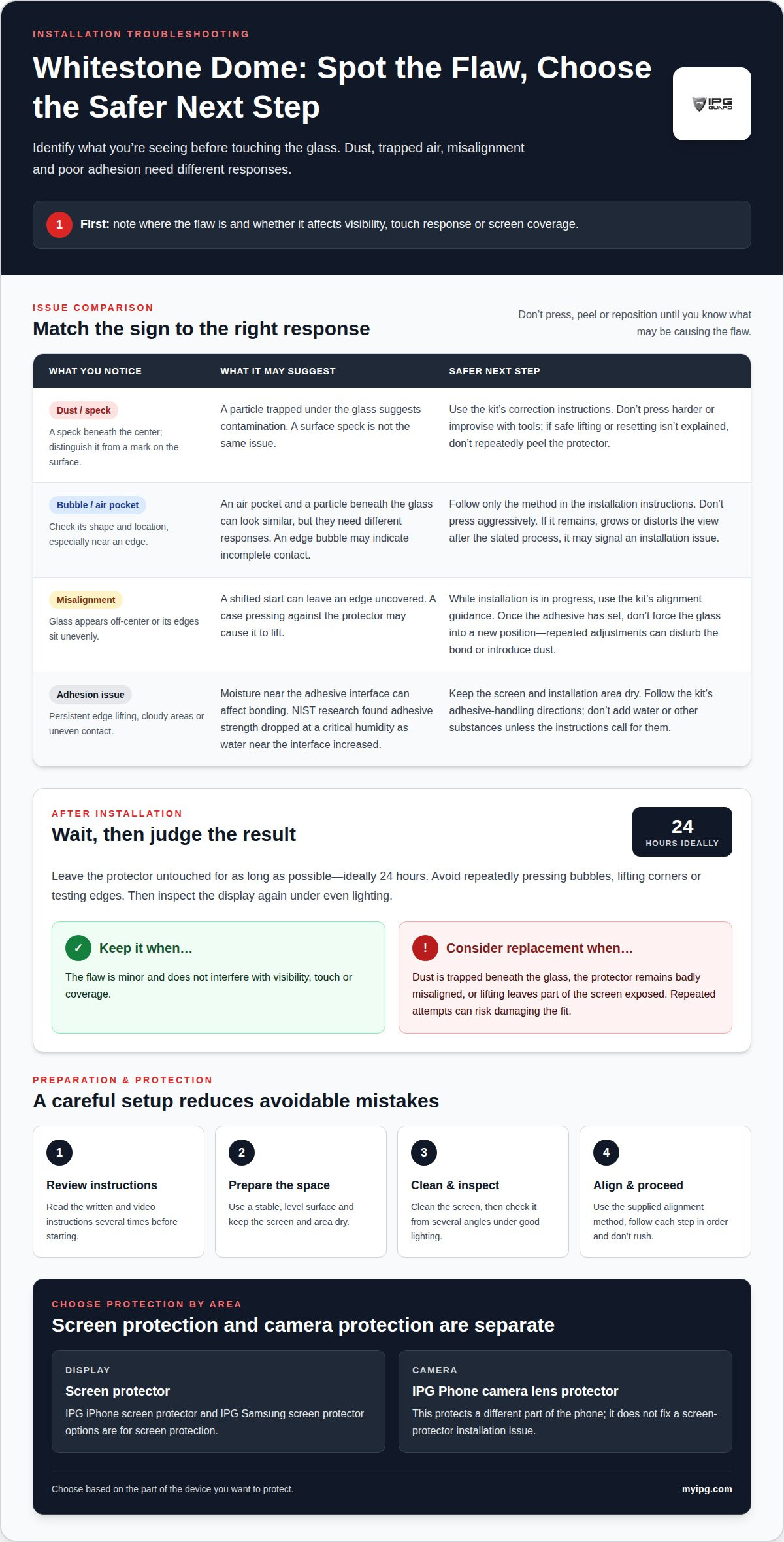
Problems with Whitestone Dome installation
Identify the defect before touching the glass. Dust, trapped air, uneven adhesion, and misalignment can look similar at first. A speck beneath the center suggests contamination, while a bubble near an edge may indicate incomplete contact. Note where the flaw is and whether it affects touch response or visibility. This helps you avoid making a minor cosmetic issue worse with an unnecessary adjustment.
Preparation and sequence matter. Review the written instructions and video instructions several times before beginning, then follow every step in order. Keep the phone stable on a level surface, and use the supplied alignment method rather than estimating placement by eye. A slight shift at the start can leave an edge uncovered or create an uneven border. Don’t rush from one step to the next; pause and compare the protector’s position with the display before proceeding.
Dust trapped under the glass is different from a speck on its surface. Clean the phone screen before installation, then inspect it from several angles under good lighting. If you spot lint after positioning, don’t press harder in the hope that it will disappear. Pressure may make the mark more visible or affect how the protector sits. Follow the kit’s instructions for corrections. If they don’t explain how to lift or reset the protector safely, don’t improvise with tools or peel it repeatedly.
For bubbles, check their shape and location first. An air pocket and a particle trapped beneath the glass require different responses. Don’t assume every bubble will vanish, and don’t press aggressively across the display. Use only the method described in the installation instructions. If a bubble remains after following the stated process, grows, or distorts the view, it may indicate an installation issue rather than a surface mark. Compare it with the surrounding glass before applying any further pressure.
Assess misalignment separately. Check whether the glass is centered over the active display and its edges sit evenly. A protector that overlaps a case edge may lift when the case presses against it. If installation is still in progress, follow the kit’s alignment guidance. Once the adhesive has set, don’t force the glass into a new position. Repeated adjustments can introduce dust or disturb the bond, turning a small shift into a larger defect.
Adhesion problems may appear as persistent edge lifting, cloudy areas, or sections that don’t contact the screen evenly. Moisture near an adhesive interface can affect bonding: research by the National Institute of Standards and Technology found that adhesive strength dropped at a critical humidity as the amount of water near the interface increased. Keep the screen and installation area dry, and follow the kit’s directions for handling the adhesive. Don’t add water or other substances unless the instructions call for them.
After installation, leave the protector alone for as long as possible, ideally 24 hours. Avoid repeatedly pressing bubbles, lifting corners, or testing the edges during that time. Then inspect the display again under even lighting. Keep the protector if the flaw is minor and doesn’t interfere with visibility, touch, or coverage. Consider replacement if dust is trapped beneath the glass, the protector remains badly misaligned, or lifting leaves part of the screen exposed. A replacement is more sensible than repeated attempts that risk damaging the fit.
My IPG: IPG Phone camera lens protector
My IPG’s IPG Phone camera lens protector protects a different part of your phone than a display protector. If a Whitestone Dome installation has made you reconsider your device protection, think about the screen and camera lens separately. My IPG also offers IPG iPhone screen protector and IPG Samsung screen protector options for screen protection. Choose based on the part of the device you want to protect, rather than expecting a camera lens protector to fix a screen installation issue. Explore the IPG Phone camera lens protector for camera-focused protection. Contact My IPG or visit myipg.com to learn more.
Make Your Next Protection Choice With Confidence
If problems with Whitestone Dome installation have made you cautious, use the experience to plan your next screen-protection decision. Prepare a clean, well-lit workspace, keep the instructions nearby, and take your time. Before starting, consider which device surface you want to protect and whether your setup meets that need. A deliberate choice can help you protect the technology you rely on without rushing into a replacement you may regret.
My IPG offers screen and camera protection options for iPhone and Samsung devices. Choose based on the area you want to safeguard, then take time to prepare before installation. If you’d like help exploring your options, contact My IPG for help. A careful next step can make protecting your device feel straightforward again.