

The right Yamaha R1 instrument panel protector depends on the bike’s instrument-panel version, so match the part number to the specific model year before ordering. A protector that doesn’t fit the dash correctly can’t provide a precise fit.
It’s easy to assume that the R1 name alone confirms compatibility. It doesn’t: model-year fitment and the panel design are key details to compare. This guide explains how to identify the relevant part number and assess which Yamaha R1 years the protector fits.
You’ll also learn what to look for in the fitment details, how the protector is installed, and which practical points matter when ordering internationally. That way, you can make a more informed choice and protect the instrument panel without relying on a model-name match alone.
Key Takeaways
- Match the protector’s part number to your R1’s model year and instrument-panel design before ordering.
- Look for the key construction and installation details: a replaceable clear acrylic screen, 3 mm thick, with push-fit installation and no fixings or adhesives.
- Assess how the protector sits over the display, and consider visibility, touchscreen use, bubbles, glare, and heat when reviewing its fit.
- If ordering internationally, factor in any import fees charged by your country when the package is imported and delivered.
- Review the return terms, including the seller’s 30-day return period from the date the item is received.
Yamaha model-year fitment
Match the protector to the instrument panel fitted to your Yamaha R1, not just the name on the fairing. Model-year fitment should be stated as a clear year range alongside the protector’s part number. Treat those details as a pair: the number identifies the part, while the year range tells you which motorcycles it is designed to fit. A listing that names only “R1” does not give enough detail to make a precise model-year match.
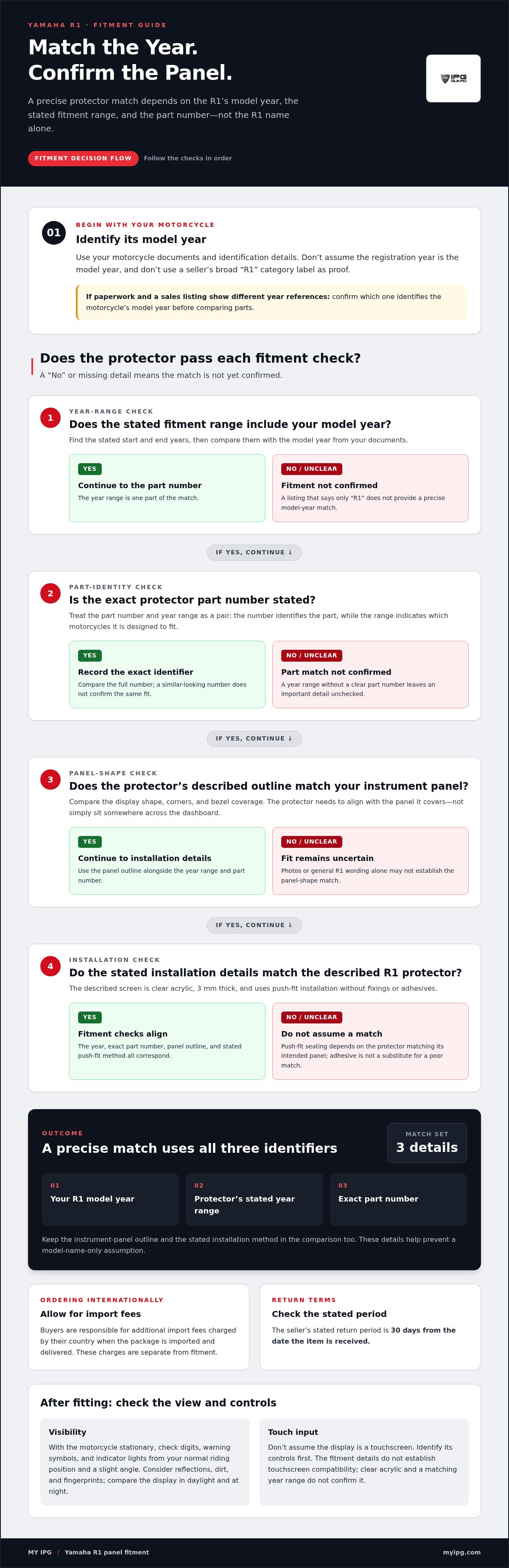
Start with your motorcycle’s model year. Use its documents and identification details to establish the year, then compare it with the protector’s stated fitment range. Don’t assume the registration year is the model year. If your paperwork and sales listing show different year references, confirm which one identifies the motorcycle’s model year before choosing a part. This reduces the risk of ordering based on the wrong year.
Next, compare the instrument panel itself. Look at the display outline, corners, and surrounding bezel. A protector needs to align with the panel it covers, rather than simply fit somewhere across the dashboard. Check whether the product details name your R1 year range and identify the matching part number. If you’re comparing two listings, compare their stated year ranges and panel shape descriptions, not just their photos or broad R1 wording.
Use a fitment checklist
Before ordering, work through these checks in sequence. Keep the model-year details and part number handy while comparing product information.
- Identify the model year. Read the year from your motorcycle documents, not from a seller’s general R1 category label.
- Read the fitment range. Find the stated start and end years, then confirm your model year falls within that range.
- Match the part number. Record the exact identifier shown for the protector. Don’t assume a similar-looking number means the same fit.
- Compare the panel outline. Check the display shape and bezel coverage against your motorcycle’s instrument panel.
- Review installation details. The described R1 protector uses push-fit installation, without fixings or adhesives.
That final detail matters because the panel’s shape and the protector’s fit work together. The described screen is clear acrylic and 3 mm thick. A push-fit design relies on the protector seating correctly against the intended panel. It isn’t the same installation method as an adhesive film, so don’t use film-installation steps or assume adhesive will correct a poor match. Check the product’s stated fitment and installation instructions for the part you’re considering.
When a model-year range covers your R1, still compare the part number before checkout. A year range helps identify compatibility, while the number helps distinguish the specific protector from other parts. Keep a note of both details with your motorcycle’s model-year information. This gives you a practical reference if you compare listings later, replace a damaged protector, or need to confirm which part was fitted.
For international orders, include delivery and import considerations in your decision. Buyers are responsible for additional import fees charged by their country when the package is imported and delivered. That charge is separate from fitment, but it can affect the total cost of receiving the part. Also review the seller’s return terms before ordering. The stated return period is 30 days from the date the item is received.
A reliable fitment decision comes from matching three details: your R1 model year, the protector’s stated year range, and its part number. Add the panel outline and push-fit installation method to your comparison. These checks help you avoid relying on an R1 name alone and keep the instrument panel’s dimensions central to the choice.
Does installing a Yamaha R1 instrument panel protector affect visibility or touchscreen operation?
A clear protector adds a layer between your eyes and the Yamaha R1 display. Its effect depends on the material, surface condition, alignment, and light around the cockpit. The described R1 screen is clear acrylic and 3 mm thick. Clear construction supports viewing the display, but it doesn’t by itself establish that every rider will see identical contrast in every lighting condition.
Check the display before and after fitting. With the motorcycle stationary, note whether digits, warning symbols, and indicator lights are easy to distinguish from your normal riding position. Then check from a slight angle, as sunlight coming from the side may affect visibility. Keep the instrument panel and protector clean during the comparison, since dust and fingerprints can make a clear surface look hazy.
Light can change the viewing experience. A bright reflection on the protector may compete with information on the display, while dirt can reduce clarity. At night, look for reflections from nearby lights and confirm the display remains legible. These checks focus on your actual R1 cockpit, rather than assuming one protector behaves identically in every environment. If the view changes after fitting, inspect the surface and seating before deciding the protector is optically unsuitable.
Check touch input separately
Don’t assume that an R1 instrument panel uses touchscreen controls. The model name alone doesn’t establish the controls fitted to a particular motorcycle. Identify how your display operates first. If it uses buttons, test each button directly, without pressing the protector as though it were a touchscreen. The described protector uses push-fit installation, not adhesive application, so its placement should follow the panel’s intended shape.
If your display has touch input, a physical acrylic cover adds material over the touch surface, which may affect how your finger reaches it, depending on the design and fit. The fitment details provided don’t establish touchscreen compatibility. Clear material or a matching year range doesn’t guarantee touch response. Before riding, test every function while stationary and confirm that each intended input registers as expected.
Use this sequence after installation:
- Inspect the entire display through the protector for clear digits and symbols.
- View the panel straight on, then from your usual seated angle.
- Check visibility under daylight and after dark, while the motorcycle remains stationary.
- Operate the panel’s physical controls without forcing or bending the protector.
- If the panel has touch input, test each intended function directly.
- Look around the edges for uneven seating that could obstruct the display.
A 3 mm acrylic screen is a solid protective layer, not an invisible one. Its thickness makes accurate seating important: a protector that sits unevenly can alter the view near an edge or interfere with access to nearby controls. The push-fit design avoids fixings and adhesives, but correct alignment still matters. Follow the fitting instructions for the specific part, and don’t force the screen into place to compensate for a mismatch.
Record what you observe before making adjustments. For example, note whether a symbol looks dim only at an angle or touch input fails across the display. These are different symptoms: reflections relate to viewing conditions, while missed input concerns the interaction between the screen and control surface. Keep the motorcycle parked during checks, and confirm visibility and operation before riding. Careful testing helps preserve readable information and reliable access to controls.
What are the risks of bubbles, glare, heat damage, or poor fit with R1 dashboard protectors?
Each issue has a different cause, so inspect the protector before riding. The described R1 screen is clear acrylic, 3 mm thick, and push-fit. It uses no fixings or adhesives. That distinction matters: adhesive-film bubbles form beneath a bonded layer, while a rigid push-fit screen can show dust, gaps, or reflections. Identify the actual defect before trying to correct it.
Start with the edges. A protector that doesn’t sit evenly may leave a visible gap or shift on the instrument panel, exposing part of the display. Don’t press harder to force a mismatched screen into place. Follow the fitting instructions to remove it, then compare its outline with the panel. A correctly matched push-fit screen should seat as designed, without adhesive or improvised fasteners.
“Bubbles” can describe different problems. A small speck beneath a clear surface may be trapped dust; a bright crescent near an edge may be a gap or reflection. With a non-adhesive, push-fit protector, don’t treat either as an adhesive bubble and try to smooth it out. Inspect the screen and panel under steady light. If you see debris, follow the product’s cleaning and refitting instructions rather than scraping the acrylic or forcing the fit.
Glare depends on light angle and the surfaces facing the rider. A clear screen can still reflect bright daylight or nearby lights. Check the R1 display from the normal seated position, then shift your viewing angle slightly. Repeat in daylight and after dark while stationary. If a reflection hides a warning symbol or reading, check for fingerprints, dust, and uneven seating first. A clean surface and accurate alignment help distinguish surface glare from a poor fit.
Consider heat and material stress
The 3 mm acrylic construction identifies the screen material and thickness, but doesn’t establish a temperature limit. Heat exposure can vary with sunlight, parking position, and the motorcycle’s surroundings. Don’t leave the R1 facing intense direct sun for extended periods as a routine storage choice. After hot conditions, inspect the acrylic for visible distortion, loosened seating, or changes around its edges. Follow the product’s care instructions for cleaning and storage.
Use this inspection sequence before riding:
- Look across the acrylic for dust, scratches, haze, or visible distortion.
- Check each edge for gaps, uneven seating, or exposed display areas.
- View the panel from the normal riding position for glare or blocked information.
- Confirm the protector stays seated without adhesive or added fixings.
- Test the display and its controls while the motorcycle is stationary.
These checks help distinguish installation problems from lighting effects. A reflection that moves when you change position points to the light angle; a persistent edge gap suggests a seating or fit issue. Distortion that remains visible from different angles calls for closer inspection of the acrylic. Don’t ride until the display is readable and the protector sits securely.
Never solve poor fit with extra adhesive, pressure, or cutting. The described design is push-fit, and modifying the screen can change its seating. A part that doesn’t match the instrument-panel outline needs the correct fitment, not a workaround. Keep the R1 panel protected by following the specific installation instructions and addressing visible defects before use.
My IPG: IPG Phone camera lens protector
My IPG’s IPG Phone camera lens protector is a next step for protecting another device you rely on every day. The R1 dashboard and a phone camera need different protector fitments, so choose protection made for the device and component you want to cover. If your priority is your phone’s camera lens, this offering keeps the focus on that part. My IPG also offers iPhone and Samsung screen protectors for readers looking to protect their phone displays.
Keep the same careful approach: identify your device, select the relevant protector, and follow its fitment details. For questions or to explore the available options, visit My IPG online.
Make your next protection choice with care
Keep your Yamaha R1 instrument panel protector decision tied to the motorcycle’s exact panel, and keep that same device-first approach for your everyday technology. A phone camera and a phone display need different protection, so choose according to the surface you want to safeguard. My IPG offers an IPG Phone camera lens protector, an IPG iPhone screen protector, and an IPG Samsung screen protector.
If you’re considering protection for a phone, share the device details and the surface you want to protect. Contact My IPG about fitment and explore the options that match your needs.
A precise match is a practical first step toward protecting the devices you rely on. Choose carefully and protect what matters.
Frequently Asked Questions
What instrument panel protectors fit the Yamaha YZF-R1 by model year?
Choose a protector whose stated fitment range includes your YZF-R1’s model year. There isn’t one universal year range that can be applied to every protector listing, so compare the product’s part number and fitment description together. For example, a listing that covers your year range is a better match than one identified only as “R1.” Also compare the panel outline, since year alone doesn’t establish that two displays share the same shape.
How do I identify the correct Yamaha R1 instrument panel protector for my bike's year and trim?
Use your motorcycle’s model-year documents, then match the year and trim to the protector’s stated fitment and part number. Check the instrument-panel outline and surrounding bezel on your bike, especially if it has a replacement display or modified cockpit. Compare the protector’s edges with the visible panel rather than relying on the model name alone. Keep the part number with your bike’s details for future reference.
How do I install a screen protector on a Yamaha R1 instrument panel?
Align the clear acrylic screen with the instrument panel’s intended shape and seat it using the push-fit installation. No fixings or adhesives are required. Follow the fitting instructions for the specific part, and don’t force it into place.