

Screen size alone can point you to the wrong Lowrance screen protector. Two displays with the same diagonal measurement may have different shapes or layouts, so start with your fishfinder’s exact model. Fit matters, and so does how easily you can read the screen in the conditions where you use it.
This guide explains how to identify your Lowrance model, compare protector materials and finishes, and review application details before choosing. My IPG lists a Lowrance Eagle 4-inch Elite HDS Pro fishfinder screen protector, offering a model-named option to compare with your device. Use the product title and your fishfinder’s full designation to narrow your search, then weigh visibility and protection priorities.
Key Takeaways
- Use your fishfinder’s full model designation and display configuration to narrow compatibility, rather than relying on screen size alone.
- Choose a Lowrance screen protector finish based on how you view your display, including whether reflections in bright outdoor conditions are a concern.
- Compare materials, stated features, fit details, and application instructions before deciding between options.
- Use the checklist to note your device model, display size, preferred finish, material details, and application requirements before ordering.
- Explore model-specific marine display protection, including IPG’s listed Lowrance Eagle 4-inch Elite HDS Pro fishfinder screen protector.
Why a Lowrance Screen Protector Starts with Exact Model Compatibility
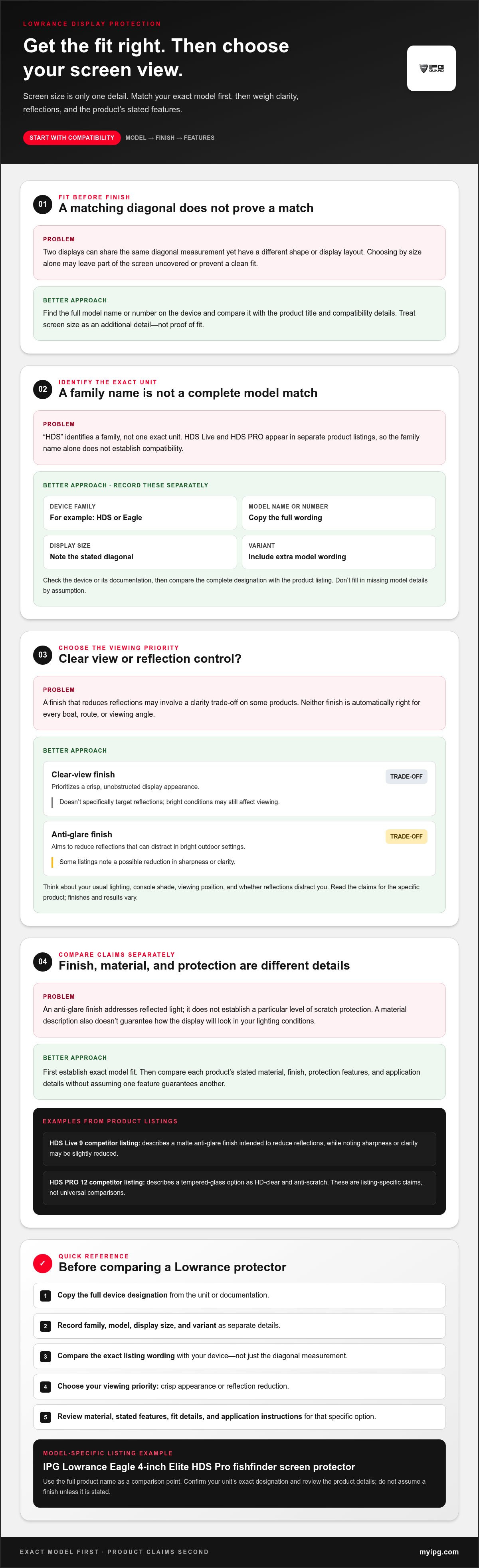
A matching diagonal measurement is useful, but it doesn’t prove that a protector is cut for your fishfinder. Lowrance families and similar screen sizes can make different units look interchangeable. A poor match may leave part of the display uncovered or prevent a clean fit. Start with the device’s full model designation, not the ruler.
Identify the exact model before comparing finishes or materials. Find the full model name or number on the device, then compare it with the product title and compatibility details. A general overview of screen-protector materials can explain broad category differences, but material alone won’t tell you whether a protector fits your Lowrance unit.
How to identify your Lowrance fishfinder or chartplotter
Look for the model name or number printed on the device, and compare it with the product documentation if available. Copy the wording as shown. The device family, specific model, screen size, and variant each provide different information, so record them separately.
For example, “HDS” identifies a family, not one exact unit. HDS Live and HDS PRO appear in separate product listings, so seeing HDS on your device isn’t enough to establish compatibility. Use the complete designation to distinguish the model, then note the screen size and any variant details shown in the documentation.
Why screen size alone is not a compatibility check
A diagonal measurement describes display size, not the full outline or layout. Two screens with the same diagonal may differ in shape or display configuration. Don’t assume that a protector advertised for one screen size fits every Lowrance unit with that measurement.
Compare the product title with the full designation on your device. Check that the family and model wording align, and treat screen size as an additional detail rather than proof of fit. If a title names only a family or size, don’t fill in missing model information by assumption.
IPG lists an IPG Lowrance Eagle 4-inch Elite HDS Pro fishfinder screen protector. Use its full product name as a comparison point, especially if your unit’s family name or variant resembles another model.
Before comparing finish and material, make a short identification note:
- Device family: for example, HDS or Eagle.
- Model name or number: copy it from the unit or documentation.
- Display size: record the stated diagonal measurement.
- Variant: include any additional model wording shown on the device or in its documentation.
Keep these details together while shopping. They make it easier to compare listings accurately and avoid choosing by screen size alone.
Clear or Anti-Glare: Choose the Lowrance Screen View You Prefer
A protector’s finish affects how the display looks in your usual conditions. A clear finish prioritizes an unobstructed view, while an anti-glare finish is intended to reduce reflections. Neither is automatically right for every boat, route, or viewing angle. Consider the light you typically face, how often reflections distract you, and how important a crisp-looking display is to you.
Reflection reduction and scratch protection are separate considerations. An anti-glare finish addresses reflected light; it doesn’t establish a particular level of scratch protection. Compare each product’s stated features rather than assuming one finish provides every benefit.
When glare reduction may matter on the water
Think about where and when you read your display. Is it usually exposed to bright, open conditions, or shaded by the console? Do reflections make information harder to see from your normal position? These everyday viewing details can help you decide whether reflection control should be a priority.
For example, a competitor listing for an HDS Live 9 describes a matte anti-glare finish intended to reduce reflections, while noting that sharpness or clarity may be slightly reduced. That trade-off applies to that listing, not necessarily to every anti-glare protector. Finishes and results vary, so read the claims for the specific option you’re considering.
| Priority | Potential benefit | Trade-off to consider |
|---|---|---|
| Clear-view finish | Prioritizes a crisp, unobstructed display appearance. | Doesn’t specifically target reflections; bright conditions may still affect viewing. |
| Anti-glare finish | Aims to reduce reflections that can distract in bright outdoor settings. | Some listings note a possible reduction in sharpness or clarity. |
How to weigh display clarity against reflection control
Rank your priorities based on typical use. If preserving the display’s clear appearance matters most, compare clear-view descriptions. If reflections regularly compete with the screen, consider anti-glare options and check for any stated clarity trade-offs. For use in varied conditions, decide which compromise would bother you less during a typical trip.
Keep the finish decision separate from compatibility and material. First, establish that a product is intended for your exact Lowrance model. Then compare its stated material and finish. A finish label doesn’t establish model fit, and a material description doesn’t guarantee how the display will look in your lighting conditions.
A competitor’s HDS PRO 12 listing, for instance, describes its tempered-glass option as HD-clear and anti-scratch. Those are claims from that listing, not a universal comparison between all tempered glass and film protectors. Read the product-specific wording, and don’t assume the listed IPG Lowrance protector has a clear or anti-glare finish unless its product details say so.
Once you’ve identified your preferred viewing priority, compare it with your model and display details in model-specific marine-device screen protectors. That keeps the finish decision grounded in your viewing needs without losing sight of fit.
Compare Lowrance Screen Protector Materials, Fit, and Application
Compare four details in each listing: device compatibility, material, finish, and application method. A prominent feature such as “HD-clear” or “anti-scratch” shouldn’t distract from the rest. A Lowrance screen protector still needs to match your model, and you should understand its application instructions before choosing it.
What to compare in a product listing
Start with the complete supported model name, not just “Lowrance” or a screen measurement. Then look for the material and finish stated in that listing. If either detail is missing, don’t infer it from a product photo or a similar protector. Read the application instructions before buying, since installation methods can differ between protector types.
Compare like with like. A model name addresses fit, a material description identifies what the protector is made from, and a finish label describes a viewing characteristic. Record those details separately so one appealing claim doesn’t distract from an unclear compatibility match or application process.
How to interpret material and performance claims
Tempered glass is the material named in a competitor listing for an HDS PRO 12 protector. That listing also calls its product HD-clear and anti-scratch. Another competitor describes its HDS Live 9 option as Graph Glass with a matte, anti-glare finish. These are examples of claims made for specific listings, not features to assume across all products or models.
| Competitor listing example | Stated material | Stated features |
|---|---|---|
| HDS PRO 12 protector | Tempered glass | HD-clear and anti-scratch |
| HDS Live 9 protector | Graph Glass | Matte, anti-glare finish |
“Anti-glare” and “HD-clear” aren’t interchangeable promises. One describes a finish intended to address reflections; the other is a clarity claim. Neither phrase alone tells you whether the protector fits your unit, what it’s made from, or how to apply it. Check each detail in the product’s own description.
Keep protection claims specific, too. A scratch-related claim concerns scratches; it doesn’t establish impact protection or mean the protector is waterproof or dustproof. Look for clearly stated features and limits, and don’t extend a claim beyond what the listing says.
IPG lists a Lowrance Eagle 4-inch Elite HDS Pro fishfinder screen protector. Use the full product name as a comparison point, and rely on its product details for material, finish, and application information rather than assuming specifications from another listing apply. You can also browse IPG marine-device screen protectors to compare model-named marine options.
Use This Lowrance Screen Protector Buying Checklist Before Ordering
A quick review can help prevent a promising listing from turning out to be the wrong match. Keep your device details in front of you as you compare options. Work through each check, and pause if the product title or description doesn’t line up with what you’ve recorded.
Five checks to complete before adding a protector to your cart
- Record the complete device designation. Copy the model name or number from your Lowrance unit or its documentation. Include the family and any variant wording, rather than noting only “HDS” or “Eagle.”
- Compare the title and display size. The product title should match your device’s full model designation. Check the stated display size, too, but treat it as an additional compatibility detail, not proof of fit by itself. For example, IPG’s listing names an Eagle 4-inch Elite HDS Pro fishfinder protector. Compare that wording carefully with your device details.
- Decide on your viewing priority. Before comparing clear and anti-glare listings, consider whether preserving a clear display appearance or reducing reflections matters more in your usual conditions. Base your choice on the finish claims for each individual product.
- Read the material details. Note the material only when the product page states it. Don’t transfer a material description from a different protector or model, even if the products look similar.
- Review the application instructions. Read the listed steps before ordering so you understand the stated application method and preparation instructions. Don’t assume every protector type installs the same way.
Common shopping mistakes that can lead to a poor match
“Fits Lowrance” or a matching diagonal size may sound specific, but neither phrase alone establishes that a protector is intended for your exact unit. Compare the full product title with your recorded model designation. A family name can cover multiple devices, and a similar-looking display isn’t a reliable substitute for a model match.
Keep brands and series separate. A protector listed for a Garmin marine device doesn’t establish compatibility with a Lowrance display. Likewise, don’t assume a listing for one Lowrance series fits another, or borrow a finish or material claim from a different model’s page. Each product listing describes its own option.
Use the checklist as a final filter: model, size, finish, material, and application details should each have a clear answer from the device or the individual product page. If the product title doesn’t match your full model designation, don’t let a familiar brand name or screen measurement make the decision for you.
Compare your notes with IPG marine-device screen protectors and use the product titles to guide your fit check.
Explore IPG Marine-Device Screen Protectors for a Model-Specific Fit
A marine display is an important piece of equipment, so a product named for a specific device is a more useful starting point than shopping by brand alone. My IPG marine-device listings use model details to distinguish options. Compare the product title with your fishfinder’s complete designation, then review the product details. A model name helps narrow compatibility, but similarly named units aren’t automatically interchangeable.
What to know about My IPG's listed Lowrance option
The catalog lists a My IPG Lowrance Eagle 4-inch Elite HDS Pro fishfinder screen protector. Use that full name to compare the product with your device. Refer to the product details for its material, finish, hardness rating, and installation method instead of assuming those specifications from another listing.
A product title can help narrow your search; the specific product page provides the details to compare. Keep those specifications tied to that listing. Don’t transfer claims from another marine protector just because it appears in the same collection or shares a similar display size.
My IPG offers a lifetime replacement guarantee for the life of the protector after warranty registration, as well as a 30-day money-back guarantee. These brand-level purchase policies are separate from model compatibility and product specifications. Review the applicable terms to understand what each policy covers.
Examples of model-specific choices in the marine collection
The collection also shows how product names can identify a specific brand, device family, size, or protector type. For example, My IPG Garmin listings include:
- Garmin GPSMAP 9017 17-inch ProActive, identified by the Garmin model and display size.
- Garmin ECHOMAP UHD2 5-inch 52cv Original Hydrogel, identified by its Garmin series, size, model variant, and product type.
These are Garmin-specific examples. Their detailed names help distinguish products, but they don’t indicate compatibility with Lowrance devices. Match each Lowrance screen protector to its named device, and use the product details to assess its stated specifications and application guidance.
For a Lowrance search, compare the listed Eagle name with your device details, then review the corresponding product listing. Don’t borrow features from a Garmin option or another Lowrance series.
Choose Display Protection with Confidence
Keep your Lowrance model details close, compare them with the full product name, and choose a finish based on the conditions in which you fish. A careful match helps you make an informed choice for the display you rely on, without treating another model’s specifications as your own.
My IPG brings more than 15 years in screen protection and experience serving more than 2 million customers worldwide. When comparing marine-device listings, use each product’s model-specific details to guide your decision.
Frequently Asked Questions
Can I use any screen protector on a Lowrance fishfinder?
No. A Lowrance brand label or matching screen measurement alone doesn’t establish that a protector fits your unit. Compare your complete model designation and stated display size with the exact product title and its compatibility details. A protector named for another Lowrance series or a Garmin device shouldn’t be assumed to fit. Use the product listing, not a similar-looking screen, as your reference.
How do I find my Lowrance fishfinder model number?
Check the device or its product documentation for the model name or number. Look for the full designation, not just a family label such as HDS, since a family can include different units. Write down the wording as shown, including any variant details. Before buying, compare that designation with the protector listing rather than relying on a shortened name or memory.
Does an anti-glare screen protector reduce display clarity?
It can, depending on the product’s finish and construction, so read the specific listing rather than assuming every option looks the same. Precision Sonar’s HDS Live 9 listing says its matte finish may slightly reduce sharpness or clarity. That note applies to that listing, not every anti-glare protector. Apply it to IPG’s Lowrance option only if its product details state the same effect.
Will a Lowrance screen protector affect touchscreen use?
The effect may depend on the protector’s fit, material, and the particular display. Don’t assume touchscreen response will remain unchanged because a protector is thin or designed for another fishfinder. Review the individual listing’s compatibility and application information, and follow its instructions during installation. Claims about one model or protector don’t automatically apply to another, even within the same device family.
Is tempered glass or film better for a Lowrance display?
Neither category is automatically the better choice. Compare the exact product’s material, model fit, finish, and application instructions, then weigh those details against your priorities. A competitor’s HDS PRO 12 listing, for example, describes a tempered-glass protector, but that doesn’t make glass the right choice for every Lowrance unit. Don’t assign tempered glass or film to IPG’s Lowrance option unless its listing says so.
Can a screen protector prevent scratches on a Lowrance fishfinder?
A screen protector is intended to help protect a display surface, but the result depends on the specific product and how it’s used and cared for. Look for the product’s stated scratch-related claims and care instructions, and don’t treat them as a promise against every type of damage. A scratch claim doesn’t establish protection from impact, water, or dust. Keep the device’s own care guidance in mind.
How do I choose the right Lowrance screen protector for bright conditions?
Think about when reflections interfere with your view, such as during bright, open-water use, then compare the finishes described in the product listings. Anti-glare options are intended to reduce reflections, though Precision Sonar notes a possible slight clarity trade-off for its HDS Live 9 matte finish. Check that your chosen listing states the finish you want and matches your exact Lowrance model.
Explore My IPG marine-device screen protectors and compare the listed Lowrance option with your fishfinder’s full model designation.