
A screen that looks unusually dim may not be dim at all. If you’re wondering how to know if someone is using a privacy screen, start by noticing how the display changes with your viewing angle. A physical privacy filter can leave a screen clear from straight on but make it darker or harder to read from the side. Low brightness, reflections, and software features can create similar effects, so one glance isn’t proof.
It’s reasonable to want a clearer answer without making assumptions or touching someone else’s device. This guide covers five visual checks, explains how viewing angle and brightness affect what you see, and shows how to check your own device more reliably. The goal is to recognize useful clues, understand their limits, and avoid treating a dark display as confirmation.
Key Takeaways
- To learn how to know if someone is using a privacy screen, look for visibility that changes with viewing angle, but treat it as a clue, not proof.
- Compare the screen from different angles and consider other causes, such as low brightness, reflections, dark mode, or display timeout.
- Check your own device by viewing it straight on, changing your angle, reviewing settings, and checking the protector documentation.
- When choosing a privacy screen for your device, consider viewing angle, front-on visibility, fit, and compatibility.
- Learn how a physical privacy filter differs from a clear protector, and which clues you can notice without touching someone else’s device.
How to know if someone is using a privacy screen: the visible clues
A physical privacy screen protector is a layer fitted over a display to limit how clearly it can be seen from off-center positions. Monitor filters made for this purpose are commonly called monitor filters for privacy. Their directional filtering can make screen content easier to see from directly in front than from the side.
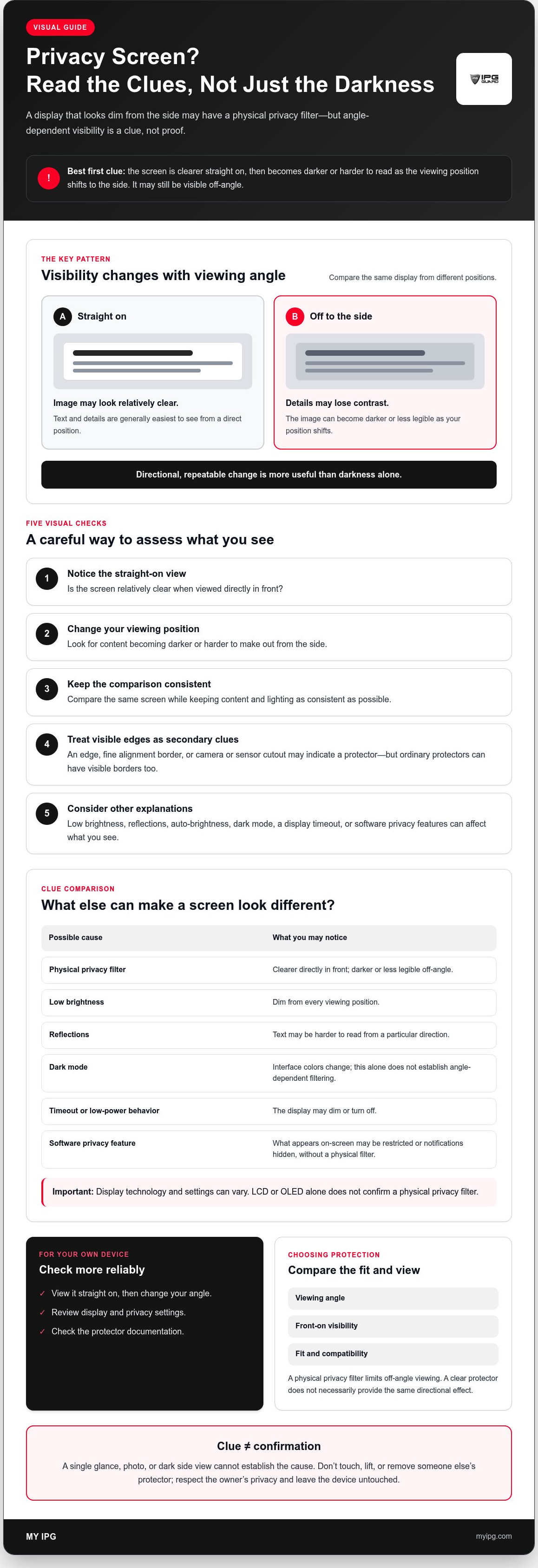
That change in visibility is the clearest clue. If text and images look readable head-on but become darker or less legible as your viewing position shifts, a privacy filter may be involved. The effect varies with the filter design, the display, your angle, and surrounding light. A darker side view suggests a privacy filter, but doesn’t prove that a separate protector is installed.
What does a privacy screen look like from the side?
From directly in front, the image may look relatively clear. As you move to one side, details may lose contrast or become harder to make out. The change can be gradual, and no single angle or level of darkness confirms a privacy screen. Room lighting and reflections can also affect the display’s appearance.
How can you spot a physical protector on the display?
Sometimes you can see a protector’s edge, a fine alignment border, or a cutout around a camera or sensor. These are secondary clues, not proof of a privacy filter. A well-fitted protector may sit close to the screen with little visible at the edges, while other screen protectors can have visible borders too. Don’t touch, lift, or remove someone else’s protector to investigate.
Keep physical filters distinct from software behavior. An operating-system privacy setting may restrict what appears on-screen or hide notifications, but it doesn’t necessarily create the same angle-dependent darkening as a physical filter. Low brightness can make the display look dim from every position. Reflections can reduce legibility from one direction, and a screen that has timed out may simply be asleep.
So, how to know if someone is using a privacy screen? Observe whether visibility changes with your angle, but don’t treat that observation as a definite identification. Without permission to inspect the device or confirm its settings, you can’t reliably rule out other causes. Respect the owner’s privacy and leave the device untouched.
How viewing angle, brightness, and display technology change what you see
A privacy filter changes how light from the display reaches a viewer, so content is generally easiest to see from a direct position and less legible off-angle. It doesn’t make a screen invisible. The image may still be visible from the side, just darker or less clear. Angle-dependent privacy filtering is a change in screen visibility as the viewer’s position shifts, caused by a filter that limits off-angle viewing.
Why does a privacy screen look darker from an angle?
Many physical filters use micro-louver structures, tiny directional elements that work somewhat like blinds for light. They let more of the display’s light travel toward the intended viewing position while reducing the light reaching viewers off to the side. An overview of privacy display technology discusses these approaches, including micro-louvers and directional light control.
The visible result depends on the filter’s design, the screen, the observer’s position, and ambient light. One filter may retain more side visibility than another. Don’t expect a universal cutoff angle or a screen that suddenly turns black. Look for a directional, repeatable change rather than judging by darkness alone.
Could settings or lighting mimic a privacy screen?
Yes. A screen set to low brightness may look dim from the front and the side. Auto-brightness can change the display as lighting shifts, while reflections can wash out text from a particular position. Dark mode changes the interface colors, not necessarily the display’s off-angle visibility. A display timeout or low-power behavior may dim or turn off the screen, too.
Display technology is another factor, but not a verdict. LCD and OLED panels produce images differently, and their viewing characteristics can vary by device and settings. Neither display type, by itself, confirms that a physical privacy filter is present. A software privacy feature may also alter what’s shown without adding a layer to the screen.
For a more useful comparison, view the same screen straight on and from a different position while keeping the content and lighting as consistent as possible. If brightness, content, or surroundings change at the same time, the comparison is less reliable. A single glance or a photograph taken at an unknown angle and exposure can’t establish the cause.
If you’re considering this type of protection for your own device, review the details for My IPG’s privacy screen protector and check the product specifications for your device before choosing. Appearance alone can’t tell you whether a particular filter is compatible.
Privacy screen or ordinary protector? Compare the clues carefully
A visible border can suggest that a protector is fitted, but it won’t tell you what kind. The more useful clue is whether the display repeatedly becomes less legible as the viewing angle changes. Compare several signs, and distinguish what you can observe from what you can conclude.
| Clue | Privacy filter | Clear protector | Possible alternative |
|---|---|---|---|
| Viewing angle | Visibility may decrease off-angle. | Usually not designed to limit side viewing, though optical effects can vary. | Reflections, lighting, or display characteristics. |
| Front-on clarity | Content may be easier to read from a direct position. | Often intended to leave the image visible from different positions. | Brightness, focus, or screen condition can affect clarity. |
| Visible edges | A border or cutout may be visible. | A border or cutout may also be visible. | Case edges or the device’s own display frame. |
Which signs suggest a privacy filter rather than a clear protector?
Give the most weight to a repeatable change in visibility as the observer moves from a direct view to an off-center one. If the same area becomes harder to read from the side, that pattern is more consistent with privacy filtering than a border alone. It is still a clue, not confirmation. A clear protector may have visible edges, and some protectors can affect reflections or perceived clarity without being designed for privacy.
Appearance can’t reliably identify a protector’s exact brand, material, or model. Even a strong angle-related effect doesn’t reveal whether it comes from a separate film, another screen feature, or viewing conditions.
What can make the signs misleading?
Reflections may obscure content from one position, while fingerprints or screen damage can create patches of haze. Ambient light, brightness settings, and the content shown can also change how clear a display looks. When several factors overlap, a quick visual judgment becomes especially uncertain.
So, how to know if someone is using a privacy screen without making assumptions? Treat angle-dependent changes as evidence to weigh, not a conclusion about the device or its owner. Don’t infer someone’s intentions or settings from a dim display. If confirmation matters and the situation allows, ask the owner rather than inspecting or handling their device.
How to check your own device without mistaking a clue for proof
If you’re asking how to know if someone is using a privacy screen, start with a device you own or have permission to check. A controlled comparison can show whether visibility changes with your viewing position, but it can’t identify the cause with certainty. Keep the screen, settings, and lighting steady so you’re comparing like with like.
What are the steps for checking your own screen?
- View it straight on. Open ordinary text or another familiar screen and note how easy it is to read. Set brightness to a comfortable level rather than leaving it unusually dim.
- Shift your viewing position. Move modestly to one side without touching the device or changing its settings. Notice whether the same content becomes less legible.
- Keep conditions steady. Stay in the same lighting and repeat the comparison. If a bright reflection moves across the screen or the display changes brightness on its own, pause and try again under more consistent conditions.
- Check settings separately. Review display and privacy settings for features that might change screen brightness or what appears. Don’t treat a setting or visual effect alone as confirmation of a physical filter.
How can you confirm the result?
Check the device’s records for stronger evidence. Review the protector packaging, purchase or order history, and product documentation for an explicit description of a privacy filter. If the device has software privacy options, review those separately. They can affect displayed content without confirming that a physical layer is fitted.
Visual checks indicate possibilities, not proof. Documentation that names the protector or confirmation from the owner provides a more reliable answer. If the records are unclear, don’t remove or disturb the protector to investigate. For more background on protector types and considerations, read the ultimate screen protector guide.
If you’re exploring privacy protection for your own device, review My IPG’s privacy screen protector and check the product details against your device before deciding.
How to get privacy protection for your own screen
Once you’ve considered the clues, decide whether a privacy filter suits your own device and how you use it. A filter can help limit off-angle viewing, but the right choice depends on your needs. Compare privacy with everyday visibility, fit, and compatibility before choosing. Check manufacturer documentation for product-specific details rather than relying on appearance alone.
What should you check before choosing a privacy screen protector?
- Confirm the exact device model. Check the model name and display dimensions. Similar-looking devices may have different screen sizes, shapes, or camera and sensor positions, so don’t assume a protector will fit across a product family.
- Review viewing behavior. Look for the manufacturer’s description of how off-angle visibility changes and what to expect when viewing the screen straight on. Consider whether that balance suits your usual tasks, such as reading messages or sharing a screen with someone beside you.
- Check installation and compatibility details. Read the instructions and confirm that the protector is intended for your device. If you rely on touchscreen functions or other screen features, check the product documentation for any stated compatibility information.
These checks help you weigh privacy against changes in screen visibility and confirm that you’re considering a product made for your display. Avoid assuming all privacy filters behave alike. If the product details don’t answer a key question, seek clarification before purchasing.
Where can you learn more about protecting your display?
If you’re comparing phone-specific options, the iPhone screen protector buying guide offers further context for evaluating screen protection. For privacy filtering, My IPG lists an IPG Privacy Screen Protector. Check its product information for device compatibility and specifications. Don’t infer those details from the product category alone.
Knowing how to know if someone is using a privacy screen can help you recognize a possible filter, but selecting one for yourself calls for a closer look at fit and product documentation. If you’d like to compare available options, you can explore My IPG’s screen protection products.
Protect your own screen with confidence
Angle-dependent darkening can be a clue, but it can’t confirm a physical privacy filter by itself. Brightness, reflections, display settings, and screen technology can affect what you see. For a more dependable answer about your own device, compare visibility under steady conditions, then check the protector’s packaging or documentation.
If you’re considering added privacy, review exact device compatibility, fit, viewing behavior, and front-on visibility before choosing. My IPG lists an IPG Privacy Screen Protector, alongside screen protection products for phones, automotive displays, and specialty devices.
Understanding how to know if someone is using a privacy screen helps you recognize possible clues without making assumptions. For your own device, rely on product details rather than appearance alone. Explore My IPG screen protection products to compare options for your device.
Frequently Asked Questions
How can you tell if someone has a privacy screen protector?
A common clue is that the display stays clearer from straight on but becomes darker or harder to read from the side. This can help with how to know if someone is using a privacy screen, but it doesn’t prove one is fitted. Brightness, reflections, settings, or display characteristics may look similar. Don’t touch another person’s device. If confirmation matters, ask its owner when appropriate.
Can you see a privacy screen protector on a phone?
Sometimes, but not always. You might notice a fine edge, alignment border, or cutout around the camera or sensors. These signs can indicate that a protector is fitted, but they don’t show whether it’s a privacy filter or a clear protector. A close-fitting protector may have few visible edges. Avoid handling someone else’s phone to inspect it.
Can phone settings make a screen look like it has a privacy filter?
Yes. Low brightness or auto-brightness can make a screen look dim, while dark mode changes the appearance of the interface. Reflections may obscure content from a particular position, and a display timeout can dim or turn off the screen. Software privacy options may also change what’s shown. These effects can resemble clues from a physical filter, but they don’t confirm one is installed.
Does a privacy screen protector make a phone completely invisible from the side?
No. A privacy protector is designed to limit off-angle visibility, not guarantee that nobody can see the display. From the side, content may appear darker or harder to read, but some information can remain visible. The result varies by filter design, screen, angle, and lighting. Don’t rely on a privacy filter as a substitute for careful handling of sensitive on-screen information.
How can I confirm whether my own phone has a privacy screen?
Compare the screen’s legibility straight on and from a modest side angle under steady lighting, with brightness held constant. Then review your settings separately for software privacy features. For stronger confirmation, check the protector’s packaging, order record, or product documentation for a privacy-filter description. Visual clues only suggest a possibility. If someone else owns the device, ask permission before checking or handling it.
Are privacy screen protectors different from regular screen protectors?
Yes. A privacy screen protector is designed to restrict off-angle visibility, while a regular clear protector is not primarily made for that purpose. Both may have visible edges, and products can differ in their optical behavior. A border alone doesn’t identify the protector type. Check product documentation for the intended function, exact device compatibility, fit, and details about viewing behavior.