

The strongest glare reduction isn’t always the best choice for a fish finder display. A matte fish finder anti glare screen protector can diffuse reflections, but it may also slightly soften image sharpness and color. A clear protector preserves crisp detail, yet sunlight and reflections may remain more noticeable.
If glare makes your screen difficult to read on the water, that trade-off matters. So does fit: similar-looking fish finder models can have different screen dimensions and layouts, and a poorly matched protector may not cover the intended display area correctly. Touch response is another practical point to consider before choosing.
This guide compares matte and clear protection, explains how viewing conditions shape your choice, and outlines what to match against your exact fish finder model. You’ll also learn which details matter for visibility and everyday operation. My IPG’s catalog includes a Lowrance fish finder screen protector, so model-specific fit is a useful starting point when considering protection for your display.
Key Takeaways
- Assess where and how you use your fish finder to narrow down which screen finish suits your viewing conditions.
- Learn how a fish finder anti glare screen protector handles reflected light, and why that’s different from changing display brightness or backlighting.
- Identify the exact brand, model, series, generation, and screen configuration before selecting a protector.
- Use a simple checklist to weigh screen coverage, visibility, and practical operation before making your choice.
- Explore My IPG’s Lowrance fish finder screen protector as a model-relevant option for protecting your display.
Why use a fish finder anti-glare screen protector?
A fish finder display is easiest to use when its information stays visible from your normal position at the helm. On bright water, sunlight may reflect from the screen and compete with the image underneath. A reflection can wash over details or create bright patches, making the display harder to read without changing what the unit shows.
A fish finder anti glare screen protector is a protective layer with a surface finish intended to diffuse reflected light and make the display more comfortable to view in some conditions. It has two distinct roles: the finish may help manage reflections, while the protector acts as a physical layer over the screen. Neither role guarantees a glare-free view or a damage-proof display.
What does anti-glare mean on a fish finder display?
Matte and other anti-glare finishes scatter reflected light across a wider area rather than leaving it as a sharp reflection. That can make a direct reflection less distracting, but it doesn’t increase screen brightness, strengthen the backlight, or improve the display’s underlying contrast. The effect depends on the screen, finish, viewing angle, and surrounding light.
Anti-glare treatment is also different from an anti-reflective coating, though both relate to controlling reflected light. The Anti-reflective coating reference explains the distinct optical approach. A protector’s label alone doesn’t tell you how its finish will look on your display.
When can screen glare become a practical problem?
Glare can be most noticeable in bright daylight, especially when the sun or a bright patch of sky reflects toward your eyes. As the boat changes heading or position, the angle of incoming light shifts. A screen that looked clear a moment ago can then pick up a reflection.
Display placement matters too. A unit mounted low, angled away from the operator, or viewed from the side may catch reflections differently from one positioned directly in front of the helm. Your line of sight changes the relationship between the screen, your eyes, and the light source. Before choosing a finish, notice when and where reflections appear during your usual use.
Keep glare management separate from physical protection. A protector covers the display, but its ability to reduce reflections depends on its finish and the conditions around it. A matte surface doesn’t necessarily provide more physical protection than a clear one. The material and construction determine that role, so don’t treat “anti-glare” as a durability rating.
Think of the decision as a balance, not a guarantee. If reflections regularly interrupt your view, a diffusing finish may be worth considering. If sharp detail is your priority and reflections are manageable, another finish may suit your setup better. Your display, mounting position, viewing angle, and changing light all influence the result. Protect the screen, but choose with visibility in mind.
How anti-glare fish finder screen protectors manage reflections
A matte finish changes how light reflects from the surface in front of the display. Instead of reflecting a bright source as a sharp, mirror-like image, its fine surface texture scatters that reflected light in several directions. This can make a reflection less distinct from your viewing position. It doesn’t remove the light, and the result depends on the protector’s finish, the display beneath it, and the angle of the sun or other light source.
Glare reduction changes reflected light; it doesn’t turn up screen brightness. Brightness comes from the display’s own output and settings, while contrast describes the difference between light and dark areas on the screen. A protector can affect how clearly you perceive those details, but it doesn’t increase the unit’s backlight or alter the information it displays.
Matte finishes, reflections, and perceived clarity
Scattering reflected light can make a sharp reflection look more diffuse. That may help when a concentrated reflection distracts from the display, but spreading light can also make the image look softer in some conditions. It’s a possible trade-off, not an identical result on every unit. The display’s pixel density, the protector’s surface, and your viewing distance all influence how crisp small text and fine lines appear.
Judge the balance against what you need to see. If your screen shows detailed map contours or small labels, crisp edges may be a priority. If reflections repeatedly obscure the display, reducing their intensity may matter more. Consider both needs rather than assuming “matte” means better visibility in every situation.
What can affect visibility beyond the protector?
The screen is only one part of the viewing picture. Ambient light changes throughout the day, and the angle between your eyes, display, and light source can make reflections shift. A helm-mounted display may look different when viewed straight on than from a standing position or the opposite side of the boat. Mounting position sets your everyday line of sight.
Display settings matter, too. If the image seems dim, review the unit’s brightness setting before expecting a surface finish to solve the problem. Higher brightness may help the screen stand out in its surroundings, but it won’t stop a reflection from reaching your eyes. Contrast settings, where available, can also change how prominent details appear.
Check the display’s condition before judging a protector. Smudges, residue, scratches, or wear can affect what you see and may be mistaken for a loss of clarity caused by the finish. Clean the display according to the fish finder manufacturer’s care guidance, then assess it from your usual operating position in the light you encounter most often. If possible, compare the screen at different angles and times of day. This helps distinguish glare from dim settings, poor positioning, or a screen that needs attention.
Once you know which balance suits your conditions, consider model fit separately from finish. For a model-relevant protection option, view My IPG’s Lowrance fish finder screen protector.
Anti-glare film vs. clear fish finder screen protection
Both matte anti-glare and clear protectors add a layer over a fish finder display, but their surface finishes handle light differently. A matte finish diffuses reflections, which can make bright reflected shapes less distinct. A clear finish is designed to preserve an unobstructed-looking view of the display, but reflections may remain more noticeable. The right choice depends on what you see at your helm, not just the wording on a package.
There’s a practical trade-off to weigh. Diffusing reflected light may affect how crisp the screen appears, while a clear surface may preserve fine visual detail but reflect more surrounding light. Neither finish is best for every screen, boat position, or fishing routine.
| Finish | Likely benefit | Consideration |
|---|---|---|
| Matte, anti-glare | Scatters reflections so they may appear less sharp. | Some displays may look softer, depending on finish and viewing conditions. |
| Clear | Maintains an unobstructed-looking view of screen detail. | Reflections may remain prominent in bright or changing light. |
When might an anti-glare finish suit your fishing setup?
Consider matte protection if you regularly view the display in bright conditions and have noticed reflections that distract from its contents. The useful clue is your own experience: does a reflection obscure the screen from your usual helm position, or is it only an occasional inconvenience? A feature label can’t account for your display angle, the boat’s orientation, or the light around you.
Anti-glare doesn’t mean glare-free. Direct sunlight and changing angles can still affect visibility, and a matte finish may change the perceived crispness of fine details. Weigh the reflection you’re trying to manage against how clearly you need to see labels, lines, and other screen elements.
When might a clear protector be the better fit?
A clear finish may suit you if reflections are manageable and preserving a crisp, unobstructed-looking display is your priority. For example, a screen positioned in shade or angled away from a strong reflection may be comfortable to read without a matte surface. That doesn’t mean clear protection prevents glare; it prioritizes a different viewing quality.
Think about your normal operating conditions, not a single moment on the water. Consider where the unit is mounted, whether you view it head-on, and how often reflections interrupt reading the screen. For broader context on protector finishes across different displays, explore this ultimate screen protector guide.
Choose matte if reflections regularly distract you; choose clear if preserving an unobstructed-looking image matters more and glare is manageable. A fish finder anti glare screen protector is a finish choice, not a universal visibility fix. Match the finish to your typical conditions, then treat exact screen fit as a separate requirement.
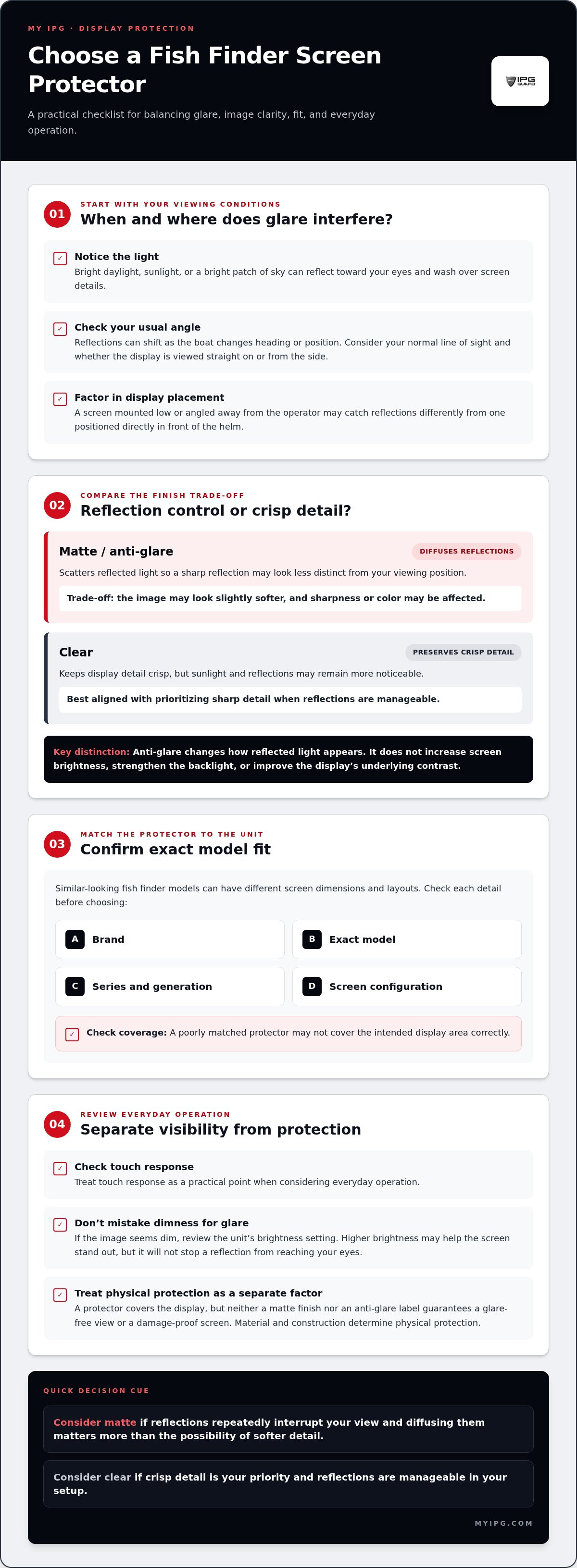
How to choose the right fish finder anti-glare screen protector
Start with the fish finder, not the finish. Record the brand, full model name, series, generation, and screen configuration before comparing protectors. Two units from the same brand may look similar but differ in screen shape, bezel layout, or display dimensions. An accurate match helps cover the display without blocking areas that need to remain accessible.
Match the protector to the exact fish finder model
Find the model name on the device label, in its settings menu, or in the manufacturer’s documentation. Use the complete identification, not just the brand or a broad family name. Then compare the protector’s stated fit against the unit’s series and generation. A product description naming a brand alone isn’t enough to establish a precise match.
- Identify the unit. Write down its brand, full model name, series, and generation. Check the settings menu or documentation if the label is difficult to access.
- Confirm the screen configuration. Note the display shape and layout, including visible cutouts, controls, or borders that affect the screen area. The protector should align with the intended display surface.
- Compare fit details, not just diagonal size. Screen size is one measurement, but it doesn’t describe the full outline, aspect ratio, bezel, or opening positions. Two displays with the same diagonal measurement can still have different dimensions or layouts.
- Choose your finish. Think about the light you usually fish in, the screen’s mounting angle, and whether reflections regularly distract you. Balance that need against your preference for a crisp-looking display.
- Review the product match before selecting. Make sure the stated model and screen configuration correspond to your notes. Don’t rely on a similar model name or an approximate size when the listing provides more specific compatibility details.
Match the protector to the exact model, series, generation, and screen layout before weighing finish or size. This reduces the risk of choosing a protector based on a familiar brand name or a measurement that doesn’t capture the display’s shape.
Choose a finish for your real viewing conditions
Base the finish choice on what you experience at the helm. If bright daylight and reflections often interfere with reading your screen, an anti-glare finish may be worth considering. If reflections are manageable and you prioritize an unobstructed-looking image, a clear finish may better suit your preference. Neither choice guarantees the same result in every position or lighting condition.
Keep finish and fit as separate decisions. “Anti-glare” describes an intended surface characteristic, not proof of a specific model match or a particular product’s optical performance. Review the model details and finish information for the protector you’re considering. For a model-relevant option, view My IPG’s Lowrance fish finder screen protector.
Protect your Lowrance fish finder display with a model-specific next step
Choosing a finish is only part of the decision. Before selecting a protector, make sure it corresponds to your fish finder’s exact display. My IPG’s catalog includes a Lowrance fish finder screen protector as an option for protecting a marine electronics display. Use the product listing and your device details to assess fit, rather than assuming a shared brand or similar screen size means two protectors are interchangeable.
What to establish before selecting a Lowrance protector
Start with the complete Lowrance model name and screen generation. Find these details on the unit, in its settings, or in its documentation, then compare them with the model information shown for the protector. A diagonal measurement can help describe a display, but it doesn’t establish the screen’s outline, layout, or exact coverage. Similar-sized Lowrance screens may still differ.
Keep two decisions separate: whether the protector fits, and whether its finish suits your viewing preferences. A fish finder anti glare screen protector describes a finish in general, not proof that a particular product has a matte surface or glare-reduction characteristics. Base your expectations on product-specific information, not a category label.
- Identify the unit. Record the full model name and generation, not only “Lowrance.”
- Compare the display. Note its configuration and visible screen layout, then match those details with the listing.
- Check the stated fit. Look for product information that corresponds to your exact model. Don’t rely on diagonal size alone.
- Set your finish preference. Consider the light and reflections you typically encounter, along with how much you value a crisp-looking display.
A straightforward path from comparison to protection
Use your notes to make a clear selection: exact model first, screen configuration next, then finish preference informed by real viewing conditions. This order keeps fit at the center of the decision instead of letting an appealing finish distract from it. Don’t infer a protector’s finish, optical properties, installation details, or touch compatibility unless those details are stated for that product.
My IPG’s Lowrance fish finder screen protector gives Lowrance owners a relevant catalog option to consider while protecting their display. Review the product information alongside the model and generation recorded for your unit, and base your choice on those details rather than a similarity in brand or size.
Ready to explore screen protection for your device? Explore My IPG screen protection.
Make your next screen-protection choice with confidence
Your fish finder deserves protection that suits both the device and the way you use it. Before choosing a fish finder anti glare screen protector, decide what matters most in your setup: reducing distracting reflections, preserving a crisp-looking image, or finding the right balance. Then let the exact model and screen configuration guide your selection. A careful match is a practical step toward protecting marine electronics without relying on assumptions about fit or finish.
My IPG offers screen protection for marine electronics, with a Lowrance fish finder screen protector in its catalog. Review the product information alongside your device details, and choose with your display’s needs in mind.
Explore My IPG screen protection and take the next step toward protecting your display with confidence.
Frequently Asked Questions
Does an anti-glare fish finder screen protector reduce clarity?
It can affect perceived clarity, although the result varies by display and protector finish. Fine text or narrow map lines may appear less crisp to some viewers through a matte surface, even as reflections become less distracting. If you’re evaluating a fish finder anti glare screen protector, consider what you need to read most often and your normal viewing distance. Product-specific optical details are more useful than assuming all matte protectors look alike.
Can I use any screen protector on my fish finder?
No. A protector can have the right diagonal measurement yet fail to align with the screen’s corners, edges, or control openings. For example, a display with a wide bezel may need a different cut from a similarly sized screen with another layout. Choose a protector intended for your exact device rather than treating a generic sheet or similar-looking model as a precise match.
Is matte or clear protection better for a fish finder?
Neither finish is automatically better; your usual viewing conditions and visual preferences should guide the choice. Think about how often reflections interrupt you and whether you prioritize a smooth, unobstructed-looking image. If you check the display frequently in changing light, glare control may carry more weight. If reflections rarely bother you, preserving a crisp appearance may matter more. Use the product listing for product-specific finish information.
Will an anti-glare protector make a fish finder readable in direct sunlight?
It may reduce the distraction of some reflections, but it can’t guarantee easy reading in direct sun. Brightness settings, shade, ambient light, and screen angle still affect visibility. Polarized sunglasses can also interact with some LCD displays: if the screen changes noticeably when you tilt your head, polarization may contribute to the problem. Try adjusting your viewing position before deciding that the protector alone is responsible.
How do I find my fish finder model before buying a screen protector?
Check the unit’s label, settings menu, or manufacturer documentation, then write down the complete model identifier. Keep a note with the model, series, and generation so you can compare it with product compatibility details later. Don’t rely on a familiar brand name or a remembered screen size. Those details can narrow the search, but they may not identify the exact device.
Are tempered glass and anti-glare the same thing?
No. Tempered glass describes the protector’s material or construction, while anti-glare describes an intended optical effect of its surface. A listing may use both terms for one product, but the material alone doesn’t show whether reflections are diffused. Read the product description for its stated construction and finish separately. This distinction helps avoid assuming every glass protector has the same viewing characteristics.
Can I install a fish finder screen protector while the display is mounted?
Possibly, if you can reach the entire screen and follow the protector’s specific instructions. A tight console or nearby equipment may make it difficult to position the protector evenly, so assess access before starting. Follow the care guidance for your fish finder and the installation directions supplied for the protector. Don’t force the fit or assume another model’s installation steps apply to your unit.