

There’s no universal winner in the ArmorSuit MilitaryShield vs hydrogel film comparison. Durability, self-healing behaviour, and post-installation wait times depend on the specific product and its instructions. Don’t choose by material label alone. Match the film’s stated features and care requirements to your device and daily use.
A screen protector should handle everyday contact while keeping the display clear and responsive. This comparison explains what durability and self-healing mean in practice, why installation wait times vary, and which details matter when choosing. Use these points to weigh the trade-offs and find protection suited to your screen.
Key Takeaways
- Compare durability by the kind of everyday wear you want the film to handle, not by material name alone.
- Learn what self-healing can address and why it shouldn’t be confused with protection from every kind of damage.
- Use the installation instructions for the specific film to determine when to handle or use the screen normally.
- Understand how film material and fit can affect clarity and touch response on your device.
- See when IPG Original (Hydrogel) Screen Protector may suit your screen-protection needs.
Durability and self-healing properties
Don’t judge ArmorSuit MilitaryShield and hydrogel film by the word “durable” alone. Consider how each surface handles the wear your device actually encounters. A phone in a pocket may rub against fabric or other items; a phone used outdoors faces different handling. Neither film replaces a case or protects against every impact.
“Self-healing” means some shallow marks on a film’s surface may become less visible over time. It doesn’t mean the material repairs a cut, puncture, lifted edge, or damaged display. A faint scuff and a deep gouge are different kinds of damage. Compare the manufacturer’s stated conditions for self-healing, and don’t assume ArmorSuit MilitaryShield and every hydrogel film behave alike.
To assess durability, distinguish surface wear from installation problems. A mark on the film may affect its appearance without indicating screen damage. Dust trapped during application, a lifted corner, or repeated rubbing at an exposed edge can affect performance. Check the protector after fitting and observe whether marks change during normal use. Don’t scrape it to test recovery, since that can cause damage rather than reveal a useful property.
Compatibility depends on the exact device model and protector cut. ArmorSuit MilitaryShield and hydrogel films come in device-specific versions, so a protector for one phone may not align with another model’s screen edges, camera opening, or sensors. Match the listing to your device’s complete model name before choosing.
ArmorSuit MilitaryShield warranty and replacement eligibility depend on the terms provided with the purchase. Keep your order record and review those terms before submitting a claim, since coverage and available remedies depend on the stated conditions.
Hydrogel’s softer, flexible feel can involve trade-offs. Its surface may show wear, dents, or scuffs differently from a rigid protector, and stretching or misalignment during installation can leave visible marks. Don’t assume a soft film offers the same impact protection as a rigid screen protector. If your phone often encounters keys or rough surfaces, weigh flexibility against your need for a firmer barrier.
Use this sequence to decide: identify your device model, define the wear you want to guard against, then compare each film’s documented protection and care instructions. Someone who prefers a flexible surface may favour hydrogel’s feel; someone focused on stated scratch resistance should compare the specific claims for the ArmorSuit MilitaryShield version they’re considering. Choose based on the product, not a category-wide promise.
Post-installation waiting time
ArmorSuit MilitaryShield and hydrogel films don’t have one universal post-installation wait time. Follow the instructions for the exact protector. The application method, any remaining moisture, and the device-specific guidance determine when you can handle it normally.
Installation difficulty depends on the kit and your technique. A well-aligned dry application can be straightforward, while a method involving application liquid requires careful positioning and moisture control. The product name alone doesn’t tell you which steps or wait time apply. Read the package instructions before starting and follow them for that specific film.
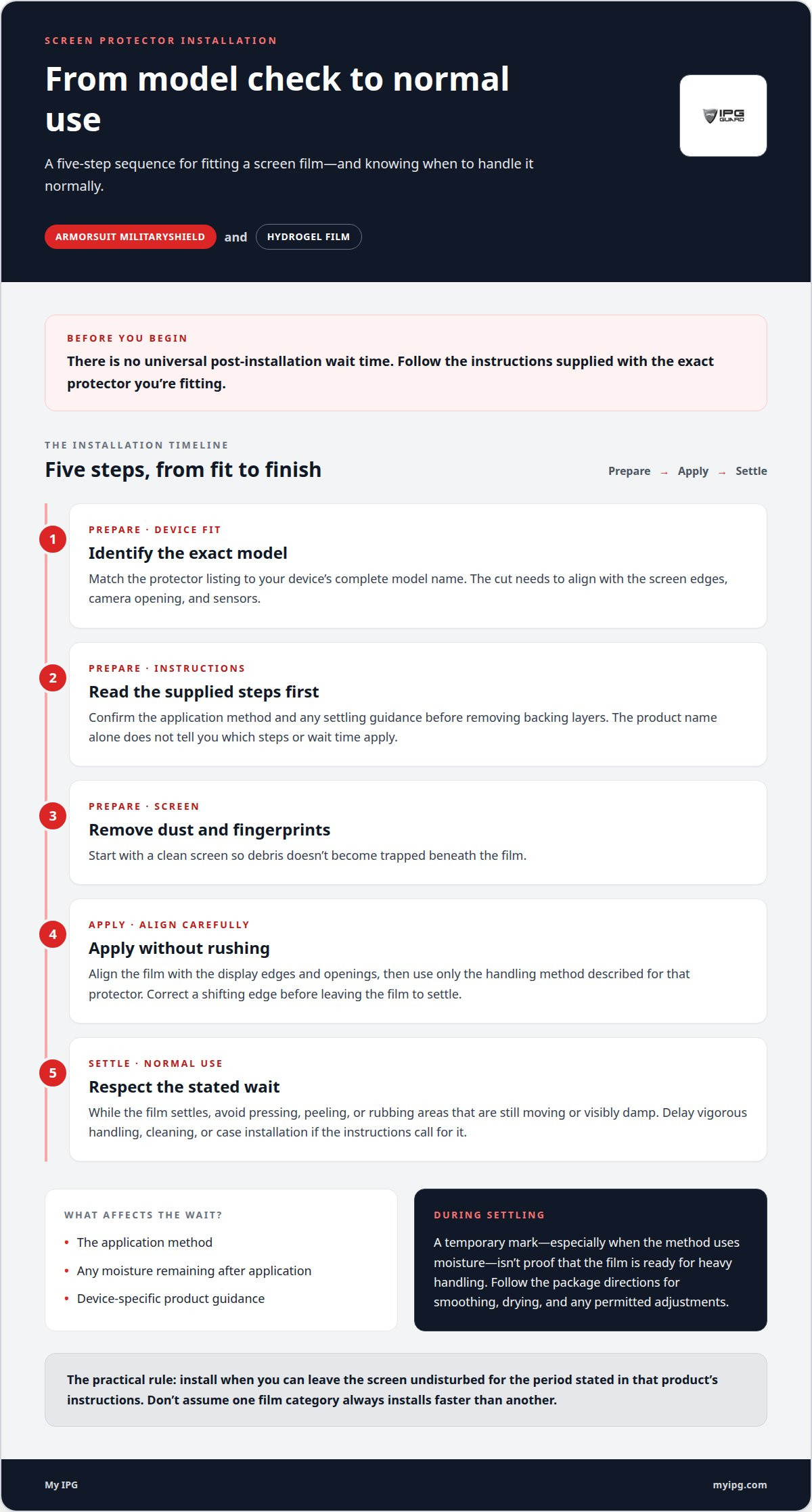
Think of installation in three stages: fitting the film, letting it settle, and returning to normal use. Start with a clean screen and align the protector with its edges, camera, and sensors. While it settles, avoid pressing, peeling, or rubbing areas that are still moving or visibly damp. Resume normal use according to the product’s instructions, not a schedule assumed from another brand.
If an edge shifts while you position the film, correct the alignment before leaving it to settle. If the application method uses moisture, don’t treat a temporary mark as proof that the film is ready for heavy handling. Follow the package instructions for smoothing, drying, and any permitted adjustments. If you need the device immediately, install the protector when you can leave the screen undisturbed for the instructed period.
A useful preparation sequence keeps the process controlled:
- Identify the exact model. The cut must fit around the display edges and openings.
- Read the supplied steps first. Confirm the application method and any settling guidance before removing backing layers.
- Prepare the screen. Remove dust and fingerprints so debris doesn’t become trapped beneath the film.
- Apply without rushing. Align the film carefully, then use only the handling method described for that protector.
- Respect the stated wait. Delay vigorous handling, cleaning, or case installation if the instructions call for it.
When comparing ArmorSuit MilitaryShield with hydrogel film, check the package instructions rather than assuming one category always installs faster. Even a straightforward kit can be tricky to align on a curved screen; a flexible film can be manageable when its steps are clear. Choose a product that suits your device, installation preferences, and schedule.
If you’re weighing a flexible film for your device, explore hydrogel screen protection as one option, then follow its supplied installation guidance from start to finish.
What material is ArmorSuit MilitaryShield made from?
ArmorSuit MilitaryShield is a product name, not a complete description of its polymer composition. The name alone doesn’t establish whether a particular version uses polyurethane, thermoplastic polyurethane, or another film material. Don’t treat “MilitaryShield” as proof of a specific chemical formula or construction.
That distinction matters because screen films can look similarly flexible while using different material blends and surface layers. A product may combine a base film, adhesive, and protective coating. Each layer serves a different purpose: the base supports the film, the adhesive holds it to the display, and the exposed surface meets fingers and everyday contact.
Polyurethane-based films are often associated with flexibility, while PET films generally have a firmer feel. These category descriptions don’t establish ArmorSuit MilitaryShield’s exact composition or prove how a specific model handles scratches, edge contact, or installation. Product versions and device cuts can differ, so don’t transfer details from one listing to another.
Use a simple process to assess material descriptions before comparing MilitaryShield with hydrogel:
- Find the exact version. Match the product name to the phone model and listing, rather than relying on a broad search result.
- Separate the layers. Look for distinct descriptions of the film, adhesive, and surface coating.
- Read the stated material terms. Treat terms such as polyurethane or PET as composition clues only when the product description applies them to that version.
- Connect material claims to use. A flexibility claim concerns handling and fit; it doesn’t, by itself, establish impact resistance.
- Compare like with like. Evaluate the same device model and the same type of stated performance across both options.
If a listing calls a film flexible but gives no specific impact rating, don’t turn flexibility into a promise of drop protection. Likewise, “self-healing” describes a surface behaviour, not the complete material recipe. Its meaning depends on the product’s explanation and stated conditions.
A useful ArmorSuit MilitaryShield versus hydrogel comparison separates verified composition from performance claims. Material names identify categories, but they don’t reveal coating thickness, adhesive chemistry, or durability for a particular user. Focus on the exact model’s stated construction and care instructions. When comparing listings, read their descriptions side by side and treat unmentioned layers as unknown rather than guessing from the product name.
What is a hydrogel screen protector made from?
“Hydrogel” describes a flexible film category, not one universal chemical recipe. A hydrogel screen protector is generally a polymer-based film, often made with a flexible plastic such as thermoplastic polyurethane. Formulations vary by manufacturer and product, so the name alone doesn’t identify every ingredient or layer.
Think of the protector as several functional layers. The base film gives it shape and flexibility. An adhesive layer holds it against the display, while the exposed surface meets fingers, dust, and everyday contact. Some products also have removable backing layers that protect the adhesive before installation. These roles explain the construction without assuming that every hydrogel film uses the same materials.
The word “hydrogel” can suggest a water-rich material, but a phone protector isn’t simply a sheet of gel. In this product category, the term describes a thin, flexible protective film. Don’t infer a specific water content, polymer blend, or coating unless the product description states it.
Material names help when they describe the actual product. For instance, a listing that identifies thermoplastic polyurethane offers a clearer clue about composition than “soft hydrogel film” alone. Even so, the name describes a material component, not the complete construction. Adhesive, surface treatment, and film thickness can also affect how the protector feels and fits.
To compare two hydrogel listings, follow this reading sequence:
- Match the device. A cut made for one phone model may not fit another model’s display edges or openings.
- Find the material description. Separate a named polymer from general terms such as flexible or self-healing.
- Identify the layers. Look for descriptions of the film surface, adhesive, and application backing.
- Connect claims to use. Flexibility describes how a film bends; it doesn’t alone establish impact protection.
- Read care instructions. Application and cleaning guidance applies to the specific product, not every film called hydrogel.
Two films marketed as hydrogel may differ in feel, surface finish, or installation method. One listing may identify a polymer material, while another highlights flexibility without naming its composition. These descriptions offer different levels of detail, but they don’t justify assuming a specific scratch rating or recovery behaviour.
Use “hydrogel” as a starting category, then assess the specific film’s stated materials and construction. For a practical comparison, focus on device fit, documented features, and installation guidance instead of treating a broad material label as a complete specification.
ArmorSuit vs Hydrogel: Clarity and Touch Sensitivity
Clarity and touch response depend on the specific film, screen, and installation. The ArmorSuit MilitaryShield name alone doesn’t establish how a particular version looks or feels. Hydrogel films vary too, so compare product-specific claims instead of assuming every film in either category performs alike.
To assess clarity, consider what you see on the display. A film’s surface finish can affect reflections, while dust, bubbles, or misalignment can distract from text and icons. For example, a bubble over a keyboard key may be more noticeable while typing than near an unused screen edge. A clean, even application helps preserve the display’s appearance, but it can’t change the film’s underlying optical properties.
Touch sensitivity is how the screen responds to your finger through the installed film. Thickness, surface texture, fit, and the device’s touch system can all affect the experience. If swiping feels different after installation, distinguish a change in surface feel from missed input. A rough or tacky surface may feel unlike bare glass even when taps register. Don’t assume a flexible hydrogel film always feels faster or MilitaryShield always feels firmer.
Use the same simple checks to compare two protectors on the same device:
- Read the product details. Look for stated clarity, finish, and touch-response information for the exact model.
- Inspect a plain screen. Open a white page and a dark screen to notice visible haze, reflections, or trapped debris.
- Test familiar gestures. Type a short message, scroll a page, and use edge swipes in the same way.
- Check alignment. Confirm the film doesn’t cover a camera opening, sensor, or active screen edge.
- Separate feel from function. A different finger glide doesn’t automatically mean the touchscreen is registering incorrectly.
Someone who reads outdoors may prioritize reflection control, while frequent typists may care more about smooth finger movement. Neither priority points to a universal winner. Instead, it shows which product details and real-use checks matter for your routine. Compare the same device in similar lighting and try familiar gestures to make the assessment useful.
Choose based on the display experience you value, then follow the selected film’s installation instructions. If a protector looks hazy or misses touches, check for bubbles, debris, and alignment before judging its material. To explore a flexible-film option for your screen, view hydrogel screen protection and consider how its stated finish and fit match your device.
My IPG: IPG Original (Hydrogel) Screen Protector
If you’re considering hydrogel, My IPG’s IPG Original (Hydrogel) Screen Protector is an option to explore for your device. Choose based on the screen you want to protect and the qualities you value, such as a flexible film format. As this comparison shows, durability, installation, clarity, and touch feel depend on the specific protector and its fit. Don’t assume every hydrogel film performs the same way.
For an iPhone or Samsung device, compare the screen protector option with your model and protection priorities. My IPG also offers IPG iPhone screen protector and IPG Samsung screen protector options. Contact My IPG to discuss which screen-protection option best fits your device.
Choose protection that fits your next move
Use the ArmorSuit MilitaryShield vs hydrogel film comparison to choose screen protection that suits your device and routine. Match your choice to the exact model, then consider whether you also want to protect the camera lens. A well-matched protector helps keep your device ready for everyday use.
My IPG offers an IPG Phone camera lens protector, an IPG iPhone screen protector, and an IPG Samsung screen protector. Choose whether to focus on the display or add protection for another vulnerable surface, and make sure the product matches your device model.
For help considering a suitable screen-protection option, contact My IPG. Make your next choice with care, and give the device you rely on thoughtful protection.