

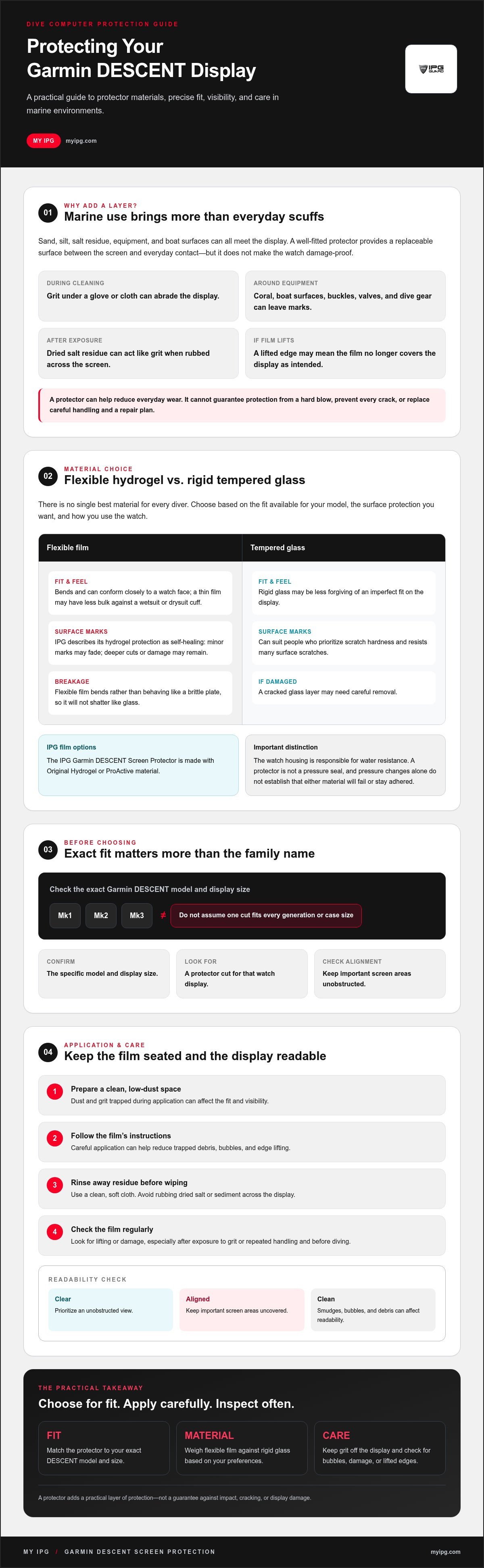
A Garmin DESCENT screen protector faces more than everyday scuffs. Sand and grit can scratch the display during cleaning, while contact with coral, boat surfaces, or dive gear can leave marks. If a film lifts, it may no longer cover the display as intended.
Choosing a protector means balancing fit, visibility, and the kind of surface protection you want. This guide explains how the IPG Garmin DESCENT Screen Protector, made with Original Hydrogel or ProActive material, compares with rigid glass, what to check before ordering, and how careful application and maintenance can help reduce bubbles and edge lifting. The goal is a clear display and a practical layer of protection for dives and everyday use.
Key Takeaways
- Compare flexible hydrogel with rigid tempered glass to weigh scratch resistance, fit, and flexibility.
- Check the exact Garmin DESCENT model and size before choosing a protector. Do not assume one fit suits every generation.
- Apply the film in a clean, low-dust space and follow its instructions to help reduce trapped debris, bubbles, and edge lifting.
- Understand the stated features of Original Hydrogel and ProActive material, and use careful cleaning habits to help maintain visibility.
- Use the selection and care advice to choose a protector that suits your dive computer and how you use it.
Why Every Garmin Descent Needs a Specialized Screen Protector
A Garmin Descent displays information you rely on underwater, so keeping its screen clear is a sensible part of dive gear care. Sand, silt, boat surfaces, and scuba equipment can all come into contact with the watch. Even a quick wipe can cause abrasion if grit is caught on a glove or cloth.
Factory glass is designed to resist scratches, but it is not immune to damage. A well-fitted Garmin DESCENT screen protector adds a replaceable surface between the display and everyday contact. Think of the IPG Garmin DESCENT Screen Protector as an added layer of protection, not a promise that the screen is damage-proof. Handle the computer carefully and check the display and film regularly.
The Reality of Sapphire Glass in Marine Environments
Sapphire is highly scratch-resistant, but the watch can still encounter particles and impacts. Fine sediment caught beneath a glove or cloth can abrade the surface during cleaning. Dried salt residue can also act like grit if rubbed across the display. Rinse away residue before wiping, and use a clean, soft cloth. A protector adds a replaceable layer, but it does not remove the need for careful cleaning. For an overview of common screen protector materials, compare how flexible films and tempered glass are constructed.
Display repair can involve more than replacing a film, but the process and cost depend on the model and damage. Check repair options for your specific device rather than assuming a fixed expense. A protector can help reduce everyday wear, but it is not a substitute for a repair plan.
Impact Protection Beyond the Surface
Tank valves, buckles, and boat ladders can strike a watch during setup or entry. Original Hydrogel or ProActive film is flexible and can conform to the display, adding a layer between it and minor contact. It cannot guarantee protection from a hard blow or prevent every crack, so handle the computer carefully and check the film for lifting or damage.
A clear display also helps keep the device looking cared for. Its condition may matter if you later resell it, though resale value depends on many factors. Most importantly, a protector can provide an extra layer of reassurance while you focus on your equipment and dive. Whether tracking open-water dives or planning a water-filled day where you visit Columbia Pictures Aquaverse, robust surface coverage helps keep your adventure watch clear and scuff-free.
Hydrogel vs. Tempered Glass: Which Shield Survives the Deep?
There is no single best material for every diver. Tempered glass is rigid and resists many surface scratches, while flexible hydrogel can conform closely to a watch face and may recover from minor marks. The right choice depends on how you use the watch, the fit available for your model, and the type of protection you prefer.
The IPG Garmin DESCENT Screen Protector uses Original Hydrogel or ProActive material. A flexible film can sit closely against a display where a rigid protector may be less forgiving of fit. That does not make it a pressure seal or show that glass will fail at depth. The watch housing is responsible for its water resistance. Protector fit and careful application help keep the film seated. For broader context, this scientific analysis of screen protector materials examines impact performance across protector types, including glass and TPU.
The Science of IPG Original Hydrogel
Unlike a rigid glass sheet, flexible film bends rather than behaving like a brittle plate, so it will not shatter like glass. My IPG describes its hydrogel protection as self-healing: minor surface marks may fade, while deeper cuts or damage may remain. The film is designed for display clarity, but no verified 99% brightness figure is available here. Keep the surface clean and check the edges after application and use, particularly after exposure to grit or repeated handling.
Why Tempered Glass May Not Suit Every Dive
Tempered glass can suit people who prioritize scratch hardness. A rigid protector may be less forgiving of an imperfect fit, and a cracked layer may need careful removal. Pressure changes alone do not establish that glass will fail or that hydrogel will stay adhered. Choose a protector made for your exact watch model, follow its application instructions, and check for lifting before diving. A thin film may also have less bulk against a wetsuit or drysuit cuff.
For bright surface conditions and low-light dives, prioritize an unobstructed view of the display. A clear, accurately aligned protector should not cover important screen areas. Keep it clean, since smudges, bubbles, and trapped debris can affect readability. If flexible film suits your needs, review the IPG Garmin DESCENT Screen Protector as a model-specific option.
Precision Fit for the Garmin Descent Series (Mk1, Mk2, Mk3)
A screen protector should match the display, not just the watch family name. The IPG Garmin DESCENT Screen Protector is described as precision-cut, but do not assume one cut fits every generation or case size. A properly aligned film can cover the display without obstructing the bezel, buttons, or sensors. It does not change the watch’s water rating or create a watertight seal. The case provides the watch’s water resistance.
Check the exact model name and size before ordering. The Descent range includes models with different case and display dimensions, so confirm that the product listing names your device. In particular, the Mk3 family includes 43 mm and 51 mm versions. Case size is not the same as screen diameter, so do not use the case measurement alone to determine protector compatibility.
- Mk1: Confirm that the protector is listed for Mk1 specifically. Do not rely on a listing that names only a later generation.
- Mk2 and Mk2i: Check the exact model designation and display fit. A shared generation name does not confirm identical screen dimensions.
- Mk3 and Mk3i: Verify the case size as well as the model. The 43 mm and 51 mm versions should not be treated as interchangeable.
Sizing the Mk2 and Mk2i Models
The Mk2 series is commonly described with a 52 mm case measurement, but that figure refers to the case, not necessarily the screen’s usable diameter. Verify the display dimensions using model-specific product information. A precise fit helps the film sit neatly at the display edge without overlapping surrounding surfaces. For a broader checklist on comparing protector dimensions, see The Ultimate Screen Protector Guide.
The New Frontier: Descent Mk3 and Mk3i Protection
The Mk3 and Mk3i feature AMOLED touchscreens, so alignment and surface clarity matter for taps, swipes, and viewing maps or menus at the surface. Test touch response after application. A screen film covers the display only; it should not interfere with buttons or the separate T1/T2 transmitter. Confirm the protector fits your specific Mk3 or Mk3i size rather than assuming compatibility across the family.
Before installing, compare the model name and size in your watch settings or documentation with the protector’s compatibility details. If a listing is unclear, verify the supported model instead of trimming the film yourself. Checking first helps preserve clean edges and keeps the display unobstructed.
Installation and Long-Term Care in Marine Environments
A clean application matters as much as a precise cut. Dust trapped beneath a film can leave a visible speck or interfere with adhesion. Salt and skin oils can also affect a smooth fit. Apply the protector indoors in a calm, low-dust space rather than on a windy boat deck. The IPG Garmin DESCENT Screen Protector features Original Hydrogel or ProActive material. Follow the instructions supplied with your protector, especially if they specify a particular application method.
The Perfect Bubble-Free Application
Prepare the watch and work area before exposing the adhesive. Take time to align the film, since even a small shift can be noticeable around a circular display.
- Clean: Wash and dry your hands. Clean the screen with the supplied materials or the method specified in the instructions. Remove fingerprints and residue, then check for lint or dust under bright light.
- Align: Position the film over the display before pressing it down. Use the screen’s circular edge as a guide, and make sure the protector does not overlap the bezel or cover any display area.
- Apply: Follow the included application directions. If a squeegee is provided, use it gently as directed to work out trapped air and establish even contact. Do not scrape or press hard.
- Inspect: Check the edges and display for debris, lifting, or obstructive bubbles. Allow the film to settle as instructed before exposing the watch to water.
The Zerodust name does not remove the need for a dust-controlled setup. In humid or outdoor conditions, wait until the screen and your hands are dry. Avoid applying the film where airborne particles or spray can settle on the adhesive.
Post-Dive Maintenance for Your Protector
After saltwater use, rinse the watch with fresh water according to Garmin’s care guidance for your model. Salt residue can become abrasive when rubbed, so do not wipe a dry, gritty screen. Pat it dry with a clean, soft cloth. Avoid harsh chemicals, abrasive cleaners, and rough fabrics, which may damage the film or affect its surface.
There is no verified dive-count lifespan for a protector, so do not assume it will last a set number of dives. Inspect it regularly. Replace it if persistent scratches, clouding, edge lift, or other damage interferes with clear viewing or coverage. For model-specific hydrogel protection, explore the IPG Garmin DESCENT Screen Protector.
Why IPG ProActive is the Choice of Professional Divers
Choose a dive computer protector for the specific display and conditions, rather than assuming one accessory suits every watch. My IPG offers screen protection for a range of devices, including the Garmin DESCENT series. Checking compatibility helps you find a film intended for your display and avoid relying on a generic protector whose dimensions may not match.
The IPG Garmin DESCENT Screen Protector uses Original Hydrogel or ProActive material. My IPG describes its hydrogel films as durable, clear, and self-healing from minor surface marks. These features may make a flexible film a practical layer for a display exposed to frequent handling and outdoor use. A protector can help guard against everyday contact, but it cannot replace careful gear handling or guarantee protection from impact damage.
Be precise about performance claims. Specific light-filtration figures, durability ratings, and documented testing under extreme underwater conditions are not verified here. Before choosing a film, review the product details for your exact model, application instructions, and stated material properties. Do not rely on broad labels such as “professional grade” without supporting specifications.
The Specialist Advantage
A specialist in display protection can focus on fit, clarity, and material selection across different devices. My IPG also makes phone camera lens protectors, extending its protection offering beyond watch displays. Explore the guide to IPG phone camera lens protectors to learn about another application. For your Descent, confirm the supported model and size, then compare the film’s listed features with the demands of your diving routine.
A flexible hydrogel film has a slim profile and may suit divers who want protection without the feel of a rigid layer. It still needs careful application and inspection for edge lifting, bubbles, or damage before a dive. These checks help keep the display unobstructed and the film in place.
Secure Your Descent Before the Next Dive
Choose a protector before a scratch or impact draws attention to the screen. A model-specific film adds a replaceable protective layer while preserving access to the display. Check compatibility and care instructions, and keep expectations realistic: no screen protector prevents every kind of damage.
Ready to review the product details? Get your IPG Garmin DESCENT Screen Protector and check that it matches your watch model before ordering.
Protect Your Display Before the Next Dive
Choosing a Garmin DESCENT screen protector involves more than comparing scratch resistance. Match the protector to your exact watch model, weigh flexible hydrogel against rigid glass, and apply it in a clean space. Regular fresh-water rinsing and careful inspection can help keep the film and display clear.
The IPG Garmin DESCENT Screen Protector is described as precision-cut for supported Descent models and is available with Original Hydrogel or ProActive material. Its self-healing properties may help minor surface marks fade, but they do not make the film damage-proof. Confirm compatibility before ordering, and replace the protector if wear affects visibility or coverage.
Protect the display you rely on with a practical, replaceable layer. Review the IPG Garmin DESCENT Screen Protector and confirm that it matches your watch model before your next dive.
Frequently Asked Questions
Does the screen protector affect visibility underwater or at night?
A clear, correctly aligned protector should leave the display readable, but dust, bubbles, scratches, or residue can reduce clarity. The IPG Garmin DESCENT screen protector uses hydrogel material designed for display protection, but no verified brightness or glare-reduction percentage is available. Inspect the screen after application and clean it gently after dives. Replace the film if it becomes cloudy or damaged enough to affect visibility.
Will the IPG Garmin DESCENT Screen Protector stay on in saltwater?
No film can be guaranteed to stay adhered through every dive, temperature change, or application condition. Start with a clean, dry display and follow the supplied installation instructions. Check that the film sits flat before diving, then inspect its edges after use. Rinse salt residue from the watch with fresh water according to Garmin’s care guidance, and do not rub a dry, gritty surface.
Does the protector interfere with the heart rate sensor or touch screen?
A correctly fitted display protector covers the screen, not the rear heart rate sensor. On touchscreen models, a compatible, properly applied film should allow normal touch use, but test taps and swipes after installation. Check that the protector does not overlap the bezel or leave bubbles over the display. If touch response changes, review the alignment and model-specific compatibility details before diving.
How do I remove the protector if I want to replace it?
Remove it slowly and carefully, following any instructions supplied with the protector. Start at an edge and lift the film gently with a fingernail. Do not use a knife, metal tool, or force that could scratch the display. If it resists, stop and consult the product instructions rather than pulling harder. Once removed, clean the screen with a soft, suitable cloth before applying a replacement.
Can I use this screen protector on the Garmin Descent Mk3i with the AMOLED screen?
Check the current product listing for your exact Mk3i case size before ordering. The Mk3i is available in different sizes, and compatibility with one version does not confirm a fit for another. A correctly sized protector should sit on the display without covering surrounding areas. After installation, test touch response and inspect alignment. Do not trim a protector to make an uncertain fit work.
What happens if I get a bubble under the protector during installation?
A small bubble may shift or settle depending on the protector’s application instructions, but trapped dust can leave a persistent bump. Do not press hard or scrape the film with a sharp object. If the instructions allow repositioning, follow them carefully. Otherwise, avoid lifting the film repeatedly, which may affect adhesion. Apply in a clean, low-dust space and inspect the screen before placing the film.
Is the hydrogel material better than tempered glass for diving?
It depends on what you prioritize. Original Hydrogel or ProActive film is flexible and may recover from minor surface marks, while tempered glass is harder and offers strong scratch resistance but is rigid. Neither material is best for every diver, and a protector does not make the watch waterproof or damage-proof. Choose a model-specific fit, consider how you handle your gear, and follow the product’s application and care guidance.
How long does an IPG screen protector typically last on a dive watch?
There is no verified set lifespan or dive count for the IPG Garmin DESCENT Screen Protector. Durability depends on fit, application, handling, and exposure to grit or impacts. Check the film regularly for lifting edges, persistent scratches, clouding, or damage that affects visibility. Replace it if coverage or clarity is compromised, and follow the care instructions between dives.