

Could a screen protector listed for a nearly identical iPhone model still be the wrong fit? Yes. Choosing the right My IPG Zero Dust tempered glass protector starts with checking your iPhone’s exact model name, not guessing from a similar listing. A difference such as Pro versus Pro Max can matter when you’re looking for a protector designed for your device.
Even with the right fit, installation can be frustrating if dust gets beneath the glass, bubbles form, or the protector is misaligned. My IPG Zero Dust listings describe a fit tray with automatic alignment and a dust-removal installation process, designed to make application simpler and help reduce these common issues.
This guide explains how to identify a matching listing, compare device-fit labels, and understand the installation system. Before choosing, check which features are stated for the specific model, including the fit tray and pack quantity. Start with compatibility, then compare the listed details.
Key Takeaways
- Check your iPhone’s model in Settings or reliable device documentation before choosing an ipg zerodust (tempered) listing.
- Compare the listing’s full compatibility label with your exact model. Similar iPhone names don’t guarantee the same fit.
- Look for stated installation details, such as a fit tray and automatic dust removal, and follow the product instructions carefully.
- Check pack quantity and any model-specific features on the individual listing instead of assuming they apply across the collection.
- Check case compatibility against the exact product listing rather than relying on a general assumption.
IPG Zero Dust tempered glass: what it is and who it suits
Start by matching your exact iPhone model to the listing. The ipg zerodust (tempered) range consists of model-specific tempered glass screen protectors with a guided installation system. It may suit shoppers who want a protector listed for their iPhone and help positioning it during installation at home.
A screen protector is a layer placed over a device’s display to help protect it from surface damage. Tempered glass is one material used for this purpose. IPG’s Zero Dust listings name tempered glass, a fit tray, and an automatic dust-removal process. Check each product description for the features stated for that specific listing.
What does Zero Dust mean in this collection?
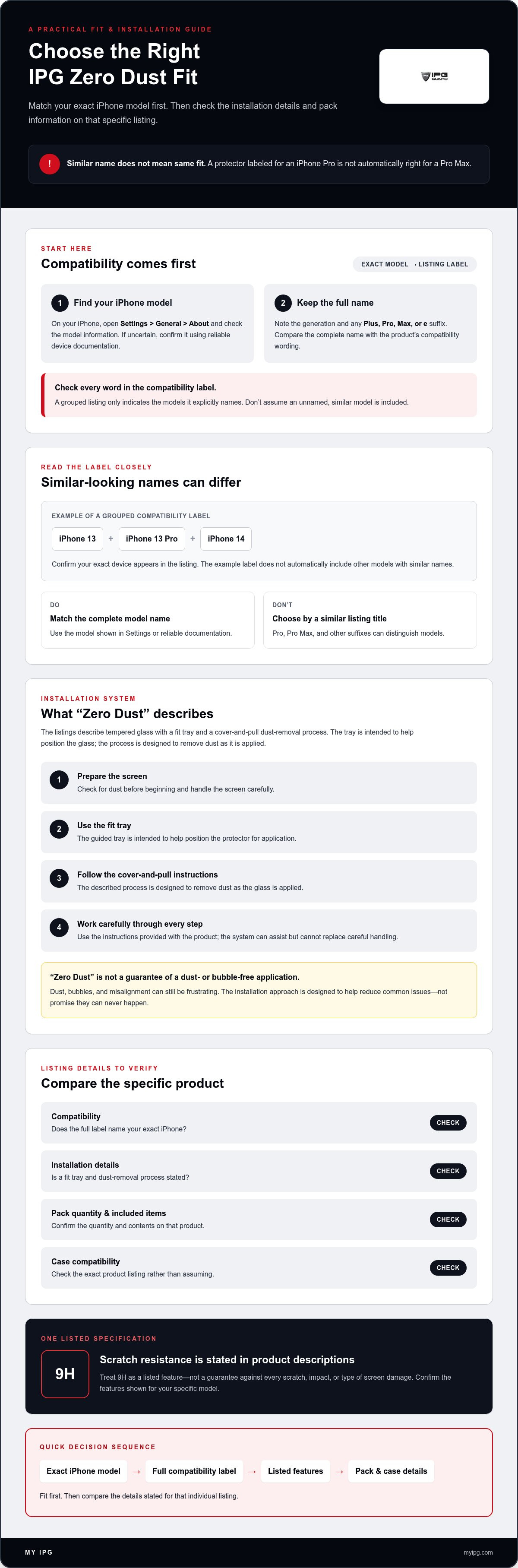
Here, “Zero Dust” refers to the described installation approach, not a promise that every application will be completely free of dust or bubbles. The product description identifies a cover-and-pull process and a fit tray. The tray is intended to help position the protector, while the process is designed to remove dust as the glass is applied. Prepare the screen carefully and follow the listing’s instructions. The system can assist, but it can’t replace careful handling.
This guided setup may suit shoppers who want extra help aligning a protector at home. It still takes attention: check the screen for dust before you begin, work carefully, and follow the steps provided with the product.
Is tempered glass the right protector format for you?
Choose tempered glass if you’re looking for the material named in these listings. The product descriptions also state 9H scratch resistance. Treat that as a listed feature, not a guarantee against every scratch, impact, or type of screen damage. Check the fit and stated features for your iPhone rather than relying on one specification alone.
If you’re comparing protector materials or formats, read the broader screen protector buying guide for context beyond this model-specific range. Then return to the Zero Dust listings and use your exact iPhone model as the first filter. Confirm fit first, then decide whether tempered glass and the guided installation features suit your needs.
How to choose the right IPG Zero Dust iPhone fit
Confirm your exact iPhone model before comparing protector features. The ipg zerodust (tempered) listings are organized around iPhone models and model groups. Similar names don’t establish a fit: a protector labeled for a Pro model isn’t automatically right for a Pro Max, and a suffix can distinguish models.
How do I confirm my exact iPhone model?
On your iPhone, open Settings > General > About and check the model information. If you’re unsure how the device is identified, confirm it against reliable device documentation. Note the complete name, including its generation and any Plus, Pro, Max, or e suffix. Then compare that full label with the compatibility wording on the product listing before ordering.
Use this four-step check:
- 1. Confirm the model. Check Settings or reliable device documentation.
- 2. Compare listing labels. Look for your exact model or a group that explicitly names it.
- 3. Check stated features. Review the selected listing for installation details and other named features.
- 4. Review pack details. Confirm the quantity and included items stated for that product.
How should I read grouped compatibility labels?
A grouped label can name more than one compatible model. For example, a listing may name iPhone 13, iPhone 13 Pro, and iPhone 14. Read the full compatibility label and confirm that your exact device appears. Don’t extend the group to a similar model that isn’t named. For more on fit and other protector considerations, see this iPhone screen protector buying guide.
Technical references also need context. ASTM C1048 addresses heat-strengthened and fully tempered flat glass. A reference to that standard isn’t proof that a particular phone protector complies unless its product information explicitly says so. Base your choice on the listing’s compatibility and stated features.
Once you’ve confirmed your model, review the IPG tempered glass listings and compare their details without relying on similar-sounding names.
Compare IPG Zero Dust listings, features, and model coverage
Use the compatibility label as your first comparison point. The ipg zerodust (tempered) listings cover specific iPhone models and model groups, so similar names alone don’t establish a fit. The table organizes the ten supplied options by stated device compatibility. Check the current listing before selecting, especially if your model has a Plus, Pro, Max, or e suffix.
Which Zero Dust listings cover the featured iPhone models?
| Listing | Stated iPhone compatibility | Pack quantity | Named distinguishing features |
|---|---|---|---|
| IPG Zero Dust tempered glass for iPhone 17 | iPhone 17 | 2 units | Core Zero Dust features |
| IPG Zero Dust tempered glass for iPhone 17e | iPhone 17e | 2 units | Core Zero Dust features |
| IPG Zero Dust tempered glass for iPhone 16e | iPhone 16e | 2 units | Anti-fingerprint; case-friendly |
| IPG Zero Dust tempered glass for iPhone 16 Pro | iPhone 16 Pro | 2 units | Core Zero Dust features |
| IPG Zero Dust tempered glass for iPhone 16 Pro Max | iPhone 16 Pro Max | 2 units | Core Zero Dust features |
| IPG Zero Dust tempered glass for iPhone 15 Pro | iPhone 15 Pro | 2 units | Core Zero Dust features |
| IPG Zero Dust tempered glass for iPhone 15 Pro Max | iPhone 15 Pro Max | 2 units | Core Zero Dust features |
| IPG Zero Dust tempered glass for iPhone 15 Plus / 16 Plus | iPhone 15 Plus, iPhone 16 Plus | 2 units | Core Zero Dust features |
| IPG Zero Dust tempered glass for iPhone 15 / 16 | iPhone 15, iPhone 16 | 2 units | Core Zero Dust features |
| IPG Zero Dust tempered glass for iPhone 13 / 13 Pro / 14 | iPhone 13, iPhone 13 Pro, iPhone 14 | 2 units | Core Zero Dust features |
Which product features can I compare confidently?
The supplied product descriptions identify two units per pack, a fit tray, automatic alignment and dust removal, bubble-free application as an aim, and 9H scratch resistance. Confirm the individual listing for its stated features. Anti-fingerprint and case-friendly wording is identified specifically for the iPhone 16e listing, not as a feature of every option.
A stated scratch-resistance rating isn’t a promise of an unbreakable screen. Compare named features, but don’t use them to assume a model fit or rank otherwise similar listings. Choose the option whose compatibility label matches your iPhone and whose listed details suit your priorities.
Avoid common mistakes when buying IPG Zero Dust tempered glass
A fit tray can help position the protector, but it can’t replace careful preparation. The ipg zerodust (tempered) installation features are designed to assist with alignment and dust removal, not to make every application foolproof. Two avoidable mistakes are choosing a listing based on a similar model name and starting before the screen is ready.
What should I check before ordering?
Compare your complete iPhone model name with the exact product listing. Don’t assume a Pro, Pro Max, Plus, or e model shares a fit with a similarly named phone. Check the pack quantity and feature wording on that product page, then review the current listing for availability and other purchase details before checkout.
Check case fit against the selected product, too. Don’t assume a protector will work with your case just because it fits the phone, or because a different listing mentions a case-friendly design. Confirm what the selected product page says for your model and setup.
How can I prepare for a cleaner installation?
Choose a clean, well-lit work area where you can see the screen clearly. Clean the display carefully, then inspect it for visible dust before beginning. Follow the instructions supplied with the product. The fit tray supports positioning, but preparation still matters. Don’t substitute generic steps if the package gives different directions.
Keep expectations grounded. Dust-removal and bubble-free language describes the intended installation outcome, not a guaranteed result in every environment. Likewise, don’t infer impact protection or universal case compatibility from the tempered glass material or the presence of a fit tray. Check the features and compatibility stated for the specific listing you’re considering.
Before you proceed, use this quick check:
- Confirm the full iPhone model name on the product page.
- Verify the listed pack quantity and model-specific features.
- Check the selected listing for case-related wording.
- Prepare the screen, then follow the package instructions in order.
Once those details line up, review the IPG tempered glass listings and check the current product information for your device before choosing.
Choose your IPG Zero Dust protector and shop the collection
Make the choice in order: confirm your exact iPhone model, shortlist only listings that name it, then compare the features stated on those product pages. This keeps the decision focused on fit instead of a similar-sounding product title. With ipg zerodust (tempered), the compatibility label is the starting point, not a detail to check after comparing extras.
Which Zero Dust option should I shortlist?
For example, a shopper with an iPhone 17 can start with the listing labeled for iPhone 17. An iPhone 16 Pro owner should look for that exact model, not assume a listing for iPhone 16 Pro Max is interchangeable. These are model-specific options, not performance rankings. Your shortlist depends on the device you’ve confirmed.
The iPhone 16e listing is described with anti-fingerprint and case-friendly features. Treat those as details of that listing, not promises for the whole collection. If a selected product page states a two-unit pack or fit tray, include those details in your comparison. Check the current page for its full compatibility label and stated features before choosing.
Where can I browse the IPG Zero Dust collection?
Keep the order simple: match the model first, then compare features. If your device appears in a grouped compatibility label, make sure the exact model is named. Next, review the selected listing’s pack details and installation features. This helps you compare options without making assumptions based on similar model names.
Ready to check the listings against your device? Browse IPG Zero Dust tempered glass protectors. Confirm the exact iPhone fit and review the product page details before choosing.
Choose a protector that matches your iPhone
Choose by fit first. Confirm your complete iPhone model, including its generation and any Plus, Pro, Max, or e label, then select a listing that names it. The collection includes ten model-specific or model-group options, so don’t rely on a similar product title or assume one variant fits another.
Once compatibility is clear, compare the details stated on the listing. Product descriptions name a fit tray and an automatic dust-removal installation process designed to assist with alignment and application. These features can help guide a careful installation, but they don’t replace screen preparation or guarantee a dust- or bubble-free result. Check the selected product page for its pack quantity and any features specific to that model.
That’s the practical approach to choosing ipg zerodust (tempered): verify your device, match the listing, then review its stated features. Take a moment to confirm the details before protecting your screen. Browse IPG Zero Dust tempered glass protectors and find the listing that matches your iPhone.
Frequently Asked Questions
What is IPG Zero Dust tempered glass?
IPG Zero Dust tempered glass is a model-specific screen protector made from tempered glass and described with a guided installation system. Product descriptions name a fit tray and an automatic dust-removal process intended to assist application. “Zero Dust” doesn’t mean dust or bubbles are impossible in every installation. Match the listing to your iPhone first, then review the features stated for that product.
How do I choose the right IPG Zero Dust protector for my iPhone?
Check your iPhone’s full model name in Settings or reliable device documentation, then compare it with the complete compatibility label on the selected listing. Include its generation and any Plus, Pro, Pro Max, Max, or e suffix. Don’t assume similar names indicate the same fit. After confirming compatibility, review the product’s stated installation features, model-specific details, and pack quantity before choosing an ipg zerodust (tempered) listing.
Does the IPG Zero Dust fit tray remove dust during installation?
The fit tray is described as part of an installation system that includes automatic dust removal. It’s intended to assist with positioning and help remove dust during application, but it can’t guarantee a perfectly dust-free result every time. Prepare the screen carefully, inspect it for visible dust, and follow the instructions supplied with your product. The tray is an aid, not a substitute for careful installation.
Can I use an iPhone 15 protector on an iPhone 16?
Only if the specific product listing explicitly names both models. The supplied collection details include a listing labeled for iPhone 15 and iPhone 16, so check that combined compatibility label if you own either device. Don’t assume a protector labeled only for iPhone 15 will fit iPhone 16 or infer compatibility from a similar product title. Confirm the exact listing before ordering.
Does tempered glass guarantee that my iPhone screen will not crack?
No. Tempered glass can provide a protective layer, and the IPG Zero Dust product descriptions state 9H scratch resistance, but that rating isn’t a guarantee against cracks or all types of damage. Treat it as a listed scratch-resistance feature, not an unbreakable-screen promise. Choose the correctly fitted protector and handle your device carefully, while keeping expectations realistic about what a screen protector can do.
Are IPG Zero Dust protectors compatible with phone cases?
Check the exact product page and your case rather than assuming compatibility across the collection. The iPhone 16e listing specifically names a case-friendly feature; don’t generalize that wording to other models. Even when a listing includes case-friendly language, verify that it applies to your selected protector and review its current product details. Don’t use a different model’s listing to determine fit.
How many screen protectors come in an IPG Zero Dust pack?
The supplied product descriptions state that the listed IPG Zero Dust protectors come as two-unit packs. Still, check the current product page for the specific model you’re considering and confirm its pack quantity before ordering. When comparing similar listings, check both the model label and the included items. Don’t infer pack details from a different product listing.
What is the difference between IPG Zero Dust models?
The primary difference is the stated iPhone compatibility: the collection includes listings for individual models and groups of models. Product descriptions also name a fit tray, automatic alignment and dust removal, and 9H scratch resistance. The iPhone 16e listing additionally names anti-fingerprint and case-friendly features. Check each product page, since features named for one model shouldn’t be assumed to apply to every listing.