

Imagine you're hovering over a honey hole with 100,000 lux of midday sun turning your flagship display into a high-priced mirror. You know the fish are there, but all you see is the reflection of your own frustrated expression and a hazy white glare. It's a common struggle for every serious angler; the more powerful the sun, the harder it is to track those subtle sonar returns. Learning how to reduce glare on fish finder screen displays is the difference between landing a record catch and enduring a long, eye-strained boat ride home.
We understand that your marine electronics are a significant investment that deserves professional-grade protection. You need a solution that stops the squinting and prevents salt spray from scoring your expensive anti-reflective coatings. This guide delivers the ultimate 2026 strategy for total screen clarity. We will walk through technical backlight calibration, optimal mounting angles, and the advanced hydrogel technology required to filter light while safeguarding your glass. You'll gain a permanent, crystal-clear view of the water column even in the harshest high-noon conditions.
Key Takeaways
- Identify the critical difference between specular and diffuse reflection to choose the right optical solution for your specific marine environment.
- Learn how to reduce glare on fish finder screen displays by optimizing mounting angles and utilizing gimbal mounts for real-time adjustments as the sun moves.
- Discover why high-clarity hydrogel protectors outperform standard matte films by scattering light without sacrificing the fine target separation required for live sonar.
- Protect your high-value electronics from salt-crystal scratches and chemical degradation with professional-grade maintenance and specialized cleaning protocols.
- Reduce thermal load and battery drain by using physical hoods and visors, allowing your display to remain legible at lower brightness settings.
Understanding the Science of Fish Finder Screen Glare
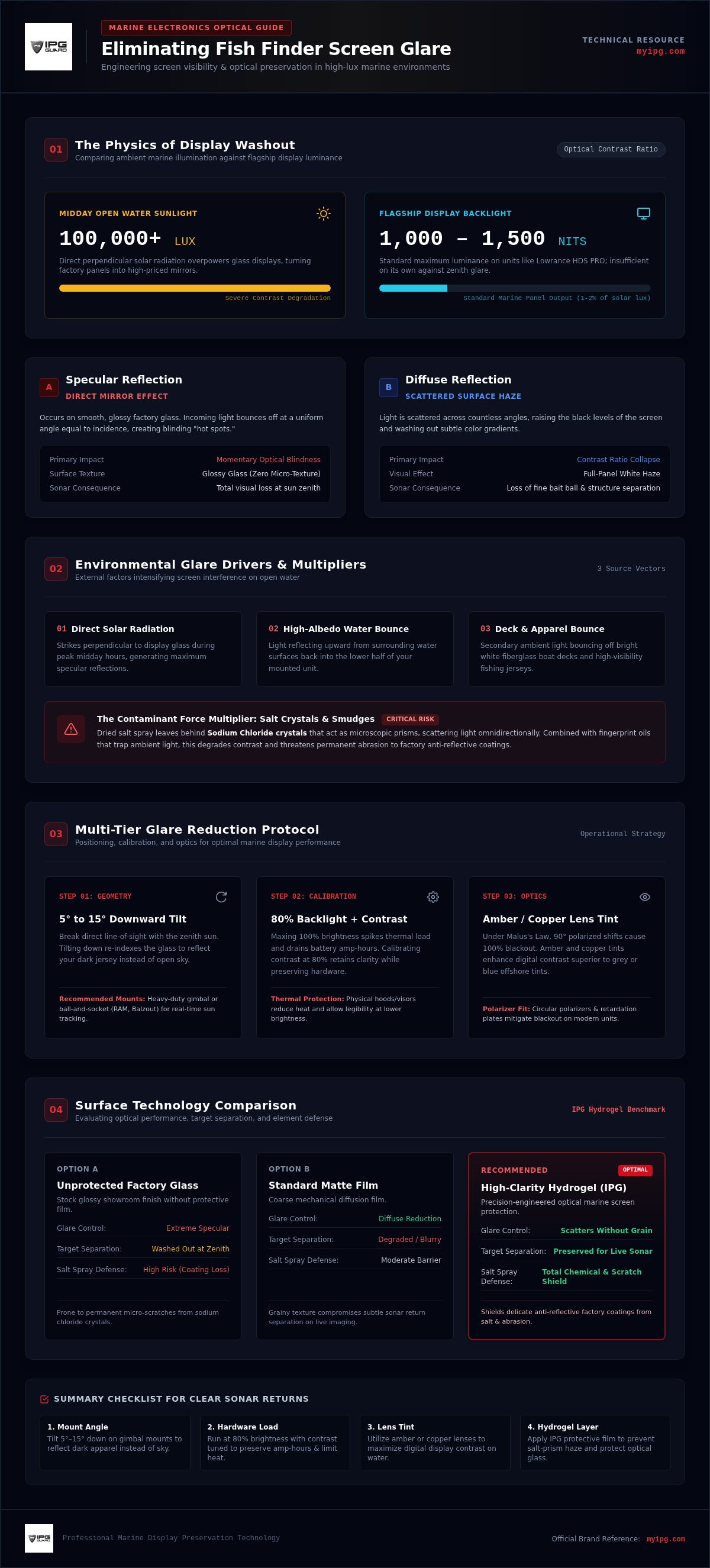
Glare is the enemy of precision. It is light energy bouncing off your display surface instead of allowing the sonar data to reach your eyes. To understand how to reduce glare on fish finder screen displays, you must first identify the two types of reflection at play. Specular reflection acts like a mirror; it creates high-intensity "hot spots" that can physically blind you for a split second. Diffuse reflection is a scattered haze that kills contrast across the entire panel. Both phenomena turn your high-value electronics into expensive mirrors.
Three primary environmental factors drive this visual interference on the water:
- Direct solar radiation hitting the glass at a perpendicular angle.
- High-albedo reflections bouncing off the water surface and back into the unit.
- Reflected light from white fiberglass boat decks and bright-colored fishing jerseys.
Most factory displays feature glossy glass. While this looks premium in a retail showroom, it is prone to extreme specular glare. Glossy surfaces lack the microscopic texture needed to break up light waves. Without a specialized light-filtration solution, the screen simply redirects incoming light back at the viewer. This makes it nearly impossible to distinguish a brush pile from a bait ball when the sun is at its zenith.
The Impact of Ambient Light on Marine Displays
Open water is a brutal lighting environment. Direct midday sun can reach levels exceeding 100,000 lux. Modern flagship units, such as the Lowrance HDS PRO series, operate between 1,000 and 1,500 nits to combat this. However, even 1,500 nits of brightness can't always overcome the sheer volume of external light. When ambient light is significantly stronger than the screen output, your contrast ratio collapses. This washout effect renders subtle sonar returns invisible, leaving you guessing about what's actually under the boat.
Why Salt Spray and Smudges Make Glare Worse
Environmental debris acts as a force multiplier for glare. When salt spray dries on your unit, it leaves behind sodium chloride crystals. These crystals function as micro-prisms. They catch light and scatter it in every direction, turning a single glare point into a full-screen haze. Fingerprint oils add another layer of complexity. They create a film that traps light and increases diffusion. This cumulative buildup doesn't just degrade your visibility; it risks permanent damage to the factory anti-reflective coating if you don't use a protective barrier. Managing these contaminants is vital for long-term screen preservation.
Optimizing Hardware Settings and Positioning
Physical geometry is your first line of defense against optical washout. Learning how to reduce glare on fish finder screen displays begins by breaking the direct line of sight between the sun and your glass. A fixed mount often leaves you vulnerable as the sun traverses the sky. Instead, utilize heavy-duty gimbal mounts or ball-and-socket systems from brands like RAM or Balzout. These allow you to re-index your viewing angle on the fly. Tilting the screen down approximately 5 to 15 degrees away from the midday zenith typically provides the most legible results by reflecting your dark jersey instead of the open sky.
Software calibration is equally critical. While manufacturers suggest maxing out the backlight, this creates excessive thermal load and drains battery amp-hours. If your unit produces 1,000 to 1,500 nits, you can often achieve better clarity by dropping to 80% brightness and adjusting your contrast settings. This balance preserves your hardware and keeps the unit cool during summer tournaments. For those seeking maximum visibility without straining their internal components, applying a specialized IPG Lowrance FishFinder screen protector offers a protective layer that maintains optical clarity while shielding the factory finish from the elements.
The Polarized Sunglasses Conflict
Most anglers wear vertically polarized sunglasses to cancel out horizontal water glare. However, this creates a conflict with LCD panels. If your screen uses linear polarizers, tilting your head can cause a total optical blackout. This is governed by Malus's Law, where a 90-degree shift in axes blocks 100% of light. Modern flagship units often integrate circular polarizers or retardation plates to mitigate this effect. To ensure maximum readability, choose amber or copper lens tints. These enhance contrast on digital displays better than standard grey or deep blue offshore lenses.
Advanced Sonar Color Palettes
Color selection dictates how well you can see returns through a layer of surface reflection. Avoid "Night Mode" or dark backgrounds in direct sun; these turn the screen into a mirror. High-contrast palettes, specifically white or bright blue backgrounds, are far more effective at cutting through ambient light. You should also fine-tune your sensitivity to sharpen returns through the surface clutter. Gain is the setting that controls the amplification of the sonar signal returns on your display. Increasing gain helps targets pop against the background, while properly calibrated sensitivity prevents the screen from becoming cluttered with unnecessary surface noise.
Physical Solutions: Visors, Hoods, and Enclosures
Physical shielding offers a direct, mechanical answer to light interference. While digital adjustments help, a physical barrier stops photons before they ever strike the glass. Professional-grade visors, such as those custom-molded from UV-resistant ABS polymer, provide a structural solution for how to reduce glare on fish finder screen units without requiring constant software menu navigation. These shields are precision-engineered to fit specific models like the Lowrance HDS Pro or Garmin Echomap series, ensuring a secure fit that doesn't rattle in heavy chop.
DIY solutions, such as using kydex or plastic folders, can offer temporary relief but often lack the durability needed for the marine environment. Professional hoods feature reinforced mounting points and matte internal finishes that absorb rather than reflect light. The primary trade-off with any physical barrier is accessibility. A deep hood improves visibility significantly but can obstruct the corners of a touch-screen interface. When choosing a hood, prioritize designs that offer a balance between shade depth and ergonomic access to your quick-access keys and touch controls.
Benefits of a Dedicated Sun Hood
A sun hood functions by creating a "dark room" effect around the display. By casting a shadow across the panel, it dramatically improves the perceived contrast ratio. This is vital for identifying subtle bottom transitions or separating individual fish within a bait ball. Beyond visibility, hoods reduce the thermal load on your electronics. Shading the housing prevents internal processors from overheating during long summer days, which can lead to screen dimming or system lag. While effective, these hoods can be bulky in small bass boats with limited dash space, so consider the footprint before installation.
Gimbal and Swivel Mount Adjustments
Mounting height and stability are critical factors in your overall visual experience. Telescoping mounts allow you to raise the unit closer to eye level, which reduces the angle of incident light and minimizes the need to hunch over. Vibration dampening is equally important. A shaking screen increases perceived glare as light flickers rapidly across the surface. High-quality gimbal mounts ensure the unit remains steady, providing a consistent viewing experience in rough water. This focus on display stability is a standard across many industries, as seen in our Car Screen Protector Guide, where anti-glare technology is critical for high-stakes navigation.
Enclosures provide the ultimate level of protection for offshore anglers. They shield the unit from both overhead glare and lateral salt spray. This dual-purpose utility is essential for center console boats where the helm is exposed to the elements. By combining a physical hood with a precision-cut film, you create a layered defense system that preserves the integrity of your sonar glass while ensuring every return is visible in the harshest midday sun.
Anti-Glare Screen Protectors: The Professional Edge
While hoods and mounting angles provide mechanical relief, a specialized film offers a permanent, technical solution for how to reduce glare on fish finder screen displays. Anti-glare (AG) films work by utilizing a microscopic surface texture to convert specular reflection into diffuse reflection. This process scatters incoming light waves, preventing the concentrated "mirror effect" that turns your sonar into a blank slate. By diffusing these rays, the film ensures that the 1,000 to 1,500 nits of brightness from your unit actually reach your eyes instead of bouncing back into the atmosphere.
Modern anglers often fear that adding a layer will dim the display or ruin touch sensitivity. This is a common myth. High-clarity hydrogel films are engineered for maximum light transmission. They preserve the vibrant color palettes of flagship units while maintaining the rapid response times required for live-sonar adjustments. It's a protective guardian that remains invisible during operation, allowing you to focus on the fish rather than the hardware. For the best results, shop the IPG marine collection to find a solution tailored to your specific gear.
Hydrogel vs. Tempered Glass for Marine Use
Tempered glass is a popular retail choice, but it fails in the brutal marine environment. Glass is brittle; it shatters under the high-frequency vibrations and heavy impacts common on choppy water. The IPG Original (Hydrogel) Screen Protector offers a superior alternative. It utilizes a flexible, shock-absorbent polymer that won't crack or spider-web when the boat slams into a swell.
Durability extends beyond impact resistance. Salt crystals and wind-blown sand act like sandpaper on unprotected glass. Hydrogel features specialized self-healing properties that allow minor surface abrasions to close up over time, maintaining a smooth, clear finish. You can explore the full material science behind these protective layers in The Ultimate Screen Protector Guide.
Precision Fit for Lowrance and Garmin Units
A "universal" fit is a liability on the water. Any gap between the film and the bezel creates a pocket where salt spray can collect, leading to salt-crust buildup and film lifting. Precision is mandatory. We provide the IPG Lowrance FishFinder screen protector, which is custom-cut for the Elite and HDS Pro series to ensure total edge-to-edge coverage. This prevents salt ingress and protects the sensitive factory anti-reflective coating from chemical degradation. Follow these steps for a professional marine install:
- Thoroughly clean the glass with a surfactant-based marine cleaner to remove all oils.
- Use a specialized dust-removal sticker to lift microscopic salt particles.
- Align the precision-cut film with the top bezel and use a squeegee to drive air bubbles toward the edges.
This methodical approach ensures a bubble-free finish that stands up to sun, salt, and speed.
Maintenance and Long-Term Screen Preservation
Preserving the integrity of your display is a long-term commitment. Even the most advanced optical coatings fail if they are subjected to improper care. Knowing how to reduce glare on fish finder screen surfaces involves more than just hardware settings; it requires a disciplined maintenance routine. Salt spray, when left to dry, forms hard mineral deposits that act like sandpaper. Without a structured cleaning protocol, you risk stripping the factory anti-reflective layers, leading to permanent clouding and increased reflection.
A screen protector serves as a critical sacrificial layer in this ecosystem. It absorbs the environmental abuse, from UV radiation to physical abrasions, keeping the underlying glass in showroom condition. When the film eventually shows signs of heavy wear or salt etching, you can simply peel it off and replace it. This is a far more cost-effective strategy than replacing a multi-thousand-dollar head unit due to a ruined screen. We recommend using an IPG Original (Hydrogel) Screen Protector to ensure your touch interface remains responsive while providing a self-healing barrier against the elements.
The Correct Way to Clean Marine Electronics
Never wipe a dry screen. This is the fastest way to induce micro-scratches. Always rinse the unit with fresh water first to dissolve and carry away salt crystals. Use a high-quality microfiber cloth with a minimum 300 GSM rating; avoid paper towels or old t-shirts, as their fibers are too coarse for optical glass. Stick to specialized marine screen cleaners that are free from ammonia, vinegar, and alcohol. These common household chemicals aggressively dissolve the vacuum-deposited coatings that manufacturers use to manage light, resulting in a display that's impossible to read in the sun.
Preserving Touch Sensitivity and Clarity
High-humidity marine environments can eventually challenge the adhesive bond of any film. Periodically inspect your IPG Lowrance FishFinder screen protector for edge lifting or debris ingress. If the edges begin to curl, it's time for a refresh to maintain total protection. A fresh application every season ensures peak performance and keeps your visibility at 100% for the 2026 season. Before every launch, follow this 5-step visibility checklist:
- Rinse the display with fresh water to remove overnight salt or dust.
- Apply a surfactant-based marine cleaner to a clean microfiber cloth.
- Wipe in a single direction to lift oils and smudges without swirling.
- Inspect the screen protector for any signs of physical damage or lifting.
- Calibrate your backlight and color palette for the day's predicted sky conditions.
By following these steps, you safeguard your technology against the corrosive marine environment. This proactive stewardship ensures that your sonar remains a high-performance tool rather than a liability. Protect your investment, maintain your edge, and keep every fish in clear view.
Master Your View for the 2026 Season
Dominating the water requires more than just high-end sonar; it demands visual clarity under the most punishing solar conditions. You now have the technical blueprint for how to reduce glare on fish finder screen displays by combining precise mounting angles with advanced light-filtration technology. By moving beyond temporary fixes and adopting professional-grade hydrogel barriers, you ensure that every sonar return is visible while your hardware remains shielded from salt-crystal abrasions.
We take our role as the guardian of your technology seriously. Our IPG Lowrance FishFinder screen protector is precision-cut for the Elite and HDS series to provide edge-to-edge security. With advanced hydrogel technology and global shipping for maritime professionals, we deliver the protection you need to focus on the tournament, not your screen settings. Don't let reflections steal your next catch. Shield your sonar with IPG specialized marine protectors today. The fish are waiting; make sure you can see them.
Frequently Asked Questions
Can I use a matte laptop screen protector on my fish finder?
You shouldn't use office-grade protectors for marine applications. Laptop films aren't engineered to withstand intense UV radiation or corrosive salt spray. They often use adhesives that fail in high-humidity environments. A specialized hydrogel solution from My IPG is the professional choice for how to reduce glare on fish finder screen units. It provides the durability and light filtration necessary to survive the brutal conditions of open water while maintaining optical clarity.
Will an anti-glare protector affect the touch screen sensitivity of my Lowrance HDS?
Professional-grade protectors don't interfere with touch responsiveness. Our specialized hydrogel material from My IPG is engineered to be ultra-thin and highly conductive, ensuring your Lowrance HDS Pro or Elite series remains perfectly functional. You can execute rapid sonar adjustments and menu navigation without any lag. This invisible protection layer preserves the factory touch experience while acting as a dedicated guardian against physical damage and environmental debris during high-stakes fishing.
Why does my fish finder screen look black when I wear polarized sunglasses?
This occurs because of cross-polarization between your sunglasses and the LCD panel. Most fishing glasses use vertical filters to block horizontal water glare. If your fish finder emits light at a conflicting angle, the two filters block 100% of visible light, creating a total blackout. Modern flagship units often include retardation plates to solve this. Using an anti-glare film from My IPG can also help by diffusing light and making the display more legible from varied angles.
What is the best brightness setting for a fish finder in direct sunlight?
You should aim for a brightness level between 80% and 100% to overcome ambient midday sun. Flagship marine displays produce 1,000 to 1,500 nits to maintain visibility. However, running at maximum brightness increases internal heat and battery drain. Applying an anti-glare film is a smart way how to reduce glare on fish finder screen displays, allowing you to lower the backlight while still seeing every target clearly even in high-noon conditions.
How do I remove air bubbles from a marine screen protector?
Start with a surgically clean surface to prevent bubbles caused by dust or salt. If small air pockets remain after application, use a soft-edged squeegee to push them toward the nearest edge. High-quality hydrogel films from My IPG are slightly porous, meaning tiny bubbles often disappear on their own within 24 to 48 hours as the material settles. Never use sharp objects to prick bubbles, as this compromises the structural integrity and protective seal of the film.
Is hydrogel better than tempered glass for boat electronics?
Hydrogel is the superior choice for the marine environment. Tempered glass is brittle and can shatter when your boat hits heavy chop or experiences high-frequency engine vibrations. In contrast, hydrogel is a flexible polymer that absorbs impact energy without cracking. It also features self-healing properties that allow minor scratches from salt crystals to vanish over time. This makes it the most reliable guardian for expensive sonar units exposed to rough water.
Can salt water damage my fish finder screen if it isn't protected?
Salt water is highly corrosive and will eventually degrade your display. When salt spray dries, it leaves behind hard sodium chloride crystals. If you wipe these away without a protective barrier, they act as an abrasive that scores the factory anti-reflective coating. Over time, this leads to permanent clouding and optical damage. A dedicated protector acts as a sacrificial layer, ensuring the corrosive salt never makes direct contact with your high-value sonar glass.
How often should I replace my marine screen protector?
We recommend refreshing your protector once per season or whenever you notice heavy salt etching. While hydrogel is incredibly durable, the cumulative effect of UV exposure and mineral buildup can eventually impact clarity. Replacing the film is a simple maintenance step that ensures your electronics perform like new. It's a small investment in stewardship that prevents the need for a costly head unit replacement due to screen degradation or visibility loss.