

A tougher protector isn’t automatically the better choice. If it doesn’t match your phone’s camera layout, even a tempered glass camera lens cover can sit poorly, conflict with a case, or interfere with photos or flash performance.
Dependable protection starts with your exact phone model. Then compare camera-module coverage, glass clarity, case clearance, and the application method. A clean, well-aligned protector is less likely to cause image issues than one that’s poorly fitted, dusty, or scratched.
This guide explains how to compare model compatibility, full-module and individual-lens coverage, materials, coatings, and case clearance. You’ll also learn what a protector can realistically do and how to install and care for it. My IPG offers device-specific camera lens protection for iPhone and Samsung phones, so fit is central to choosing the right option.
Key Takeaways
- A tempered glass camera lens cover shields exposed camera glass, but it isn’t a substitute for a full phone screen protector.
- Because light passes through the cover, clear, clean glass and a precise fit matter for everyday photo quality.
- Match the protector to your exact phone model and generation, then compare lens coverage, camera-island layout, and installation method.
- Follow the supplied installation instructions. Clean hands, a dust-free surface, careful alignment, and a final visual check help prevent common application issues.
- Use the fit-first checklist to compare options, including My IPG’s tempered glass camera lens protectors for iPhone and Samsung devices.
What Does a Tempered Glass Camera Lens Cover Protect?
A camera lens cover is a small protective layer fitted over some or all of a phone’s rear camera area. Unlike a full phone screen protector, which covers the display on the front of the device, it’s designed to shield the camera glass and, depending on its shape, part of the surrounding camera module.
A tempered glass camera lens cover is a fitted glass layer intended to help protect a phone’s exposed camera glass from everyday contact and surface scratches. It creates a barrier between the camera area and items such as a tabletop, pocket contents, or the inside of a bag. It doesn’t make the phone damage-proof or guarantee protection from every drop, impact, or scratch.
Which part of the phone does a camera lens cover protect?
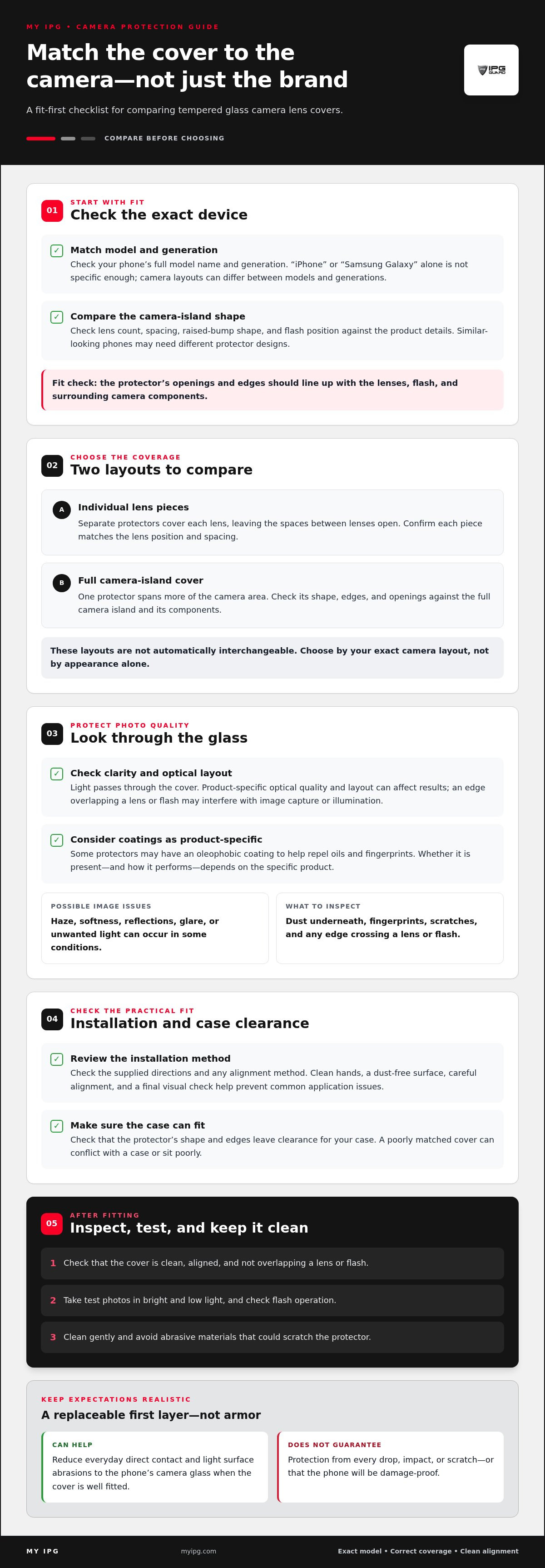
Phone cameras sit within a raised or recessed area on the back of the device. A protector may cover each lens separately, leaving the space between lenses open, or span the full camera island, which holds the lenses and other camera components. These layouts aren’t interchangeable by default. Lens positions, spacing, camera-island shape, and surrounding components vary between phone designs and generations, so a protector made for a different model may not align correctly.
What protection can tempered glass provide in everyday use?
In routine handling, a well-fitted cover can help keep direct contact and light surface abrasions away from the original camera glass. The protector itself may take on marks or crack after an incident, while the phone’s underlying camera glass may remain untouched. That’s a useful protective layer, not a promise that the lens beneath it can’t be damaged.
Tempered or toughened glass is processed to change its strength and how it behaves when broken. But material alone doesn’t determine the protection a phone receives. The cover’s design, fit, and installation all matter, as does the incident itself. A poorly aligned cover can leave part of the camera area exposed; a direct, forceful impact may still damage the protector or the phone underneath.
Think of the cover as a replaceable first layer, not armor. It can help reduce everyday wear on the camera area, while the level of protection depends on how closely it fits and what happens to the phone.
How Tempered Glass Camera Lens Covers Work With Phone Cameras
Your phone camera needs light to reach its sensors. A glass cover sits in that path, so its clarity, cleanliness, fit, and design can affect camera performance. A well-matched cover may be unobtrusive in everyday use, but protectors don’t all have identical optical properties or behave the same with every phone.
A clean, correctly aligned cover helps keep the camera’s view clear and reduces the chance that dust, smudges, or misplaced edges will interfere with photos. Even a small mark over a lens can show up as haze, softness, or unwanted light in an image. Keep the surface clean, and inspect it if photos look different after installation.
Can a glass camera cover affect photos, focus, or flash?
It can, depending on the phone and the protector’s optical quality and layout. Reflections or glare may be more noticeable in certain lighting, while a cover that overlaps part of a lens or flash can interfere with image capture or illumination. These are possibilities to check, not inevitable effects of adding glass.
Focus and sharpness also depend on the camera’s clear view through the protector. Dust trapped underneath, fingerprints on the outer surface, or an incompatible shape can affect results. Review the model-specific product details and follow the supplied installation directions. After fitting the cover, take test photos in bright and low light, and check flash operation.
Tempered glass and camera-module design
Camera modules differ in lens count, spacing, raised-bump shape, and flash position. Those details can change between generations, even within the same device family. An iPhone protector isn’t automatically compatible with every iPhone, and Samsung Galaxy models also have distinct camera layouts. Match the protector to the exact phone model rather than relying on the brand name alone.
Some designs cover each lens individually; others span more of the camera island. Either way, the openings and edges need to align with the phone’s lenses and flash. For a broader look at camera protection and design, read the phone camera lens protector guide.
Smudges are easy to overlook. Some protectors may use an oleophobic coating to help repel oils and fingerprints, though the presence and performance of a coating depend on the specific product. Clean the surface gently and avoid abrasive materials that could scratch it. For device-specific camera protection, explore My IPG’s iPhone and Samsung camera lens protectors, then match an option to your phone’s exact model and camera layout.
How to Compare Tempered Glass Camera Lens Covers Before Buying
Start with the camera layout, not a broad brand label. A tempered glass camera lens cover is made to match a phone’s lens positions and camera-island shape, so a similar-looking device from another generation may need a different design. Compare the product details with your phone’s full model name and generation before choosing a coverage or installation style.
| What to compare | What to look for |
|---|---|
| Device fit | The exact phone model and generation, not just iPhone or Samsung Galaxy. |
| Lens coverage | Individual lens pieces or one protector covering more of the camera area. |
| Camera-island layout | Openings and edges that align with lenses, flash, and surrounding components. |
| Installation method | Supplied directions and any alignment aid that suits your preferred application process. |
Does the cover match your exact phone model?
Read the full model name and generation on the product listing, then match it to your device. Phones within the same brand can have different lens spacing, camera-bump dimensions, and flash positions. Similar appearance isn’t proof of compatibility. A precise fit helps the protector sit as intended without covering part of a lens or interfering with the camera layout.
Individual lens rings or full camera-module coverage?
Individual lens protectors place a separate piece around or over each camera lens. This layout can follow lens spacing closely, but each piece needs accurate alignment. A full-module protector covers a broader section of the camera island in one application; check that its openings and edges match the phone’s components. Neither design is automatically best for every device. Prioritize exact fit and unobstructed access to every lens and the flash.
Review the installation method before buying, too. Positioning several separate pieces may call for careful alignment, while a single module-shaped piece has its own placement requirements. Follow the directions supplied with the specific protector. Tempered glass is processed to change its properties; this overview of how tempered glass is made offers additional material context, but the glass material alone doesn’t establish device compatibility.
If you also want to protect the phone display, choose a separate screen protector made for the exact device. For camera protection, My IPG’s iPhone and Samsung tempered glass options are a starting point; use the exact model match to narrow your choice.
How to Install and Care for a Tempered Glass Camera Lens Cover
A careful application helps the protector sit cleanly and keeps the camera openings clear. Follow the supplied instructions first, since cleaning materials and application steps can differ. Work slowly in an uninterrupted session. Dust or a small alignment error can be harder to correct once the glass is in place.
What should you do before applying the cover?
Choose a clean, well-lit workspace away from activity that stirs up dust. Wash and dry your hands, then use only the cleaning materials and method supplied or specified for the protector. Avoid household cleaners that may leave residue around the camera area. Make sure the surface is dry, then inspect it closely before application.
How to apply the protector
- Prepare the phone. Place it securely on the clean surface and make sure the camera area is accessible.
- Clean and inspect. Use the provided materials as directed. Check for fingerprints, lint, or dust before moving on.
- Align carefully. Match the protector’s edges and openings to the camera layout. Don’t let it overlap a lens or flash.
- Apply as instructed. Follow the product directions for positioning and securing the glass. Avoid pressing harder than the instructions require.
- Check the result. Look for trapped dust, misalignment, lifted edges, or covered camera openings.
How can you check the installation afterward?
Inspect the camera area from different angles in good light. Make sure every lens and the flash are unobstructed, and check that the protector lies flat without visible dust or lifted edges. Then take photos in different lighting conditions and test the flash. If anything looks off, consult the supplied instructions for removal or reapplication guidance instead of prying at the glass or camera area.
Care for the installed tempered glass camera lens cover gently. Wipe it with a clean, soft material suitable for the product, using light pressure. Avoid abrasive cloths, rough paper, and forceful scrubbing, which can scratch or stress the protector. If you notice a crack, residue, or persistent image issue, follow the product’s care directions before attempting removal.
Choose a model-matched option and use its instructions as your installation guide. Explore My IPG’s iPhone and Samsung camera lens protectors for device-specific protection options.
Choose a Tempered Glass Camera Lens Cover That Fits Your Phone
The right protector is designed around your phone’s actual camera layout. Before choosing a tempered glass camera lens cover, compare the exact device model, coverage shape, and application directions. These checks help you avoid a cover that leaves part of the camera area exposed or sits over a lens or flash opening.
A quick pre-purchase compatibility checklist
- Confirm the full phone model and generation. Match the name on your device to the product listing. A brand match alone isn’t enough.
- Compare the camera layout. Check that the protector’s shape corresponds to the positions of your phone’s lenses, flash, and camera module.
- Choose the coverage style. Decide whether individual lens coverage or a protector spanning more of the camera area better suits the device and your preference.
- Review application details. Read the supplied instructions before purchasing so you know how the protector is positioned and applied.
Compare the product shape with your device rather than relying on a photo or familiar brand name. Similar-looking phones can still have different lens spacing, camera-bump dimensions, or flash positions. The model-specific listing is the key reference for compatibility; don’t assume that a protector for one generation will fit another.
How My IPG supports phone camera protection
My IPG offers tempered glass camera lens protection for iPhone and Samsung devices. Use the fit-first checklist to narrow your choice: identify your exact phone, compare its camera layout with the product details, and review coverage and installation requirements. These steps help you select device-matched protection while keeping the camera openings clear.
Choose carefully, then follow the supplied application instructions to help the protector sit as intended. Explore My IPG camera lens protection for iPhone and Samsung options.
Protect Your Camera With a Better-Fit Choice
A tempered glass camera lens cover should match your exact phone model and camera layout. Check whether its coverage suits your preference, confirm the lenses and flash remain clear, and follow the supplied installation instructions. These checks help you choose protection with confidence while keeping everyday camera use in mind.
Fit matters as much as material. A cover can help guard against everyday contact, but it can’t make your phone damage-proof. Keep it clean, inspect it after installation, and address dust or alignment issues according to the product directions.
My IPG offers tempered glass camera lens protectors for iPhone and Samsung devices, with a focus on device-specific screen protection. Start with your phone’s exact model and compare its camera layout with the product details. Explore My IPG phone camera lens protection to find an option for your device.
Frequently Asked Questions
What does a tempered glass camera lens cover do?
A tempered glass camera lens cover adds a protective layer over some or all of a phone’s rear camera area. It can help shield exposed camera glass from everyday contact and surface scratches, but it doesn’t make the phone damage-proof or guarantee protection from every impact. Unlike a full screen protector, it’s designed for the camera lenses or surrounding camera module, not the phone’s front display.
Can a tempered glass camera lens cover affect photo quality?
It can, depending on the protector’s design, fit, condition, and the phone camera. A clear, clean, correctly aligned cover may have little noticeable effect, but dust, fingerprints, scratches, or reflections can cause haze or glare in some images. If photo quality changes after installation, clean the cover and check for misalignment or obstruction. Use a protector designed for your exact phone model and follow its application directions.
Will a camera lens cover work with every iPhone or Samsung phone?
No. iPhone and Samsung phones can have different camera layouts, lens spacing, flash positions, and camera-module dimensions, including across generations in the same device family. Match the full phone model and generation to the product listing rather than choosing by brand alone. My IPG offers camera lens protection for iPhone and Samsung devices, with device compatibility serving as the key selection detail.
Is full camera-module coverage better than individual lens covers?
Neither option is automatically better for every phone. Individual covers protect lenses separately and require each piece to align with its lens. A full-module cover spans more of the camera area, so its openings and edges must match the phone’s camera island. Compare the device layout and coverage you prefer, then prioritize a precise fit that leaves every lens and the flash unobstructed.
How do you install a tempered glass camera lens cover without bubbles?
Start with clean hands and a clean, well-lit, dust-free workspace. Clean and dry the camera area using the materials and method specified in the product instructions. Align the cover carefully with the lenses and flash, then apply it as directed. Check for dust, bubbles, lifted edges, and blocked openings. Don’t press harder or attempt removal or reapplication unless the supplied directions explain how to do so.
Can I use my phone flash with a camera lens cover?
Flash use depends on whether the protector fits the phone and leaves the flash area clear. An incompatible or misaligned cover may overlap the flash or affect how light reaches the scene, potentially causing glare or reflections. Check the product’s model compatibility and camera layout before applying it. After installation, take a flash photo and inspect the result in a dim setting.
How do I clean a tempered glass camera lens cover?
Gently wipe the cover with a clean, soft cloth suitable for the product, using light pressure. Avoid abrasive materials and forceful scrubbing, which can scratch or stress the glass. Follow any specific care instructions supplied with the protector, especially before using a cleaning solution. If a mark remains, inspect the surface for a scratch or trapped residue rather than pressing harder over the camera area.